Problem solved by Diff Anything
Compare two folders on Windows, locally
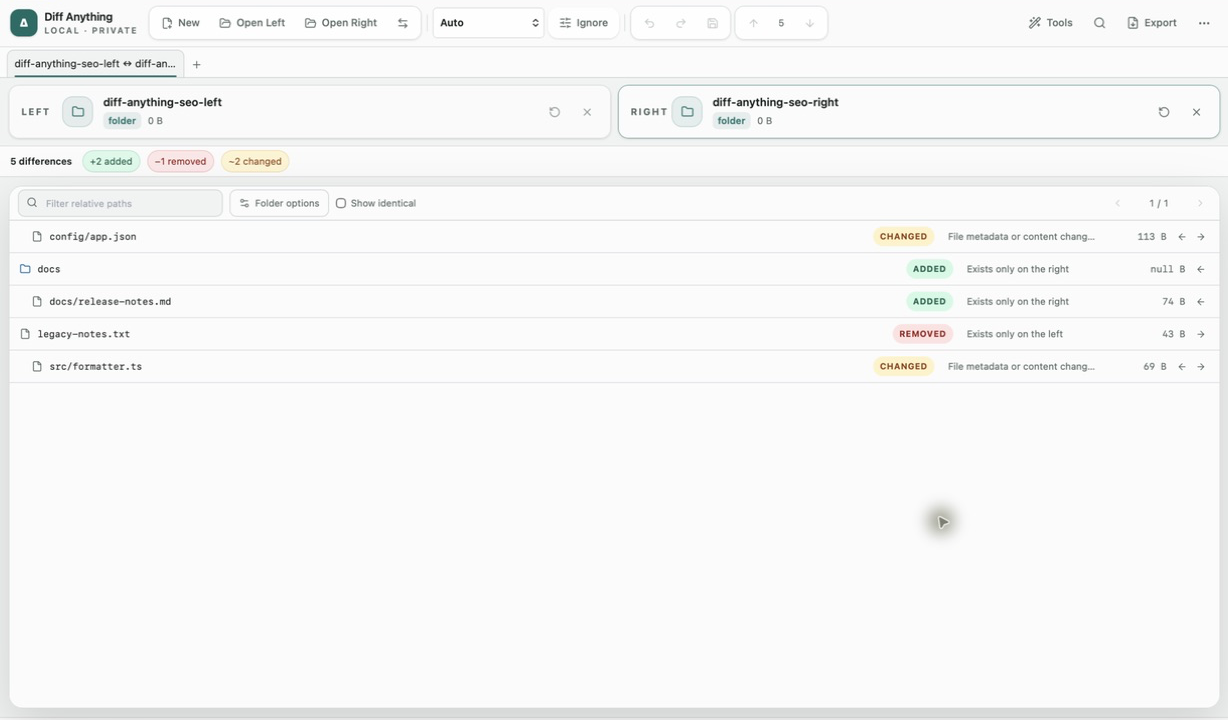
Recursively compare folders on Windows, inspect nested changes, preview create, update, and delete counts, then synchronize with rollback and undo.
See it in the app
A focused workflow, on your computer.
No accounts, cloud comparison service, analytics, or telemetry.
The problem
Why the usual workflow gets in the way.
File Explorer does not provide a focused recursive comparison of two release, backup, or project trees, and manually checking nested files does not scale.
The solution
How Diff Anything handles it.
Diff Anything compares the directory trees on the computer, opens changed pairs for deeper review, and turns a reviewed selection into an explicit synchronization plan. Pro shows create, update, and delete counts, rolls back a failed operation, and offers one-click undo after success.
Three short steps
From source to answer.
- 01
Choose both folder roots.
- 02
Filter noise and inspect the selected paths.
- 03
Review the synchronization plan, confirm its direction, and verify or undo the result.
Available for macOS and Windows