Problem solved by Diff Anything macOSWindows

Understand what an OpenAPI change could break

Learn how to review baseline and candidate OpenAPI contracts, run a free local compatibility check, and continue the detailed review in Diff Anything.

See it in the app

A focused workflow, on your computer.

No accounts, cloud comparison service, analytics, or telemetry.

OpenAPI Breaking Change Checker showing a local consumer compatibility report
Diff AnythingThe separate browser tool turns two pasted or opened contracts into a local compatibility-oriented report.

The problem

Why the usual workflow gets in the way.

A source diff can overemphasize reordered YAML while a removed operation, newly required parameter, narrowed enum, or response schema change is buried elsewhere in the contract. Compatibility also depends on which document is the existing baseline.

The solution

How Diff Anything handles it.

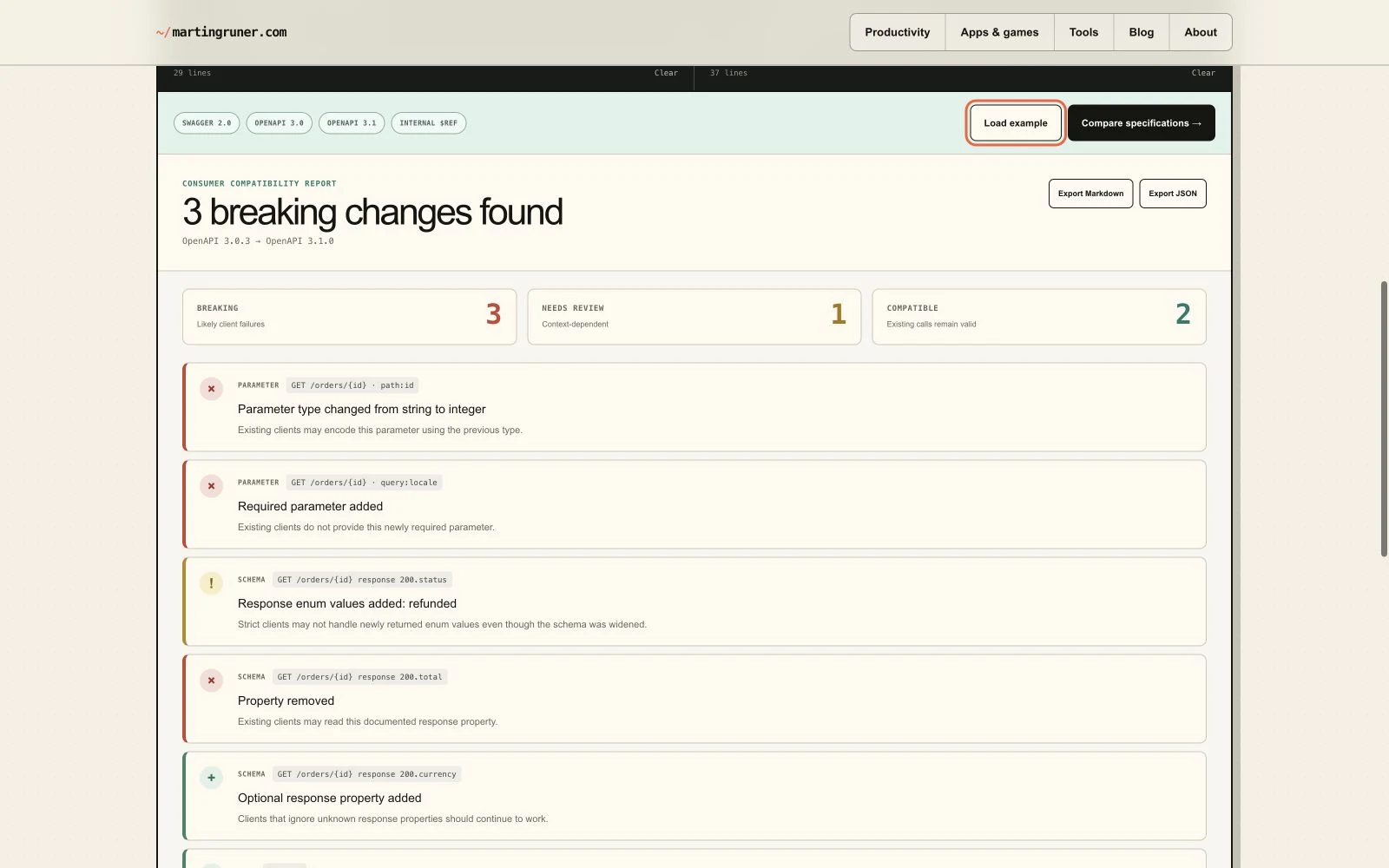
Compare the contract from the perspective of an existing consumer. The free browser checker classifies likely breaking, review-needed, and compatible changes locally; Diff Anything provides the focused desktop workflow for recurring OpenAPI and JSON Schema comparisons.

Free local checker

Run the contract check without leaving this site

The focused tool accepts Swagger 2.0 and OpenAPI 3.0/3.1 JSON or YAML, keeps the specifications in the browser tab, and exports Markdown or JSON reports.

Open the breaking-change checker

01 / Compatibility review

Put the existing contract on the baseline side

The baseline describes what current consumers already depend on. The candidate is the proposed replacement. Reversing them reverses the meaning of removal, addition, narrowing, and new requirements.

Keep both source versions available. A rule classification helps prioritize review; it does not decide whether a product-specific behavior is acceptable.

02 / Compatibility review

Review breaking and ambiguous changes separately

Removed paths, operations, parameters, properties, or enum values can break a consumer. Newly required input and narrower accepted types also deserve immediate attention. Additions are often compatible, while type, schema, security, and response changes can require context-dependent review.

Start with the reported breaking group, then inspect review-needed findings against actual clients and implementation behavior. A clean report cannot prove compatibility beyond the contracts and rules the checker examined.

  • Breaking: a consumer capability or accepted value is removed or newly required.
  • Review needed: the impact depends on use, semantics, or implementation.
  • Compatible: the parsed contract change appears additive for existing consumers.

03 / Compatibility review

Know the browser checker’s limits

The free checker accepts Swagger 2.0 and OpenAPI 3.0/3.1 in JSON or YAML. It resolves internal references, but it does not fetch external references; it reports a warning when they remain outside the comparison.

Schema traversal uses a depth limit of eight. The output is a heuristic compatibility report, so important releases still need client tests and human review of runtime behavior, undocumented expectations, and semantic meaning.
Clear answers

Common questions about OpenAPI breaking changes explained.

Does the free checker upload the API specifications?

No. Parsing and comparison run in the current browser tab; the specifications are not uploaded to martingruner.com.

Which specification versions does it accept?

The browser checker accepts Swagger 2.0 and OpenAPI 3.0 or 3.1 descriptions in JSON or YAML.

Does a clean report prove the release is safe?

No. The report is heuristic and limited to the parsed contracts and implemented rules. External references, deep schemas, runtime behavior, client assumptions, and semantic meaning can still require testing and human review.

Three short steps

Read the change in the direction consumers experience it.

  1. 01

    Use the existing consumer contract as the baseline.

  2. 02

    Open or paste the candidate contract into the local checker.

  3. 03

    Review likely breaks first, then verify context-dependent behavior and clients.

Available for macOS and Windows

Solve it with Diff Anything.