Capability overview
How can I use database tools in DevDock?
With Pro, inspect schemas, look up records, and back up or restore SQLite, MySQL/MariaDB, and PostgreSQL databases. Laravel projects also get migration review and table diagnostics.
Use a detected Laravel project's .env connection, which adds migration review and diagnostics, or create a session-only direct connection. Direct database passwords are not saved to preferences or command history.
Direct MySQL/MariaDB and PostgreSQL connections use the mysql, mysqldump, psql, and pg_dump clients installed on the computer.
Record lookups accept a validated table, an optional exact-value filter, and a result limit of up to 200 rows rather than arbitrary SQL.
Backup imports, database wipes, and seed operations remain explicit consequential actions with confirmation before execution.
Connections
Two ways to connect a database
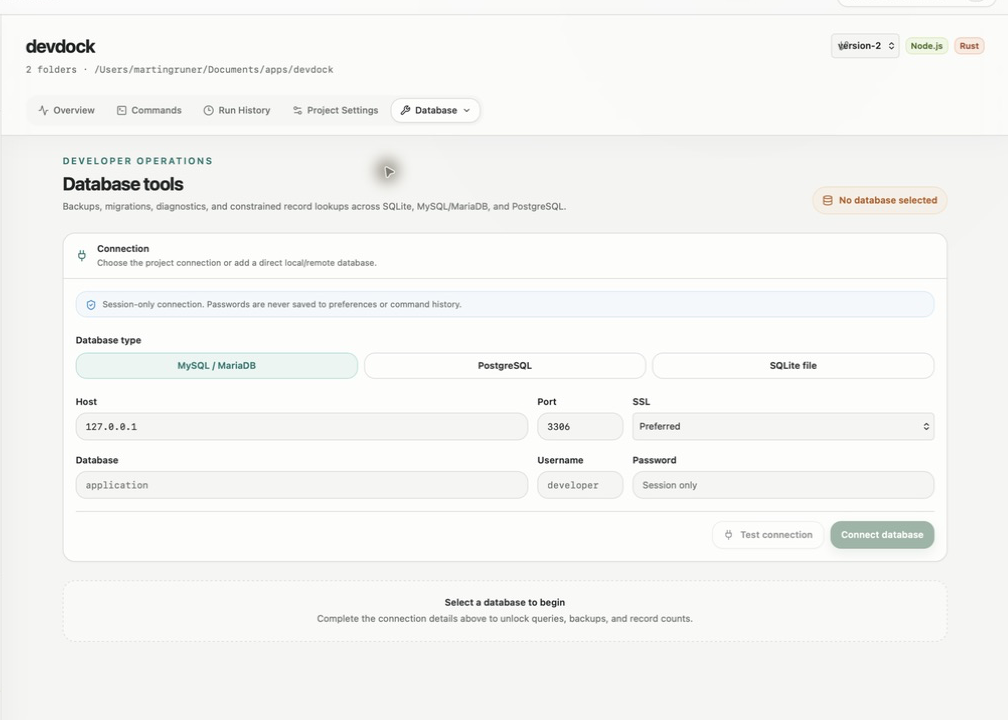
The Database section in the project's Tools menu works with the project's own database or with a direct connection. For a detected Laravel project, DevDock uses the connection in the project's .env file. For other databases, Add database opens a connection form: choose SQLite and select the database file, or choose MySQL / MariaDB or PostgreSQL and enter the host, port, database, username and password.
Direct connections last for the current session. The password field is marked Session only and is not written to preferences or command history. MySQL and PostgreSQL connections have an SSL setting of Disabled, Preferred or Required, and DevDock shows Connection verified or Connection failed before you work with the data.
Schema and records
Browse the schema and look up records
The Schema browser lists tables with their fields, primary keys, required and nullable columns, and relationships, and Search schema filters by table or field name. For a live connection the schema comes from the database itself. For Laravel projects, DevDock can also show the project definition built from migrations and Eloquent models, without running PHP.
Find records takes a table under Show records from, an optional Filter by column with an exact value, and a Limit of up to 200 rows. Without a filter it shows sample rows, and an exact record count is available. Lookups are built from the table and column you choose rather than typed SQL, and SQLite files are opened read-only for browsing and lookups.
Backup and maintenance
Export, import, and Laravel maintenance
Export backup saves a native backup: SQLite through its built-in backup, MySQL/MariaDB through mysqldump, and PostgreSQL through pg_dump. The file is written to a temporary location first and only replaces the destination once it is complete. Import backup loads a SQLite, MySQL or PostgreSQL backup into the selected database after you confirm.
Laravel connections add Wipe database, which drops every table, view and custom type, and Seed database, which runs the project's configured seeders. Both ask for confirmation. Checks & diagnostics adds Pending migrations, which compares migration files with the batches applied to the database, Table sizes, and Slow tables, which times record counts and lists the slowest tables first.
Requirements
What you need installed, and which plan
Database tools are part of DevDock Pro. On Free, the Database entry in the Tools menu shows a lock. SQLite support is built in. Direct MySQL/MariaDB connections need the mysql and mysqldump clients on the computer, and direct PostgreSQL connections need psql and pg_dump.
Migration review, wipe, seed and table diagnostics appear only when the connection comes from a detected Laravel project's .env file. They run as project commands, so their output is also kept in Run History.
In the workflow
How to use it
Open Database
Choose Database from the project's Tools menu. A Laravel project connects through its .env file.
Connect
Or choose Add database, pick SQLite, MySQL / MariaDB or PostgreSQL, and check that it shows Connection verified.
Inspect
Search the schema, then use Find records with a table, an optional exact filter and a row limit.
Back up before changes
Use Export backup before a migration, import or wipe, and restore with Import backup if needed.
Useful in practice
When to use it
Related manual
Database tools, schema inspection, and backups
Use DevDock with SQLite, MySQL/MariaDB, PostgreSQL, and detected Laravel databases for safe lookups, schema review, diagnostics, exports, and confirmed restores.
Read the guideDirect answers
Questions about database tools.
Which databases do DevDock's database tools support?
SQLite, MySQL and MariaDB, and PostgreSQL. SQLite is built in. Direct MySQL/MariaDB and PostgreSQL connections need their command-line clients installed. Database tools require DevDock Pro.
Can I run my own SQL queries?
No. Record lookups use a table you select, an optional exact-value filter and a limit of up to 200 rows.
Does DevDock save my database password?
No. A direct connection's password is used for the current session only and is not written to preferences or command history.
Do I need Laravel for migration review?
Yes. Pending migrations, Table sizes, Slow tables, Wipe database and Seed database are available for connections read from a detected Laravel project's .env file.
Free & Pro: what’s included
Available on the Microsoft Store. Free for up to three local projects with core commands, Git, Docker, project health checks, and security-audit tools. A one-time Pro purchase unlocks unlimited and multi-folder projects, custom workflows, full history and insights, database tools, SSH transfers, and configuration backup and restore.