The job to be done
Inspect and back up the project's database from the project itself
Local database work often lives in a separate client with its own saved connections, while migrations run in a terminal and backups end up in whatever folder was open. Before a risky migration you want the schema, a few records and a fresh backup of the same database, and you want to be sure which database that is.
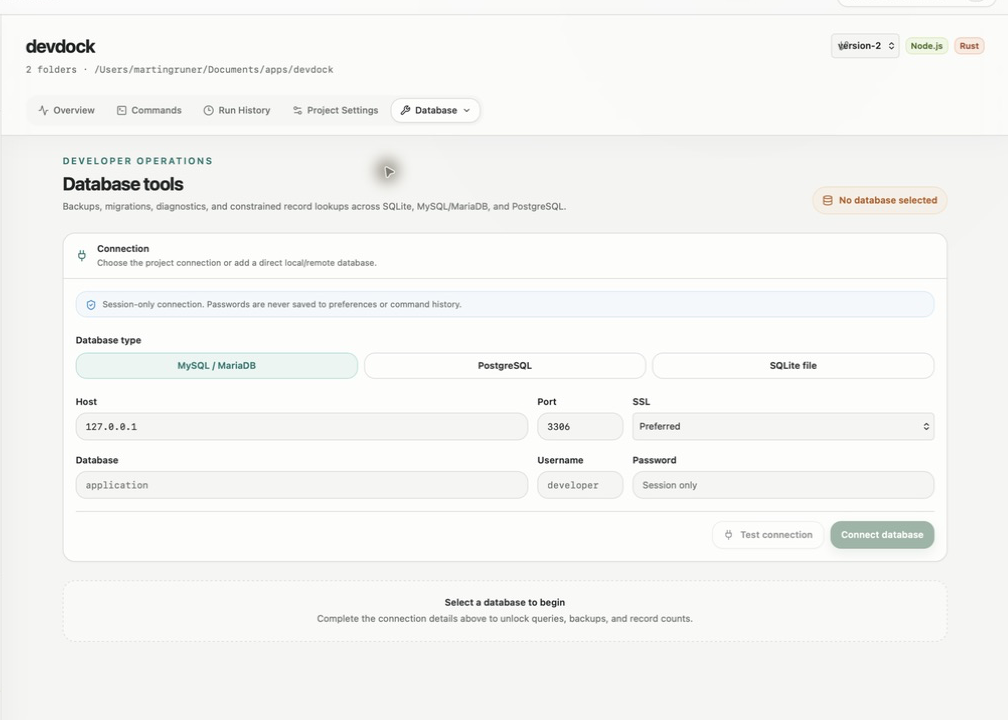
With DevDock Pro, the Database tool sits inside the project. A detected Laravel project connects through its own .env settings, and any SQLite, MySQL/MariaDB or PostgreSQL database can be added as a direct connection for the session. From there you browse the schema, look up records, and export or import native backups.
For Laravel connections, migration review, diagnostics, seeding and wiping run as project commands. Their output is saved in Run History with the rest of the project's work.
Recommended path
Back up, review, then change the schema
A safe order for running a migration against a local or test database.
Open the right connection
Open Database in the project's Tools menu. Use Project (.env) for a Laravel app, or choose Add database and run Test connection until it shows Connection verified.
Look before changing anything
Use Search schema in the Schema browser to find the tables involved, then Find records with a table, an optional exact value and a small row limit.
Export a backup
Choose Export backup. SQLite uses its built-in backup, MySQL and MariaDB use mysqldump, and PostgreSQL uses pg_dump.
Review pending migrations
In a Laravel project, run Pending migrations under Checks & diagnostics to see which migration files are not applied yet. Then start Run migrations from Commands.
Read the result
Open Run History to read the migration output and exit code. If something went wrong, restore the database with Import backup after checking the target connection.
Capabilities involved
The DevDock tools used for database work
Limits to know
Plan, tools and safety limits
The Database tool is part of DevDock Pro. SQLite needs no extra software. Direct MySQL/MariaDB connections need the mysql and mysqldump clients installed, and PostgreSQL connections need psql and pg_dump.
Pending migrations, Table sizes, Slow tables, Seed database and Wipe database appear only for a connection read from a detected Laravel project's .env file. Laravel refuses Slow tables and Import backup unless the application environment is local or testing.
Record lookups take one table, one optional exact-value filter and at most 200 rows. Arbitrary SQL is not accepted.
Passwords for direct connections last for the current session only, so you enter them again after restarting DevDock.
Related manual
Database tools, schema inspection, and backups
Use DevDock with SQLite, MySQL/MariaDB, PostgreSQL, and detected Laravel databases for safe lookups, schema review, diagnostics, exports, and confirmed restores.
Its sections cover choose the project or direct connection, understand the supported database engines, inspect schema before querying, find records with a constrained lookup, export and restore native backups, use laravel diagnostics and maintenance, troubleshoot without weakening safety. Use it when you are ready to reproduce this workflow with your own project data.
Read the guideDirect answers
Questions about this use case.
Can I use the database tools with a project that is not Laravel?
Yes. Add database creates a direct connection to a SQLite file or to a MySQL/MariaDB or PostgreSQL server. Migration review and table diagnostics need a Laravel project's .env connection.
Does Import backup ask before replacing data?
Yes. An import changes the selected database, so DevDock asks for confirmation first and checks that the backup file can be read.
Where can I see what a migration printed?
In Run History. Laravel migration commands and database actions are saved as runs with their output and exit code, and you can filter the list by command and status.
Can DevDock connect to a database server that is not on my PC?
Yes, as a direct MySQL/MariaDB or PostgreSQL connection with a host and port. Set SSL to Required for a server outside your PC; the other options are Disabled and Preferred.
Free & Pro: what’s included
Available on the Microsoft Store. Free for up to three local projects with core commands, Git, Docker, project health checks, and security-audit tools. A one-time Pro purchase unlocks unlimited and multi-folder projects, custom workflows, full history and insights, database tools, SSH transfers, and configuration backup and restore.