Capability overview
How can I use push diagnostics and logs in TestDock?
With Pro, check payload size and provider rules before sending, keep a local delivery log, and turn common provider errors into actionable guidance.
Keep your mobile app’s test links together and open them on the device where your app runs. Paste or type any URL to open it right away, share a link in from Slack, Mail, or Safari, and save the routes you check often so the next test starts with the right input.
Pre-send checks
Catch setup and payload mistakes before the request is sent
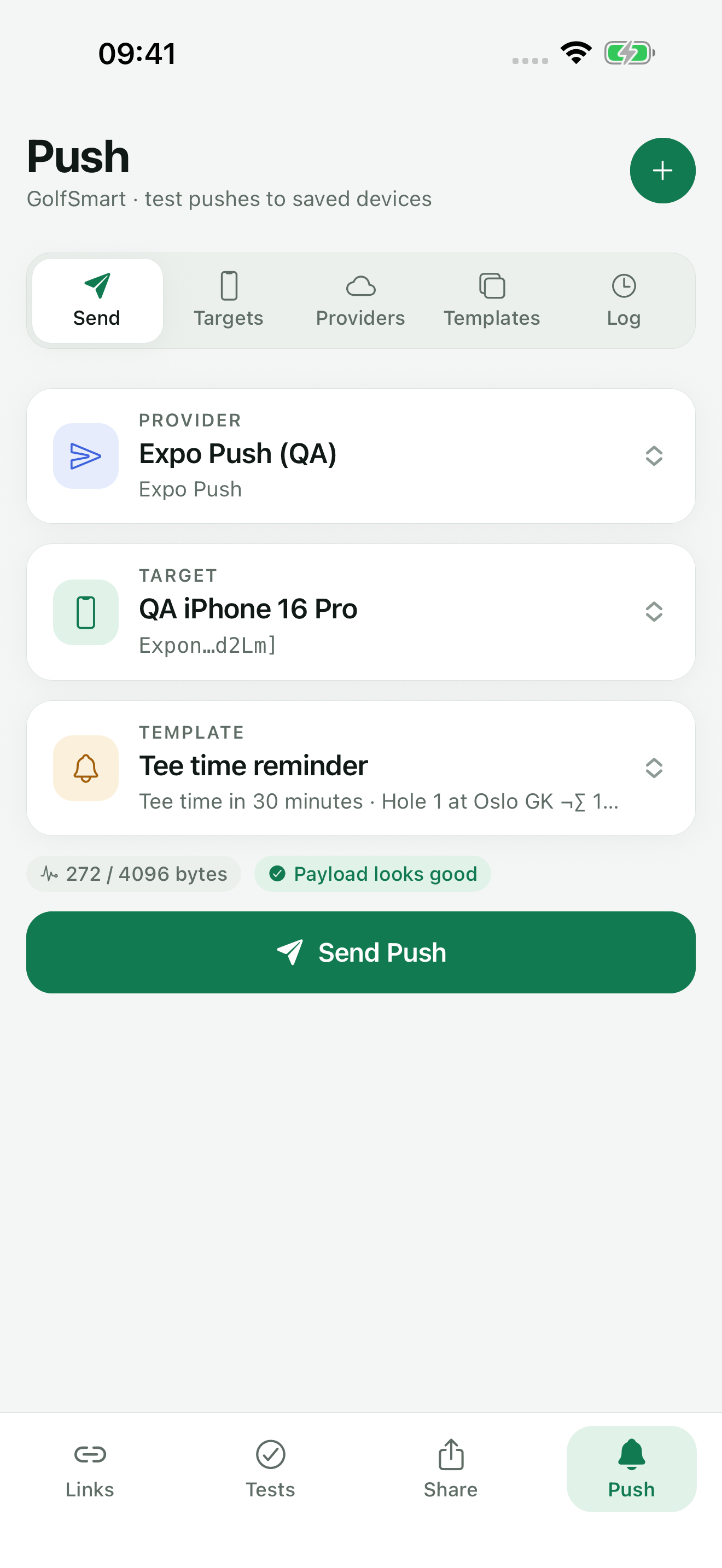
When you pick a provider setup, a saved target, and a template, TestDock builds the payload in that provider's format and shows its size against the 4,096-byte limit below the selection. A warning appears above 90 percent of the limit. Any error stops the send until it is fixed.
- The setup is disabled, or the target has no saved token
- The target and setup use different providers
- The credential, APNs topic, or Firebase project ID is missing
- A visible alert has neither a title nor a body
- Badge or time to live is not a non-negative whole number, or an FCM time to live exceeds four weeks
- The collapse ID is longer than 64 bytes for APNs or FCM
- Custom data uses a key FCM reserves: keys starting with google. or gcm., from, or message_type
- The payload is larger than 4,096 bytes
Sending
Change values for one send without editing the template
Send Push opens a dialog with the template and target names. You can change the title, message, and custom data values for that send only, which is useful for trying another order or conversation ID without editing the saved template.
When the provider accepts the request, TestDock shows the provider's message ID if one is returned. Acceptance means the provider took the message. It does not confirm delivery to the phone or how the app handled it.
Error guidance
Provider rejections come with a next step
When Expo Push, APNs, or FCM rejects a request, TestDock shows the provider's message together with guidance for common error codes.
- BadDeviceToken (APNs): the token does not match the selected Sandbox or Production gateway
- DeviceTokenNotForTopic (APNs): the token belongs to a different app than the APNs topic
- UNREGISTERED (FCM) or DeviceNotRegistered (Expo): replace the saved token
- SENDER_ID_MISMATCH (FCM): the token belongs to a different Firebase project
- PayloadTooLarge or MessageTooBig: shorten the alert text or custom data
Delivery log
A record of every send attempt for the profile
Each attempt is added to the profile's Log with the setup name, provider, a token hint showing the first and last five characters, the time, and a status of accepted, rejected, or failed. Rejected and failed entries include the error and guidance. TestDock also stores the sent payload and the provider response with each entry.
The log stays on the device and is not part of profile exports. Clear empties one profile's log. The History retention setting, 30 days by default, removes older entries when you save settings. Diagnostics, sending, and the log are part of TestDock Pro.
In the workflow
How to use it
Select the inputs
In Send push, choose a provider setup, a saved target, and a notification template.
Clear the diagnostics
Fix every error listed below the selection and check the byte count against the limit.
Send
Tap Send Push, adjust the title, message, or data values for this send if needed, and send.
Confirm on the device
Read the Log entry and any guidance, then check on the test phone whether the notification arrived and what the app did.
Useful in practice
When to use it
Related manual
Test push delivery and repeatable app flows
Configure provider-specific push targets, reuse payload templates, and combine delivery checks with observable manual scenarios.
Read the guideDirect answers
Questions about push diagnostics and logs.
Does an accepted status mean the notification reached the phone?
No. It means the provider accepted the request. Check the device to confirm delivery and the app's behavior.
Why is my payload close to the limit when the alert text is short?
The size includes custom data and the provider's own payload structure. Remove or shorten custom data fields to reduce it.
Does the log store my full device token?
No. Each entry keeps a shortened hint with the first and last five characters of the token.
Can I move the delivery log to another device?
No. Push logs stay on the device where the send happened and are not included in profile exports.
Free & Pro: what’s included
Available on the App Store and Google Play. Free includes one app profile with unlimited saved links, Quick open, Paste, sharing links in, home-screen shortcuts, and the sample scenario plus one scenario of your own. A one-time Pro purchase unlocks unlimited profiles and scenarios, share fixtures, push testing, association inspection, links created from an apple-app-site-association file on iPhone, and profile or scenario import and export.