The job to be done
Test several apps on one phone without mixing their data
A shared test phone usually carries several apps: client projects, staging and production variants, internal tools. When their schemes, domains, and push tokens share one notes file, links and pushes easily go to the wrong app.
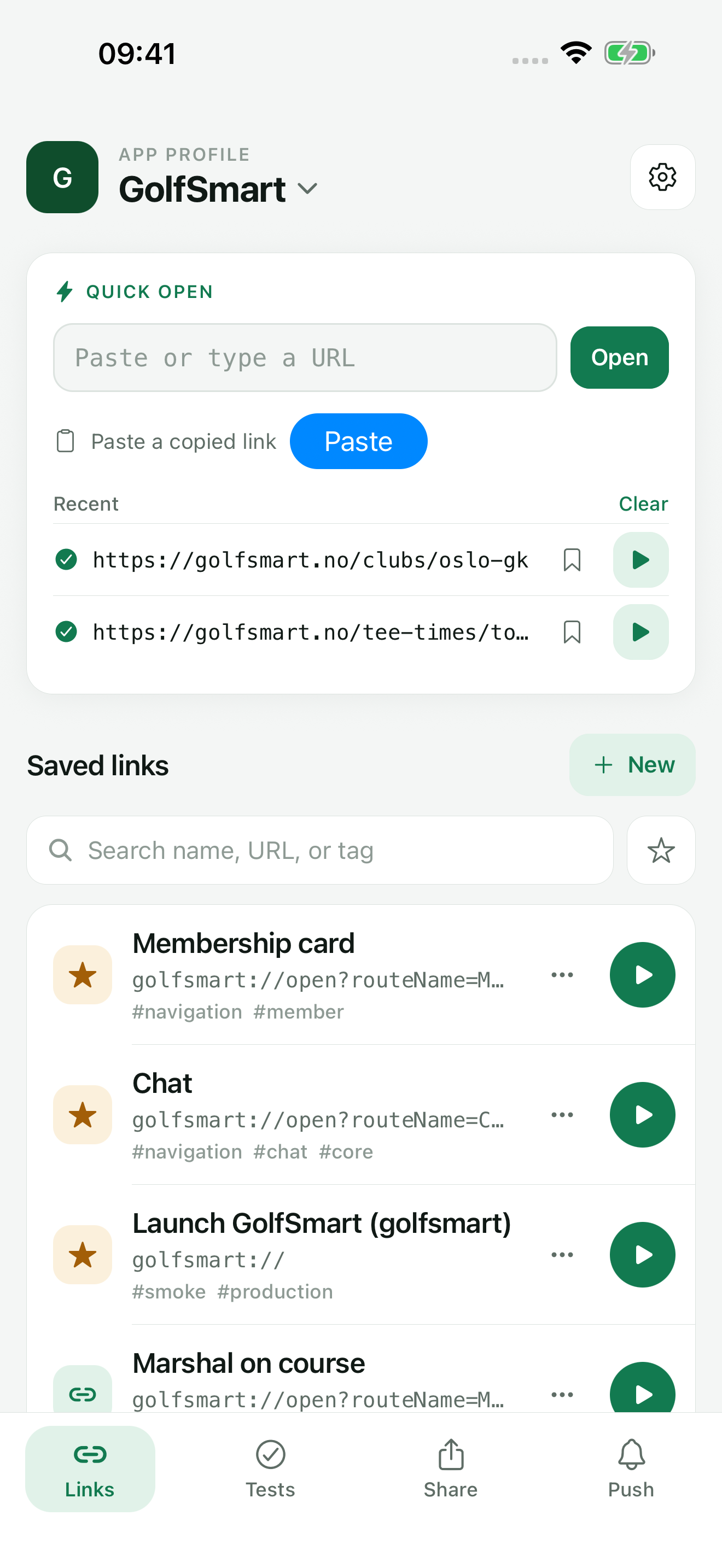
TestDock gives each app its own profile. Links, share inputs, push targets, provider setups, templates, scenarios, and their history are stored inside that profile, and you only see the data of the profile you opened.
The free version includes one app profile. TestDock Pro removes that limit and adds profile duplication, import, and export.
Recommended path
One profile per app, on every phone in the lab
A profile belongs to the platform it was created on, so each iPhone and each Android phone in the lab gets its own set.
Create a profile per app identity
Tap New App Profile and enter the app name, the bundle identifier or package name, and the custom URL schemes. Pick a color so the profile stands out in the list.
Duplicate for build variants (Pro)
For a staging build of the same app, duplicate the profile and change the identifier and schemes. Device tokens and credentials are not copied, and copied provider setups start disabled.
Keep push inputs in the owning profile
Save each app's device tokens and provider credentials in its own profile. Delete All Targets removes one profile's saved tokens when a phone is reset or handed on.
Find the right profile quickly
TestDock reopens the last profile you used. Tap the profile name to see them all, search the list, and switch the sort between Recent and Name. Archive apps that are not under test right now, and use Restore when they come back.
Set up another phone from a file (Pro)
Share Profile File exports the non-secret setup; Import app profile recreates it on a phone of the same platform, where you add credentials and tokens again.
Capabilities involved
How TestDock keeps each app separate
Limits to know
Limits to plan for in a shared test lab
Free allows one app profile, and an archived profile still occupies that slot. More profiles, duplication, import, and export require Pro.
Profiles do not span platforms. An iPhone lists only iOS profiles and an Android phone only Android ones, and APNs setups and targets are skipped when a profile is imported on Android.
Each phone keeps its own profiles. There is no TestDock account or sync, so every device in the lab is set up by hand or from an exported profile file.
The History retention setting covers every profile on the phone: saving settings removes link history, push log entries, and completed runs older than the chosen number of days.
Related manual
Set up your first TestDock app profile
Create a persistent profile for an installed mobile app and record the schemes and platform metadata its tests depend on.
Its sections cover choose the app boundary, add the app identity, record every custom scheme, find your way around a profile. Use it when you are ready to reproduce this workflow with your own project data.
Read the guideDirect answers
Questions about this use case.
Can I hide one client's profiles from other testers on the same phone?
No. TestDock has no user accounts, so anyone using the phone can open every profile on it. Tokens and credentials sit in secure storage, and saved targets display only a short token hint.
Could a token saved for one app be used for another by mistake?
No. Targets and provider setups belong to a single profile and are offered only when you send from that profile.
Should staging and production builds share a profile?
Use separate profiles when they differ in bundle identifier, schemes, or push credentials. With Pro, Duplicate gives you a starting copy.
How do I move a profile to a new test phone?
With Pro, use Share Profile File on the old phone and Import app profile on the new one, which must run the same platform. Imported provider setups stay disabled until you add the credentials and device tokens again.
Free & Pro: what’s included
Available on the App Store and Google Play. Free includes one app profile with unlimited saved links, Quick open, Paste, sharing links in, home-screen shortcuts, and the sample scenario plus one scenario of your own. A one-time Pro purchase unlocks unlimited profiles and scenarios, share fixtures, push testing, association inspection, links created from an apple-app-site-association file on iPhone, and profile or scenario import and export.