Capability overview
How can I use daily workflow in DevDock?
Run project commands from the overview or Today. Pro adds custom commands and combined workflows.
With Pro, saved workflows keep servers, workers, watchers, Docker services, and loopback readiness checks in an intentional order.
Today brings pinned workflows and recently opened projects together so returning to work does not depend on shell history.
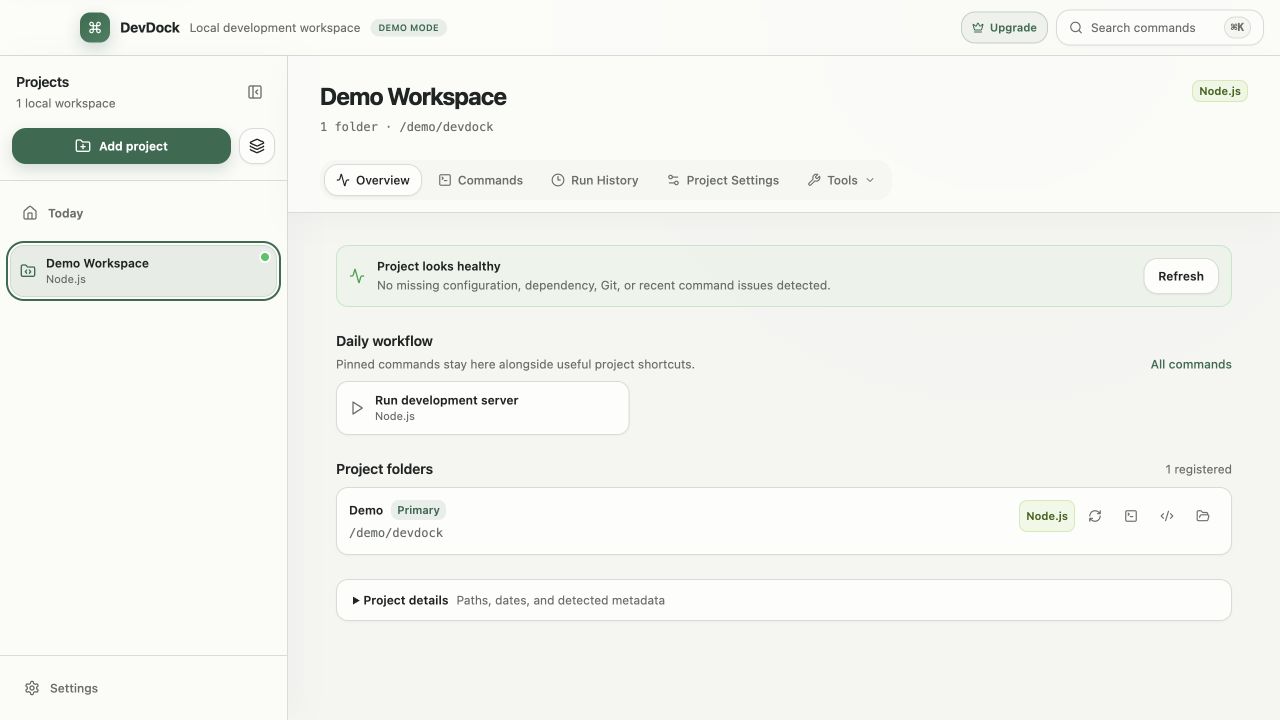
On the Overview
The Daily workflow panel on each project
The Daily workflow panel on a project's Overview shows the commands you pinned, followed by the most useful detected commands, at least six in total. Fetch is included when the project has a Git repository. One click starts a command that needs no input.
Commands that need input or a confirmation are marked Review and configure and open for review instead of starting immediately. Push opens the push dialog, and commit opens the commit dialog. Use Pin command in the Commands list to add a command to the panel; pinned entries carry a pin icon and stay at the front. Commands and technologies you hid in Project Settings are left out of the panel.
Today
Today collects the daily work of every project
Today gathers pinned commands from all projects under Quick actions, in an order you can change. Workspace actions run the same kind of task across projects: Check all repositories for updates, Audit all dependencies, and Test all projects. Needs attention lists health warnings from every project, and Recent projects reopens what you worked on last.
Customize Today reorders or hides sections, and a group selector limits Today to one project group. Docker services from Compose projects also appear here.
Outside the main window
Start pinned commands without opening a project
The DevDock icon in the Windows notification area lists your pinned commands together with running and recent runs, so a pinned command can start from there.
Ctrl+Shift+K opens a standalone command launcher from anywhere in Windows. It lists Today's pinned commands first, then the most recent run of each project, then every other command, with search across all of them. If another application already uses the shortcut, DevDock shows a warning.
Pro workflows
Custom commands and launch environments in Pro
DevDock Free runs every generated command and lets you pin any of them. Pro adds New Custom Command for your own executable or shell command, and combined commands that run saved commands in sequence. A custom command can ask for run-time parameters, set environment variables, and run in the local folder or in a Docker container. Secret environment values are kept in Windows Credential Manager.
Pro also adds Environments: saved groups of commands that start in order (Sequential — honor startup order) or together (Parallel — start together). An optional Readiness URL on localhost makes DevDock wait until the service responds, and if the launch fails, the commands it already started are stopped. Commands that require confirmation are reviewed when the environment starts. Environments also appear on Today.
In the workflow
How to use it
Pin your regular commands
In Commands, pin the dev server, test run or Git action you use every day.
Start from the Overview or Today
Run pinned commands from the project's Daily workflow panel or from Quick actions on Today.
Run cross-project checks
Use Workspace actions on Today to check every repository for updates or run each project's tests.
Use the launcher
Press Ctrl+Shift+K from any window, search for a command and start it without switching to DevDock first.
Useful in practice
When to use it
Related manual
Commands, workflows, and run history
Create dependable project commands, choose safe execution targets, manage long-running work, and use history to diagnose failed runs.
Read the guideDirect answers
Questions about daily workflow.
Can I pin commands in DevDock Free?
Yes. Any generated command can be pinned in Free. Custom commands, combined commands and launch environments require Pro.
Why does a pinned command open instead of running?
It needs input, such as a branch or device, or it requires confirmation. DevDock opens it for review so you can check the values first.
What does Test all projects run?
For each project on Today, it runs the first detected test command that does not require confirmation.
How long does an environment wait for its Readiness URL?
30 seconds by default. The timeout can be set between 5 and 300 seconds, and the URL must be an http or https address on localhost or a loopback address.
Free & Pro: what’s included
Available on the Microsoft Store. Free for up to three local projects with core commands, Git, Docker, project health checks, and security-audit tools. A one-time Pro purchase unlocks unlimited and multi-folder projects, custom workflows, full history and insights, database tools, SSH transfers, and configuration backup and restore.