Capability overview
How can I use language-aware code comparison in Diff Anything?
Switch between Smart Diff and the conventional Line Diff while keeping normal syntax highlighting, exact source text, editing, moved blocks, wrapping, and compact context visible. Detection uses filenames, extensions, shebangs, and pasted content.
Smart Diff uses language-family-aware token alignment across all 117 non-plain-text editor languages. It ignores safe layout-only edits in brace and expression languages, preserves significant indentation and statement newlines, and treats strings and comments according to the selected language. It is not an AST comparison and does not claim compiler-level semantic equivalence.
Code is detected from filenames, extensions, shebangs, and pasted content. Shared extensions are disambiguated from content, and framework files can highlight embedded implementation languages instead of falling back to plain text.
The maintained editor catalog includes 18 additional languages in 1.5: Ada, Assembly, COBOL, Crystal, CUDA, D, Elm, Erlang, Fortran, GLSL, Haskell, Haxe, HLSL, LaTeX, LLVM IR, OCaml, Raku, and WebAssembly text.
The CLI provides a Unicode-safe highlighted terminal view with automatic or forced colour, an explicit language override, and configurable context around each hunk.
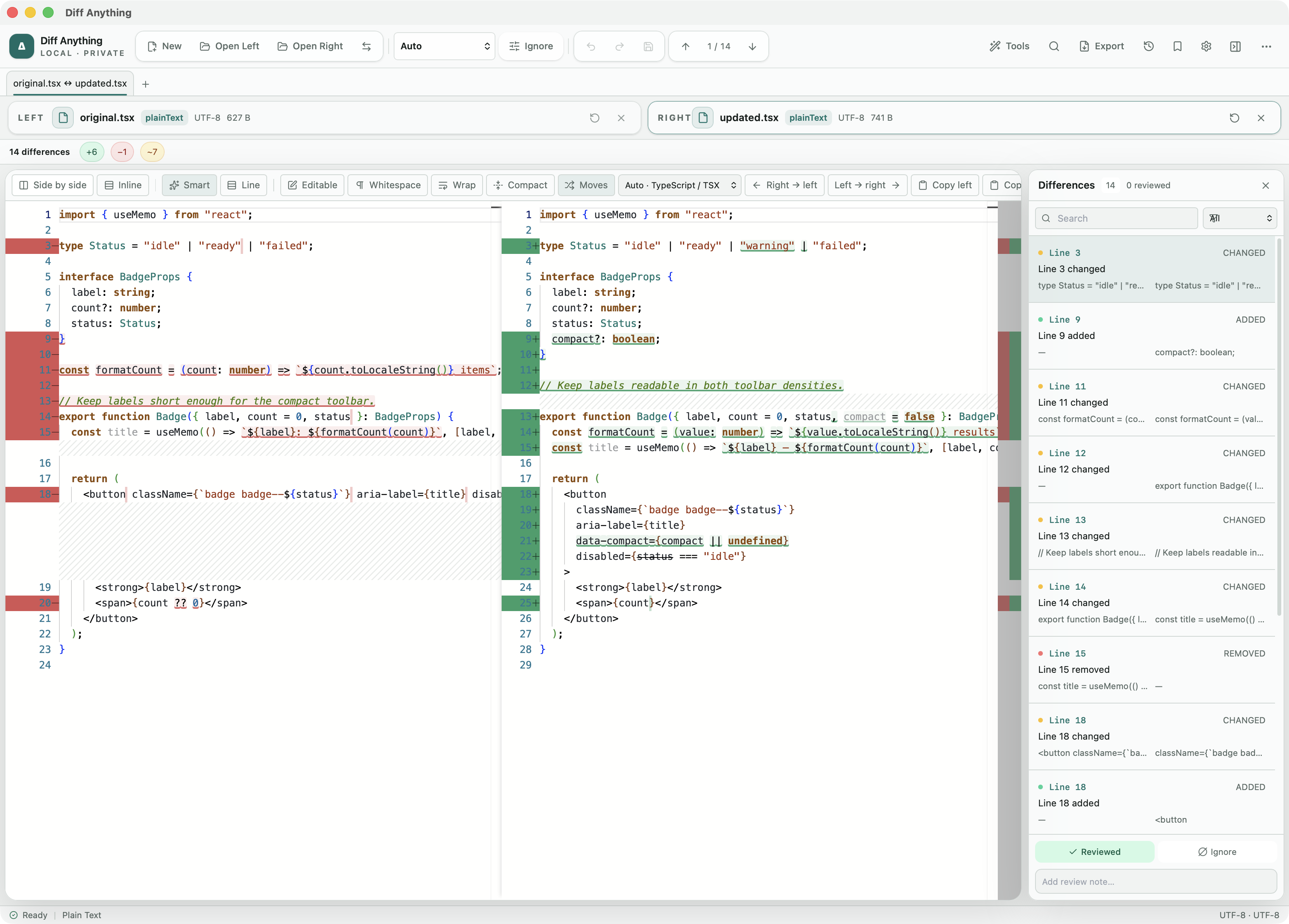
Smart or Line
When to read a change in Smart and when to read it in Line
Code review gets hard when a formatter touches a file. A wrapped function call, a re-indented block, or a brace moved to its own line can turn a one-word fix into forty changed lines. The Smart view drops those layout-only edits and highlights the tokens that actually changed, so the fix is easy to find again.
The Line view shows each line exactly as it is stored. Use it when whitespace is the change you care about, when you want to confirm a hunk before copying it across, or when you need to match line numbers with a code review tool. Both buttons sit next to each other in the text toolbar, and switching between them keeps both files and any edits you have made.
Hover over Smart to see a short summary, either the number of changed tokens or a note that the change is formatting only. Smart needs both sides in the same language. When the two files are detected as different languages, or as plain text, the Smart button is unavailable and the Line view is used.
Language detection
How the language is chosen, and how to change it
The Code language menu shows what was detected, for example Auto · TypeScript. A language you pick there wins over everything else and applies to both sides at once, which changes the highlighting and the rules Smart uses for strings, comments, and whitespace.
Without a manual choice, Diff Anything checks known filenames such as Dockerfile or Cargo.toml, then the extension, then the content when an extension is shared by several languages. That is how a .m file is told apart as MATLAB or Objective-C and a .h header as C or C++. Extensionless scripts are recognised from their shebang line, and pasted snippets from typical language markers.
Vue, Svelte, Astro, and Blade templates keep highlighting for the script and style sections inside them, instead of showing the whole file as plain markup.
Review controls
Toolbar controls for long or restructured files
Each control is a toggle in the text toolbar and can be combined with either view:
- Moves connects a block of code that was moved to a new place instead of showing it as a deletion and an addition.
- Compact collapses long unchanged stretches so the changed hunks sit closer together.
- Wrap breaks long lines, which helps with minified or generated code.
- Whitespace makes spaces and tabs visible when indentation is the question.
- Side by side and Inline switch between two columns and a single merged column.
- The Ignore menu adds Ignore whitespace, Ignore blank lines, Ignore case, and line-ending normalization for the line comparison.
Scope and plans
What Smart compares, and what the free plan includes
Smart works on tokens with rules for each language family. It keeps indentation in Python-like languages and statement line breaks in shell scripts, but it does not build a syntax tree, so it cannot tell you that two different implementations behave the same way.
Code comparison, both views, editing, and saving are part of the free plan for files up to 5 MB per side and 10 new comparison sessions per day. Pro removes those limits. The command line can print the same highlighted comparison in a terminal, with --language to force a language and --context to set how many unchanged lines surround each hunk.
In the workflow
How to use it
Open both versions
Open Left and Open Right, drop two files on the window, or paste a snippet into each side.
Check the language
Look at the Code language menu and pick a language if the file is unusual or pasted without a name.
Read it in Smart
Use Smart to find the real edits in a reformatted file, and turn on Moves if code was reorganised.
Confirm in Line
Switch to Line before copying a hunk across, then save the modified file.
Useful in practice
When to use it
Related manual
Choose the right comparison mode
Choose sources, understand automatic detection, and select the engine that answers the question you are actually asking.
Read the guideDirect answers
Questions about language-aware code comparison.
Why can't I select Smart?
Smart needs both sides detected as the same language. If one file was detected differently or as plain text, choose the language in the Code language menu; it then applies to both sides.
Does Smart ignore indentation changes in Python?
No. Indentation is meaningful in Python-like languages, so Smart keeps it. It does ignore a call or list that was wrapped differently inside its brackets.
Can I compare two snippets copied from a chat or a ticket?
Yes. Paste each snippet into one side. The language is guessed from the content, and you can set it yourself in the Code language menu.
Can I get the same highlighted diff in a terminal?
Yes. Run the app with --cli and --format terminal. Text comparisons are included in the free command line.
Free & Pro: what’s included
Available on the Mac App Store and Microsoft Store. Free desktop use lets you try every comparison engine for files up to 5 MiB per side and 10 new comparison sessions per local day; collection previews show the first 100 items and PDF previews show the first 3 pages. The free CLI supports text and JSON. A one-time Pro purchase removes the preview and session limits and unlocks larger sources within technical limits, saved profiles and history, report export, three-way merge, folder synchronization, batch manifests, trusted preprocessors, and every CLI mode.