The job to be done
Find the setting that changed, not the lines that moved.
Formatters and deployment tools rewrite configuration files constantly. A key moves or a generated list comes out in a new order, and a line diff buries the one value that matters: a different port, a removed feature flag, or a variable that production does not have yet.
Diff Anything reads JSON, YAML, and XML as data and lists each change with its path, for example $.services.api.port, beside the old and new value. Environment files are read as named variables whose values stay masked until you choose to show one.
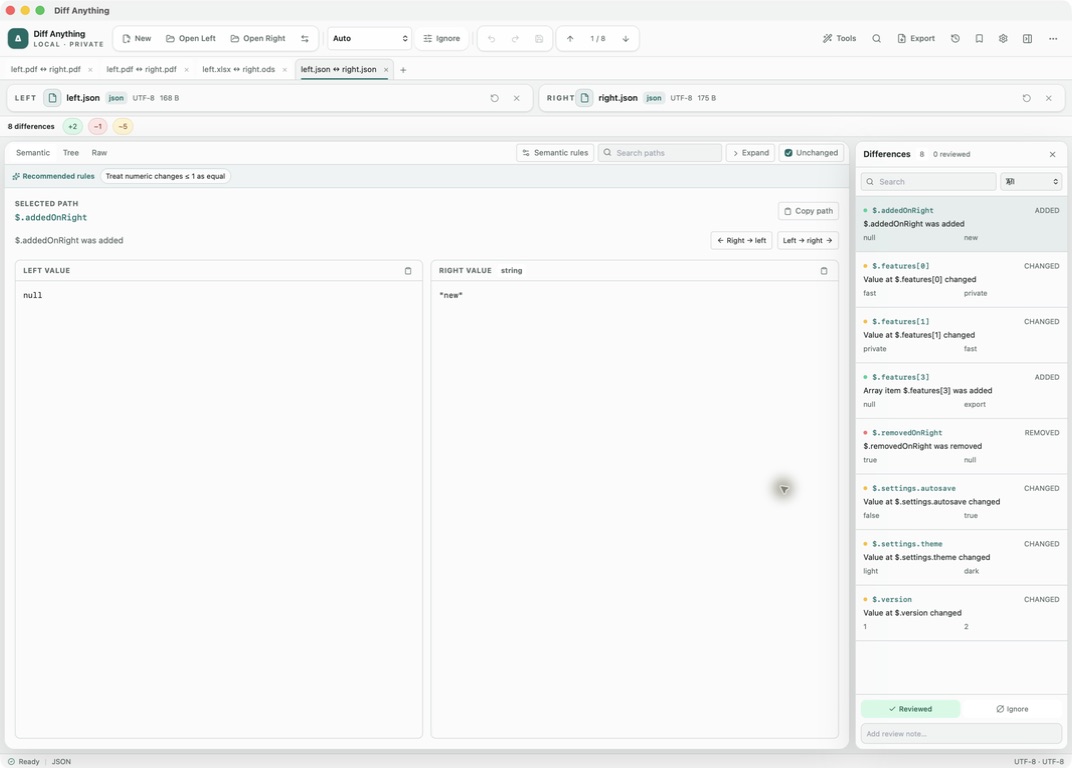
Recommended path
Review one environment against another.
Put the configuration you trust on the left, such as the file deployed today, and the proposed version on the right.
Open the pair
Choose two JSON, YAML, XML, or .env files, or paste their contents. Auto picks the mode from the file name and content.
Hide the changes you expect
In JSON mode, open Semantic rules and add Ignore paths for generated fields such as a build timestamp. Recommended rules proposes more rules from the differences it finds.
Pair list items correctly
JSON and YAML records with a unique id, _id, uuid, or key field are paired automatically. For others, add an Array keys rule, for example $.services = name, or list the path under Unordered array paths. XML elements are paired by a key attribute such as id or name; add the parent element under Unordered elements when sibling order carries no meaning.
Check variables without exposing them
Environment File mode lists missing, extra, and changed variables with their values hidden. Turn on Compare presence only when just the names must match.
Copy the corrections you approve
Pick a difference and copy it across with Right → left or Left → right. JSON targets are edited in place and keep their comments and layout; YAML and XML targets are rebuilt from parsed data after a confirmation, which drops comments and custom layout.
Capabilities involved
Three parts of Diff Anything do the work here.
Limits to know
Where the rules apply and where they stop.
Semantic rules, including Ignore paths, Array keys, and Numeric tolerance, work in JSON and YAML mode, including a JSON-and-YAML pair. XML offers Unordered elements for child order, and .env offers Compare presence only.
Values are compared as parsed, and numbers by value, so 1 and 1.0 are equal. Lists without an id-like field are matched by position, so an inserted item can mark later positions as changed; add an Array keys rule when records have another identifying field.
Masking covers the comparison view, and exported reports redact environment values by default. Pro history snapshots of .env files keep variable names with every value masked, and you can switch snapshots off in Settings.
The free plan runs all four configuration formats in the app with complete results for files up to 5 MB each and 10 comparisons per day. Saved profiles, history, report export, and command-line runs of the YAML, XML, and env modes need Pro.
Related manual
Choose the right comparison mode
Choose sources, understand automatic detection, and select the engine that answers the question you are actually asking.
Its sections cover start with the review question, choose and load sources, how automatic mode resolves, read text and structured results, compare spreadsheets across formats, choose smart diff or line diff for code, navigate and review, resolve a three-way merge, recover from input problems. Use it when you are ready to reproduce this workflow with your own project data.
Read the guideDirect answers
Questions about this use case.
Can I ignore a timestamp field in a JSON configuration file?
Yes. Add its path under Ignore paths in Semantic rules, for example $.build.generatedAt, or end a path with .* to leave out everything below it. The rules are free; keeping them for the next run requires a Pro profile.
Will reordered keys or re-indented YAML appear as changes?
No. Both files are read as data, so key order, indentation, and comments are not compared. If a list only changes order, the result reports that reorder instead of a change at every position.
Can someone looking at my screen read the secret values?
Not unless you reveal them. Changed variables are highlighted with their values masked. Reveal value shows one value at a time, Reveal all asks for confirmation first, and editing either file hides revealed values again.
Can I compare a YAML manifest with the JSON it was generated from?
Yes. Put the JSON file and the YAML file on opposite sides; Auto treats the pair as YAML data. Aliases are replaced by the values their anchors define before anything is compared.
Free & Pro: what’s included
Available on the Mac App Store and Microsoft Store. Free desktop use lets you try every comparison engine for files up to 5 MiB per side and 10 new comparison sessions per local day; collection previews show the first 100 items and PDF previews show the first 3 pages. The free CLI supports text and JSON. A one-time Pro purchase removes the preview and session limits and unlocks larger sources within technical limits, saved profiles and history, report export, three-way merge, folder synchronization, batch manifests, trusted preprocessors, and every CLI mode.