Compare contents instead of packaging noise
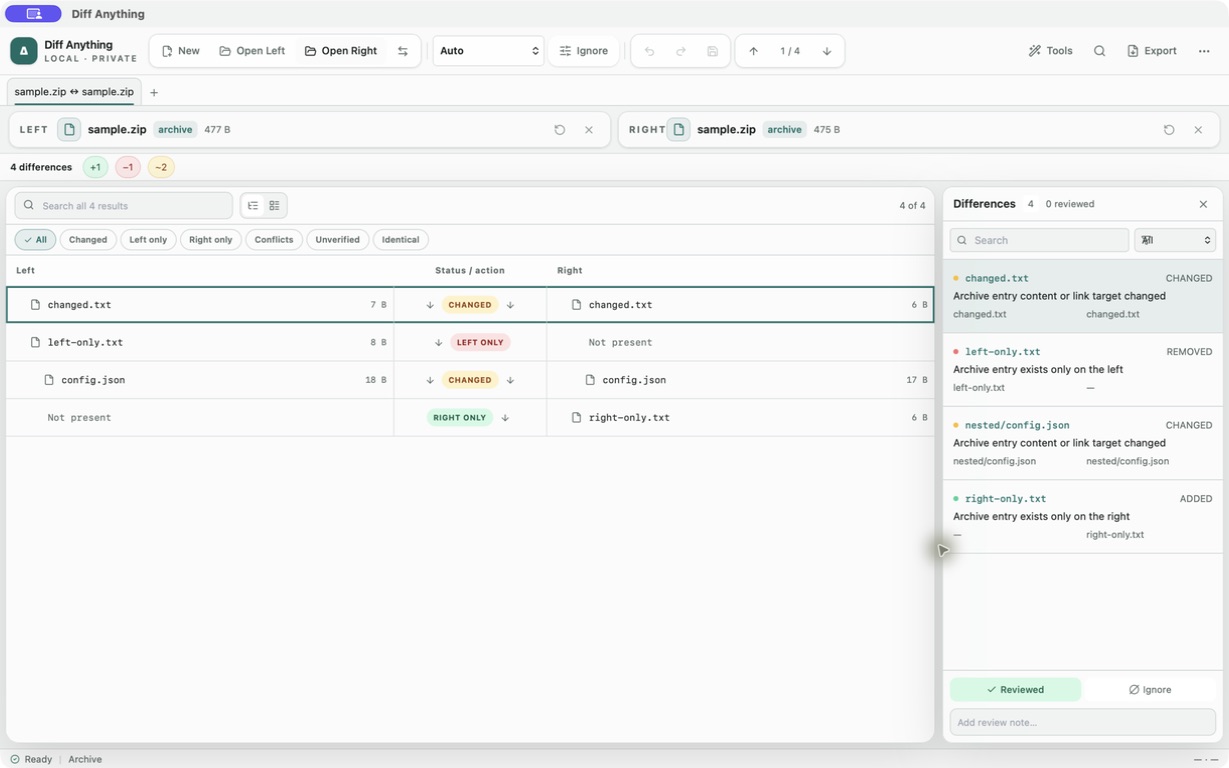
Archive mode walks both containers and compares normalized paths, entry types, sizes, SHA-256 content hashes, and link targets. Archive timestamps, compression levels, member order, and container metadata do not create false differences.
Added, removed, and changed entries remain visible in the same two-sided review model as folder comparison. A changed nested text pair can open directly in a deeper comparison, while extraction is an explicit action.
Know the supported containers
Diff Anything supports ZIP and ZIP64, including ZIPX and ZIP-based packages such as JAR, WAR, EAR, APK, AAB, IPA, EPUB, VSIX, NuGet, XPI, Python wheels, CBZ, and OpenDocument files. It also supports 7z, RAR 1.3 through RAR 7, TAR, compressed TAR variants, and standalone Gzip, Bzip2, XZ, and Zstandard streams.
Supported multipart inputs include numbered .7z.001 volume sets, RAR .partNN.rar sets, and legacy .rar/.r00/.s00 sets. Solid 7z and RAR archives and ZIP or RAR self-extracting archives are supported.
- TAR.GZ and TGZ
- TAR.BZ2, TBZ, and TBZ2
- TAR.XZ and TXZ
- TAR.ZST and TZST
Detect renamed containers and compression codecs
Detection uses bounded content signatures as well as filenames, so a supported renamed container can still route to archive mode. ZIP and RAR self-extracting archives are recognized from their embedded signatures.
ZIP readers support Deflate, Deflate64, Bzip2, LZMA, XZ, and Zstandard methods. The 7z reader supports LZMA and LZMA2, PPMd, Bzip2, Deflate, Brotli, LZ4, and Zstandard codecs.
- A filename alone does not override an incompatible signature.
- Unsupported containers stay available for binary comparison.
- Explicit archive mode reports a supported-format error instead of invoking an external unpacker.
Use separate passwords without persisting them
Encrypted ZIP entries support ZipCrypto and WinZip AES, encrypted 7z supports AES-256, and RAR supports encrypted member data and encrypted headers. The two sides may use different passwords.
The desktop asks only when a password is needed or rejected. An accepted password stays in memory for the current source pair and is not written to settings, profiles, history, diagnostics, or comparison exports. TAR and standalone compression streams do not define encryption; use an encrypted ZIP, 7z, or RAR container when encryption is required.
Stream large archives and extraction
Archive inputs are not rejected by the ordinary text-file size setting. Opening reads only a bounded signature prefix, while comparison hashes decompressed data incrementally instead of loading a full archive or member set into frontend memory.
Extraction streams to a temporary file and atomically moves the completed result into place. Opening an entry as text is capped at 128 MiB; a larger member can still be extracted. Cancellation is checked between members and during streaming hash work.
On the free plan, each archive can be up to 5 MB and the result lists the first 100 entries. Pro removes both limits, up to the safety ceilings below.
- Duplicate member names produce a warning; the final occurrence is used deterministically.
- The comparison never unpacks the archive into its source directory.
- Left and right sources remain unchanged unless an entry is explicitly extracted elsewhere.
Understand the safety ceilings and exclusions
Archive mode rejects pathological expansion before it can consume unbounded resources. Its ceilings are one million members, 500 GiB for one expanded member, 10 TiB of total expanded content, and 32 KiB member names.
Split ZIP, ACE, ARJ, CAB, ISO or other disk images, and filesystem images are not archive-mode inputs. They remain available to binary comparison, where Diff Anything can report identity and metadata without inspecting their internal filesystems.
- 1,000,000 members per archive
- 500 GiB per expanded member
- 10 TiB total expanded content
- 32 KiB member names
- 128 MiB when opening an entry as text
Free & Pro: what’s included
Available on the Mac App Store and Microsoft Store. Free desktop use lets you try every comparison engine for files up to 5 MiB per side and 10 new comparison sessions per local day; collection previews show the first 100 items, binary comparisons the first 100 byte differences, and PDF previews the first 3 pages. Plain text, JSON, and Jupyter notebook comparison are complete, and opening files from Finder or File Explorer, diffanything:// links, and AppleScript are free. The free CLI supports text, JSON, and notebooks. A one-time Pro purchase removes the preview and session limits and unlocks larger sources within technical limits, saved profiles and history, saving folder snapshots, report export and printing, JSON Patch export, applying patches, three-way merge and conflict resolution, the Git merge driver and merge tool, folder synchronization, batch manifests, trusted preprocessors, and every CLI mode.