Capability overview
How can I use deep-link workbench in TestDock?
Paste or type any URL and open it without saving it first, save every link from a pasted list at once, or share a link in from another app. Save parameterized custom schemes and web links with defaults, tags, favorites, open history, and home-screen shortcuts. Pro adds AASA and assetlinks inspection, and on iPhone creates saved links from the paths in an AASA file.
Keep your mobile app’s test links together and open them on the device where your app runs. Paste or type any URL to open it right away, share a link in from Slack, Mail, or Safari, and save the routes you check often so the next test starts with the right input.
Quick open
Open any URL without saving it first
Quick open sits at the top of the Links tab. Type or paste a URL and tap Open. The last five URLs you opened are listed below it, each marked opened or failed, with a button to save it as a link.
When the clipboard holds text, a Paste button appears. On iPhone it is the system paste button, so iOS does not ask to allow pasting. TestDock pulls the link out of the copied text and opens it. When the text holds two or more links, Save all saves them in one step: links already saved are skipped, and new ones get names automatically.
You can also share text or a link into TestDock from Slack, Mail, Safari, or another app. The first link in the shared text arrives in Quick open of your current app profile, so create a profile before sharing.
- Long-press the TestDock icon for Quick open and up to three links: favorites first, then the most recently opened
- Custom schemes from links that open successfully are added to the app profile
URL templates
Save a link once and change only the values
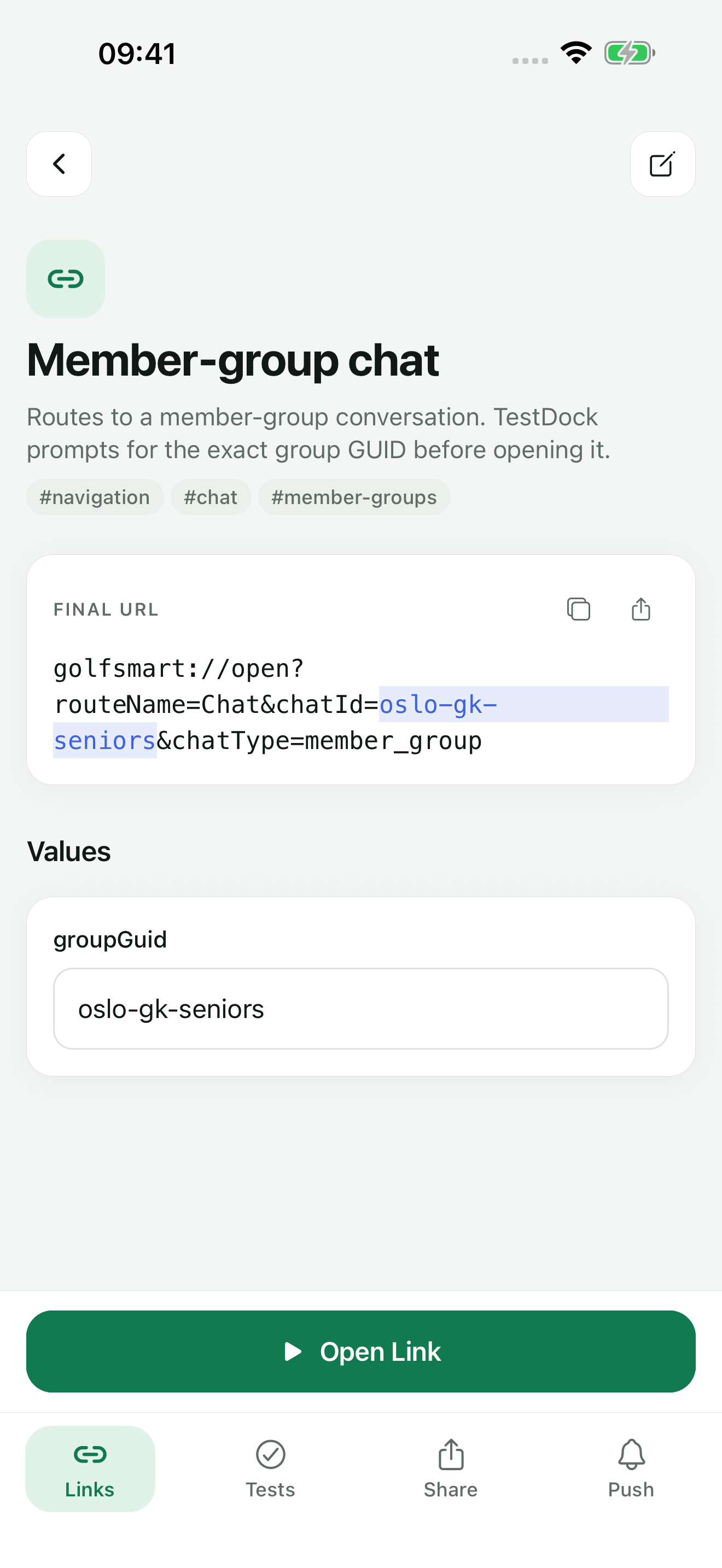
Each saved deep link has a name, an optional description, and a URL template. The template can use a custom scheme, such as myapp://profile/{{userId}}, or an https address for a universal link or Android app link. Variables go in double curly braces.
The Default values field takes one NAME=value line per variable. The link screen shows a field for every variable under Values: leave it empty to use the default, or type a value for this open. A variable without a default is marked Required, and Open Link stays disabled until you fill it in. TestDock URL-encodes each value when it builds the final URL.
Built-in variables generate a value for you: {{$uuid}}, {{$timestamp}}, {{$isoTimestamp}}, {{$randomInt}}, and {{$randomString}}. TestDock fills them in when the link screen builds the Final URL, and tapping Open Link again on that screen sends the same value. Open the link screen again when a test needs a new ID or time value.
- Search links by name, URL, or tag
- Mark a link as Favorite to keep it at the top of the list and on the home-screen shortcuts
- The play button on a saved link opens it directly when every value is known
- Duplicate a link to build a variant without retyping it
Opening links
Review the final URL, then hand it to the system
The link screen shows the template and the Final URL before anything opens. TestDock checks that the URL has a scheme, contains no spaces, and includes a host when it is a web address. Copy puts the final URL on the clipboard, and Share sends it through the system share sheet.
Open Link passes the URL to the operating system. TestDock shows whether the system accepted or rejected the request and adds the result, time, and resolved URL to the Recent opens list on the link screen. The app and screen that handled the link are outside what TestDock can see, so confirm the destination on screen.
App-link checks
Check the association file when a verified link falls back to the browser
For https links, the link screen shows a Universal / app-link checklist for the current platform. These are manual reminders that you tick off yourself; TestDock does not verify them.
With Pro, Verify universal / app links opens the Association inspector. Choose one of the profile's configured domains or type a domain, then tap Inspect public file. On iOS it fetches /.well-known/apple-app-site-association, and on Android it fetches /.well-known/assetlinks.json.
A pass means the file is reachable and has the expected structure. It does not prove that a specific URL opens the right screen in your installed build.
On iPhone, the inspector then lists the paths the apple-app-site-association file declares for the profile's bundle identifier. Select the ones you want and save them as links; wildcards in a path become values you fill in. assetlinks.json declares no paths, so this is not offered on Android.
- HTTPS response: the server returned a success status
- No redirect observed: the file was served directly
- JSON content type and valid JSON
- iOS: applinks.details is an array
- Android: at least one android_app target with a package_name
Free and Pro
Deep-link testing is free for one app
TestDock Free covers Quick open, Paste, sharing links in, home-screen shortcuts, and saving, editing, opening, and reviewing history for deep links in one app profile, with no cap on the number of links. The association inspector, links created from an AASA file, and more profiles require Pro.
In the workflow
How to use it
Write the template
Tap Add, name the link, enter the URL with {{variables}}, and add NAME=value defaults and tags.
Resolve the values
Open the saved link, fill any Required fields under Values, and read the Final URL.
Open and observe
Tap Open Link, look at the screen the app shows, and use Recent opens to repeat the same URL later.
Inspect if routing fails
For an https link, go through the checklist and, with Pro, inspect the domain's association file.
Useful in practice
When to use it
Related manual
Test deep links and app associations
Save reusable custom schemes and web links, resolve their parameters, open them on device, and inspect association files.
Read the guideDirect answers
Questions about deep-link workbench.
Why is Open Link disabled?
A variable still has no value, or the final URL is invalid. Fill the required fields, or fix the missing scheme, missing host, or spaces reported under the Final URL.
Does an accepted result mean the right screen opened?
No. It means the operating system took the open request. Check the destination in the app yourself, or record it in a scenario.
Can I open a link from a chat message without copying just the URL?
Yes. Copy the whole message and tap Paste in Quick open. TestDock takes the link out of the text and opens it, or offers Save all when the text holds two or more links.
Do I need Pro to check apple-app-site-association or assetlinks.json?
Yes, the Association inspector is part of Pro. The manual checklist on the link screen is available in Free.
Can I reuse links from my iPhone profile on Android?
Not directly. Saved links belong to the profile's platform, and links exported from an iOS profile are skipped when the package is imported on Android.
Free & Pro: what’s included
Available on the App Store and Google Play. Free includes one app profile with unlimited saved links, Quick open, Paste, sharing links in, home-screen shortcuts, and the sample scenario plus one scenario of your own. A one-time Pro purchase unlocks unlimited profiles and scenarios, share fixtures, push testing, association inspection, links created from an apple-app-site-association file on iPhone, and profile or scenario import and export.