Problem solved by Diff Anything macOSWindows

A Beyond Compare alternative for spreadsheets, archives, and structured files

Compare Diff Anything with Beyond Compare. See where each tool fits, then try Diff Anything free on Windows or Mac for folders, spreadsheets, archives, JSON, and code.

See it in the app

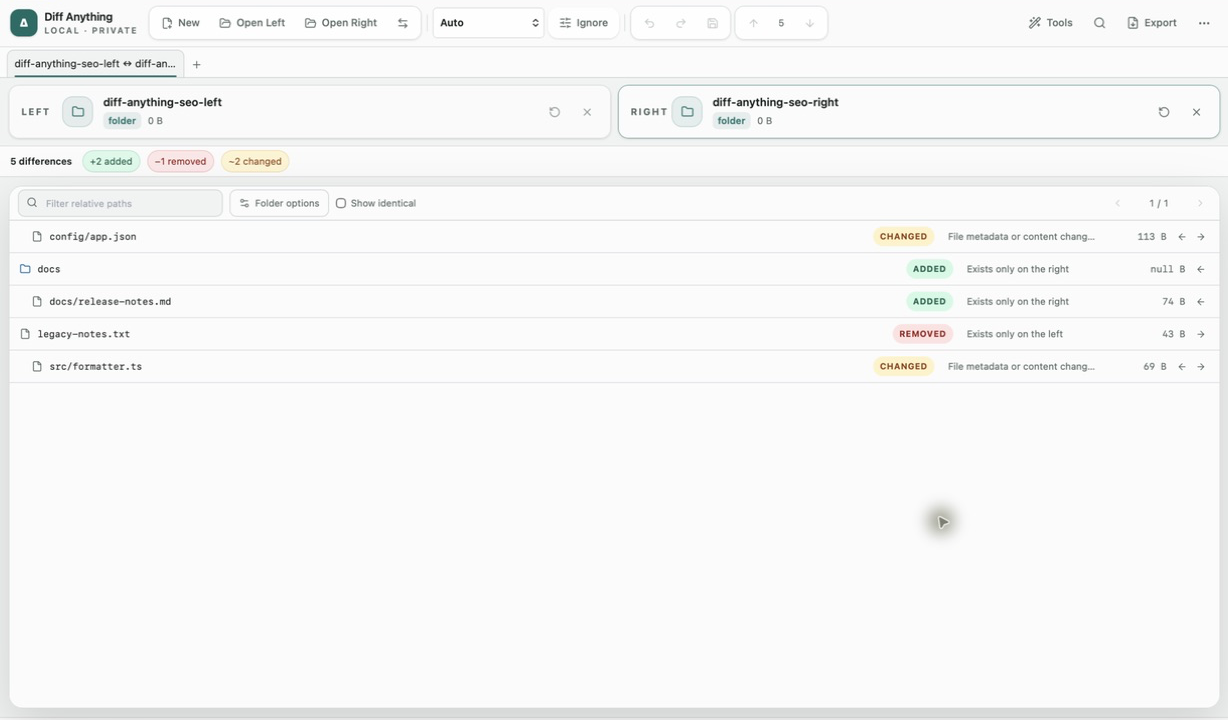
Compare folder trees and open the files that changed.

No accounts, cloud comparison service, analytics, or telemetry.

Diff Anything showing two folder trees with changed paths, status filters, and file sizes
Diff AnythingFolder comparison with status filters and nested file review. Screenshot shows the shared desktop interface.

The problem

Why the usual workflow gets in the way.

Beyond Compare is the tool many people already know for comparing files and folders. If most of your comparisons involve spreadsheets in different formats, archives, JSON or YAML configuration, or code that was reformatted, you may want a tool built around those files.

The solution

How Diff Anything handles it.

Diff Anything picks the comparison that fits the files you open. It compares folders with moved-file detection, spreadsheet values across Excel, OpenDocument, and Apple Numbers, archive contents instead of packaging, and structured data by meaning instead of line order. It runs locally on Windows and Mac, and the free version lets you try every comparison type.

Compare folders

See how folder comparison works

Read the Windows folder comparison guide: choosing the two folders, reading missing, changed, and moved results, and checking content rather than names and dates.

Read the Windows folder guide

01 / Workflow detail

Where Diff Anything is different

Diff Anything is built around the kinds of files that line-by-line text comparison handles poorly:

  • Spreadsheets: compare stored cell values across XLSX, OpenDocument, and Apple Numbers workbooks without converting either file first.
  • Archives: compare ZIP, 7z, RAR, TAR, and compressed archives by their extracted content, including encrypted and multipart archives, instead of by packaging metadata.
  • Structured data: compare JSON, YAML, XML, CSV, and environment files by their parsed content, so reordered keys do not show up as changes.
  • Code: switch between Smart Diff and Line Diff across 117 editor languages. Smart Diff connects changes through reformatting and reflow while keeping the exact source text.
  • Documents and images: compare Office documents and PDFs, and review image changes with overlays and pixel heatmaps.

02 / Workflow detail

How the two tools compare

Both tools compare files and folders and are sold as a one-time purchase. The main differences are the platforms, where the files can come from, and which file types each tool treats specially.

Diff Anything and Beyond Compare at a glance
TopicDiff AnythingBeyond Compare
PlatformsWindows 10 version 1809 or later, Windows 11, and macOS 13 Ventura or laterWindows, macOS, and Linux
Where to get itMicrosoft Store or Mac App StoreScooter Software website
PriceFree version, plus a one-time Pro purchase priced in your local store currencyStandard $35 per user, Pro $70 per user, one-time purchase; free evaluation available
Where files come fromFiles and folders on your computerLocal files, plus SFTP, FTP over SSL, WebDAV, Dropbox, OneDrive, Amazon S3, and Subversion in Pro
MergingThree-way text merge from Base, Ours, and Theirs in ProTwo- and three-way merging for text files and folders in Pro

03 / Workflow detail

When Beyond Compare is the better choice

Choose Beyond Compare if you work on Linux, if you compare files directly on remote servers or cloud storage, or if you need three-way folder merges or Windows registry comparison. Diff Anything does not cover those tasks.

Choose Diff Anything if your comparisons are mostly local files and folders, and you often deal with spreadsheets in different formats, archives, structured configuration, or reformatted code.

04 / Workflow detail

What you can do in Free and Pro

Free lets you try every comparison type with files up to 5 MiB per side and 10 new comparison sessions per local day. Folder and archive previews show the first 100 items, and PDF previews show the first 3 pages.

A one-time Pro purchase removes those limits and unlocks larger sources within technical limits. Pro also adds folder synchronization, report export, three-way merge, and saved comparison profiles and history.

Clear answers

Questions about switching from Beyond Compare

Is Diff Anything free?

Diff Anything has a free version that lets you try every comparison type, with files up to 5 MiB per side and 10 new comparison sessions per local day. A one-time Pro purchase removes those limits.

Does Diff Anything run on Linux?

No. Diff Anything runs on Windows 10 version 1809 or later, Windows 11, and macOS 13 Ventura or later. Beyond Compare also runs on Linux.

Can Diff Anything compare files on an FTP server or in cloud storage?

Not directly. Diff Anything compares files and folders on your computer. Download or sync the files to a local folder first.

Can I compare Excel files with Diff Anything?

Yes. Diff Anything compares stored cell values across Excel, OpenDocument, and Apple Numbers workbooks, including an XLSX file against an ODS or Numbers file.

Does Diff Anything upload my files?

No. Comparisons run locally in the desktop app. You choose files and folders on your computer; nothing needs to be uploaded to a website.

Does Diff Anything do three-way merges?

Diff Anything Pro resolves overlapping text edits from Base, Ours, and Theirs in a three-way merge workspace. It does not merge folders three ways.

Three short steps

Try it on a comparison you already do.

  1. 01

    Install Diff Anything from the Microsoft Store or the Mac App Store.

  2. 02

    Choose the original file or folder on the left and the updated version on the right.

  3. 03

    Review the result in the view Diff Anything picked for those files, then open any changed file for detail.

Available for macOS and Windows

Solve it with Diff Anything.