Diff Anything 1.4 makes archive comparison substantially broader and safer. It can compare modern ZIP, 7z, RAR, TAR, and compressed-stream formats by their extracted contents—including encrypted and supported multipart archives—without unpacking either source into its own directory.
The goal is not to tell you that two containers have different bytes. It is to explain which members were added, removed, or changed while ignoring packaging details that do not alter the extracted artifact. The work remains local on macOS and Windows, with no account, cloud comparison service, analytics, or telemetry.
01 / Compare the artifact inside
Content changes stay visible; packaging noise does not
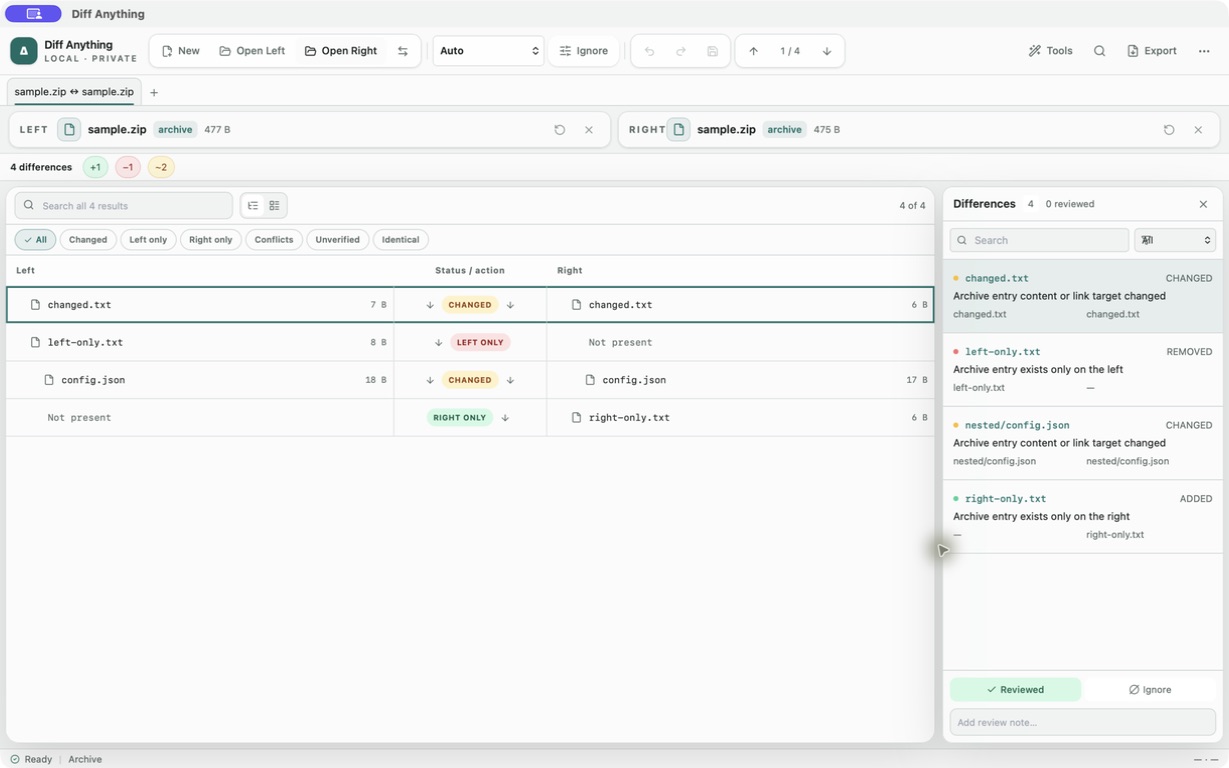
Archive mode walks both containers and compares normalized paths, entry types, sizes, link targets, and SHA-256 hashes of the extracted bytes. Archive timestamps, compression levels, member order, and container metadata do not create false differences.
The result uses the same two-sided review model as folder comparison. You can search and filter the member list, inspect added, removed, changed, or identical entries, and keep the Differences pane connected to the current selection.
02 / A much wider format matrix
ZIPX, 7z, RAR, compressed TAR, and standalone streams
ZIP support now covers ZIP64 and ZIPX as well as ZIP-based packages such as JAR, WAR, EAR, APK, AAB, IPA, EPUB, VSIX, NuGet, XPI, Python wheels, CBZ, and OpenDocument files. ZIP readers handle Deflate, Deflate64, Bzip2, LZMA, XZ, and Zstandard methods.
7z includes solid archives and LZMA/LZMA2, PPMd, Bzip2, Deflate, Brotli, LZ4, and Zstandard codecs. RAR support spans RAR 1.3 through RAR 7, including solid and self-extracting archives. TAR covers plain TAR, TAR.GZ/TGZ, TAR.BZ2/TBZ/TBZ2, TAR.XZ/TXZ, and TAR.ZST/TZST. Standalone Gzip, Bzip2, XZ, and Zstandard streams are supported too.
Detection uses content signatures as well as filenames. Renaming a supported container does not necessarily hide it, and embedded ZIP or RAR signatures can route self-extracting archives correctly.
03 / Passwords stay with the active pair
Encrypted archives can use a different password on each side
Encrypted ZIP entries support both legacy ZipCrypto and WinZip AES. 7z supports AES-256, while RAR supports encrypted member data and encrypted headers. If the left and right artifacts use different passwords, Diff Anything asks for them separately.
The prompt appears only when a password is required or rejected. An accepted password stays in memory for the current source pair and is not written to settings, profiles, history, diagnostics, or comparison exports. TAR and standalone compression streams do not define encryption; use an encrypted ZIP, 7z, or RAR container when encryption is required.
04 / Large archives can span volumes
Supported 7z and RAR multipart archives compare as one source
Version 1.4 understands numbered .7z.001 sets, RAR.partNN.rar sets, and legacy .rar/.r00/.s00volumes. Select the starting volume and the reader resolves the supported set for comparison.
Split ZIP remains unsupported, as do ACE, ARJ, CAB, ISO or other disk images, and filesystem images. Those inputs stay available to binary comparison; explicit archive mode reports a supported-format error rather than quietly calling an external unpacker.
05 / Large inputs need bounded work
Hashing and extraction stream, with explicit expansion ceilings
Archive inputs are not rejected by the ordinary text-file size setting. Opening reads a bounded signature prefix, and comparison hashes decompressed member data incrementally instead of loading the full archive or its members into frontend memory. Extraction streams through a temporary file and atomically moves the completed result into place.
Safety ceilings reject pathological expansion: one million members, 500 GiB for one expanded member, 10 TiB of total expanded content, and 32 KiB member names. Opening a member as text is capped at 128 MiB, although a larger member can still be extracted. Cancellation is checked between members and throughout streaming hash work.
06 / Three-way merge, redesigned
See what Ours and Theirs changed from Base
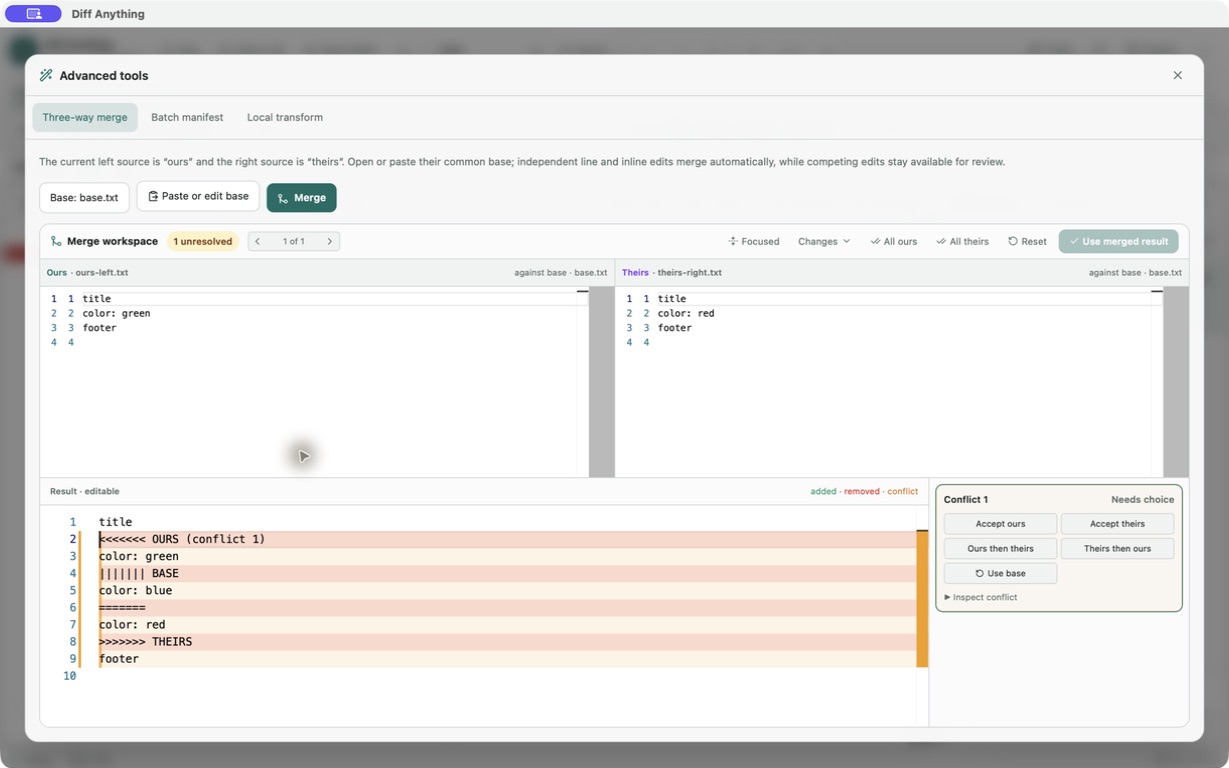
Archive comparison is the headline change in 1.4. The same release also redesigns the Pro three-way text merge workspace. Instead of three plain source panes, it now shows Ours against Base and Theirs against Base as focused diffs, with an editable merged result below.
Version 1.4 makes a complicated merge easier to work through:
- Jump between conflicts one at a time.
- Collapse unchanged source lines to focus on the edits.
- Choose All ours or All theirs, or reset the merge and start again.
- Automatically combine independent character-level edits on the same line.
- For competing edits, choose Ours, Theirs, Ours then Theirs, Theirs then Ours, or Base.
- Keep the merged result unavailable until every conflict marker is resolved.