| Diff tool | Open the original file on the left and the changed file on the right. Text and code are shown side by side or inline with word-level changes, syntax highlighting for 117 editor languages, editing, and applying changes in either direction. Smart Diff follows changes through reformatting; Line Diff gives the exact line-by-line view. |
|---|
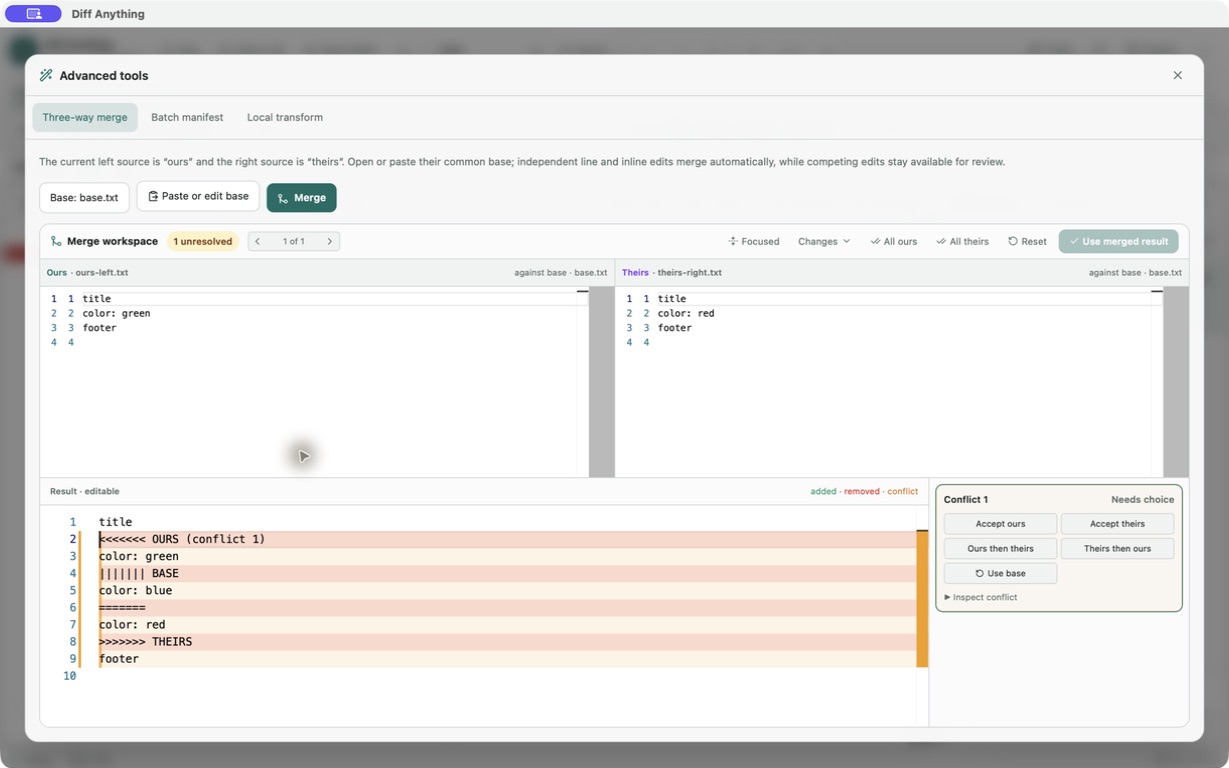
| 3-way Merge tool and SureMerge | With Pro, the three-way merge workspace takes Ours on the left, Theirs on the right, and the Base you choose. Changes that do not overlap combine automatically, and each overlapping edit becomes a conflict you resolve with Ours, Theirs, both, or Base in an editable result. It merges text files. |
|---|
| Folder compare and synchronization | Compare two folders in tree or table layouts with search, status filters, ignore patterns, and moved-file detection, then open any changed pair. With Pro, copy entries between the two sides or synchronize the folders from a plan you review first, with undo. |
|---|
| Image Diff Tool | Compare PNG, JPEG, GIF, WebP, and BMP images pixel by pixel with side-by-side, overlay, swipe, blink, heatmap, and changed-pixel views, a threshold, and measurements. Other image formats, such as TIFF or HEIC, are compared by size and checksum only. |
|---|
| Binary Diff Tool | Binary mode reports the detected format, size, and SHA-256 checksum of both files, so you can see whether they differ. It does not show a byte-by-byte view of where they differ. |
|---|
| Ignore options | Text comparison can ignore whitespace, blank lines, letter case, and line endings. JSON and YAML can ignore chosen paths and array order, CSV comparison can ignore chosen columns, and folder comparison takes ignore patterns. There are no regular-expression ignore rules and no setting to ignore a range of character columns in text. |
|---|
| Manual Alignment | Lines are aligned automatically. There is no manual alignment. |
|---|
| Over 150 File Encoding formats and Save files Encoded As | Text files are read as UTF-8, UTF-16 with a byte-order mark, or a detected legacy encoding such as Windows-1252, and edits are saved in the file's own encoding. You cannot choose an encoding by hand or save in a different one, and EBCDIC files are not supported. |
|---|
| Save Compare Report (HTML) and Save Differences As | With Pro, export a comparison as an HTML, JSON, or Markdown report, a unified diff of a text comparison, or a CSV list of changes for a CSV comparison. |
|---|
| Command line utilities (Jiff, Suremerge, GuiffyReport, UPatch) | On Windows, the Microsoft Store version provides the diff-anything command. With --cli it compares two files or folders and prints a highlighted diff, a summary, or JSON, with an optional exit code when differences are found; with Pro, --merge merges three files. The free command line compares text and JSON; Pro adds the other comparison types and batch runs with JUnit or SARIF output. It does not apply patches. The Mac App Store version is limited to files and folders you choose in the app, so command-line use is for Windows. |
|---|
| CM/SCM Integrations | Git, on Windows: Diff Anything works as git difftool, as the diff driver for the file types you choose, and, with Pro, as a merge driver and git mergetool. There is no ready-made setup for AccuRev, ClearCase, CMSynergy, Mercurial, Perforce, StarTeam, SVN, or Team Foundation Server, and no Eclipse or NetBeans integration. |
|---|
| Desktop Integrations with Windows Explorer and Finder | Choose files and folders in the app, or drag them into its window. The store versions add no File Explorer or Finder menu commands. |
|---|
| Translations | The interface is in English. |
|---|
| User defined keyboard shortcuts | Keyboard shortcuts and a command palette cover common actions. Shortcuts cannot be reassigned. |
|---|
| BIG files > 2GB | Text comparison opens files up to 20 MB by default and up to 100 MB after you raise Maximum automatic text size in Settings; larger text files cannot be compared as text. Archive comparison streams large archives and is not bound by that setting. The free plan compares files up to 5 MiB per side. |
|---|
| Filter Plugins | With Pro on Windows, Local transform runs a program installed on your computer, such as jq or xmllint, on both text sources before they are compared. |
|---|
| Cross Platform | Windows 10 version 1809 or later, Windows 11, and macOS 13 Ventura or later, from the Microsoft Store and the Mac App Store. There is no Linux, Unix, or Java version. |
|---|