The job to be done
Know what your containers are doing before you run the next command
A Compose-based project spreads its state across the Docker engine, several services, their published ports and the commands you run against them. When a service keeps restarting or the engine is stopped, the first sign is often a test that fails with an error that seems unrelated.
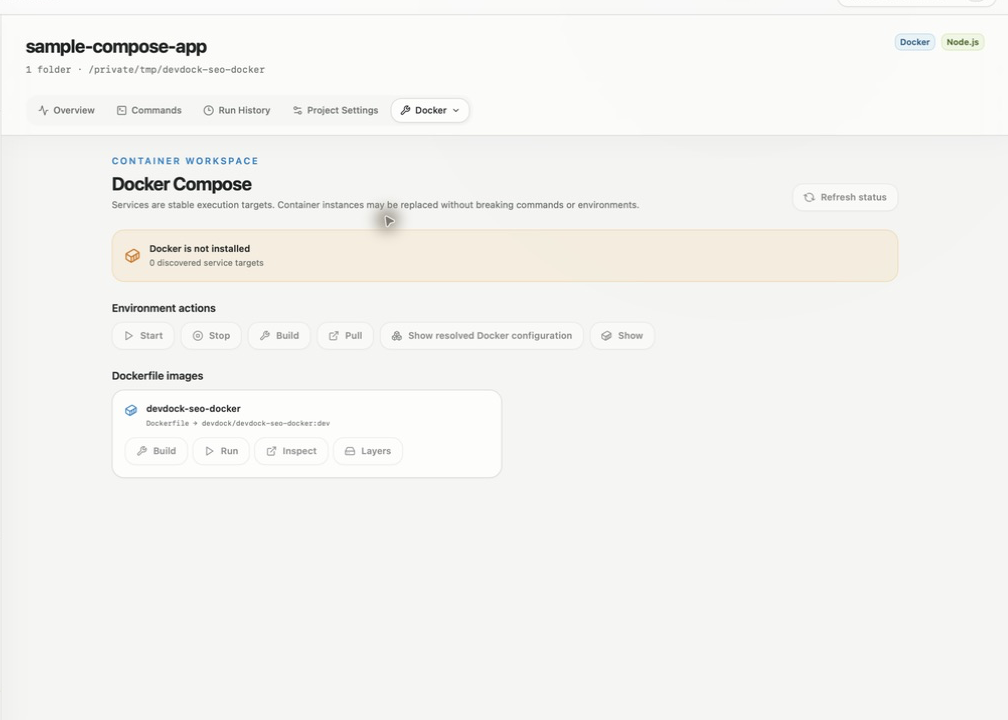
DevDock reads the project's Compose files without starting anything and lists each service with its state, health, published ports and a CPU and memory snapshot. Start, Stop, Build and Pull are buttons in the Docker section, and service problems show up as warnings beside the rest of the project's health.
When a service bind-mounts your project folder, DevDock also offers the project's commands inside that service. You decide whether tests run on Windows or in the container.
Recommended path
Run a Compose project from its DevDock workspace
Register the folder that holds the Compose file, then work from the Docker section and the Overview.
Add the Compose repository
Add the repository that contains compose.yaml or docker-compose.yml. A matching override file is applied automatically, and a .devdock/docker.json file can list custom Compose file names and env files in the order they should be used.
Check the engine
Open Docker from the project's Tools menu. The status line says whether Docker is ready, installed but not running, or not installed. Refresh status reads it again.
Start the stack
Use Start under Environment actions, or start and stop single services from their rows. Follow service logs streams a running service's output, and Open service shell in Terminal opens a shell inside the container.
Choose where commands run
When several services mount the project, pick a Preferred execution service. Its container versions of the project's commands are listed first in Commands, and the Windows versions stay available.
Act on service warnings
Watch Project health on the Overview. An unhealthy, repeatedly restarting, out-of-memory or failed service appears there with Restart service and Inspect service.
Capabilities involved
What helps while the containers are running
Limits to know
Docker scope and plan limits
DevDock works with local Compose projects on the Docker engine installed on your PC. Remote Docker contexts, Swarm and Kubernetes are outside its scope.
Destructive Compose actions ask for confirmation, and the generated down command keeps named volumes. Pruning and volume deletion stay in Docker's own tools.
Compose files, and every path listed in .devdock/docker.json, must be files inside a registered folder.
The Docker section, generated service commands and container versions of detected commands are in DevDock Free. Custom commands that run in a service or a one-off container, and saved environments with readiness checks, require Pro.
Related manual
Docker and Compose workflows
Connect Compose discovery, runtime health, host-versus-container execution, and safe daily environments into one repeatable DevDock workflow.
Its sections cover prepare the compose project, how compose discovery works, read docker health in context, configure non-standard file sets, choose host or container execution, build a repeatable development environment, understand safety limits and recovery. Use it when you are ready to reproduce this workflow with your own project data.
Read the guideDirect answers
Questions about this use case.
Does DevDock start containers when I add a project?
No. It parses the Compose files to find services, ports, health checks, mounts and profiles. Containers start only when you run a start command.
Can I run tests inside the container instead of on Windows?
Yes, when a Compose service bind-mounts the project folder. DevDock adds container versions of compatible commands that run in the mapped working directory, and the command details show the Execution target, such as Docker Compose service: app.
Will the generated down command delete my database volume?
No. The down command DevDock generates keeps named volumes. Removing a volume is a separate step you take with Docker's own tools.
What if two services publish the same port?
The Services section, titled Ports & services, lists readiness URLs and published Docker ports together and marks a Potential port conflict when configured services use the same port.
Free & Pro: what’s included
Available on the Microsoft Store. Free for up to three local projects with core commands, Git, Docker, project health checks, and security-audit tools. A one-time Pro purchase unlocks unlimited and multi-folder projects, custom workflows, full history and insights, database tools, SSH transfers, and configuration backup and restore.