Capability overview
How can I use project health in DevDock?
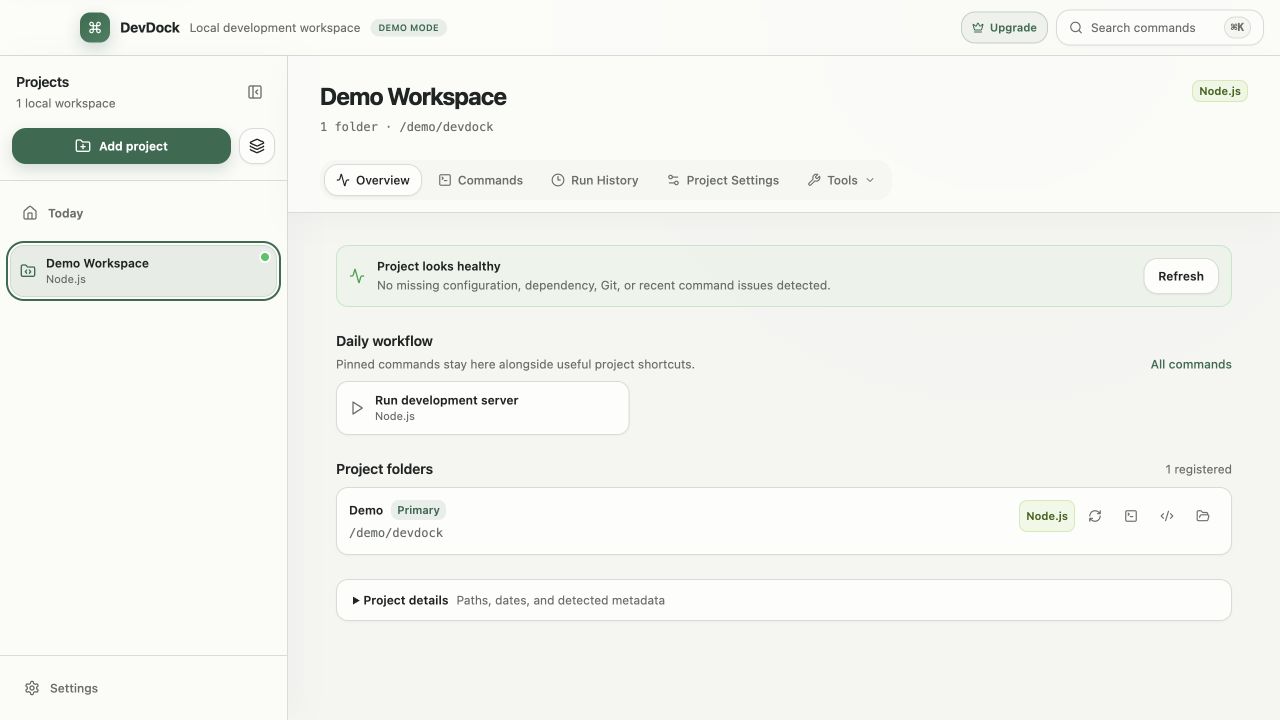
See whether configuration, dependencies, Git, Docker, toolchains, or recent command results need attention.
Health remains descriptive: a warning identifies the affected folder, tool, configuration, or recent run without blocking unrelated work.
Detection and runtime health stay separate, so a recognized project can explain that an SDK, executable, engine, or service is unavailable.
What is checked
The problems Project health reports
Project health appears near the top of each project's Overview, and Needs attention on Today collects the same warnings from every project. Each warning names the folder, tool, file or run it is about.
- Folders: a registered folder that has been moved or deleted.
- Git: uncommitted changes, commits waiting to push, remote changes available, upstream changes that have not been fetched, no remote configured, work that is not on a branch, and an interrupted branch switch that still needs restoring.
- Toolchains: a required runtime or SDK that is missing, an installed version that does not match what the project asks for (for example in go.mod or rust-toolchain.toml), or a tool that cannot report its version.
- Dependencies: Node or Composer dependencies that are not installed, or a Python project without a virtual environment.
- Environment files: a missing .env, keys that are in the example file but not in .env, and blank values.
- Docker and runs: Docker unavailable, a service that is unhealthy, restarting repeatedly, out of memory or exited with an error, and a latest command that failed.
Fix actions
Each warning offers a next step
Warnings come with an action that fits the problem. Missing dependencies offer Install dependencies, a missing Python environment offers Create virtual environment, and a missing .env offers Create from example. Missing keys offer Add from example, and blank keys offer Review blank keys.
Git warnings lead to Commit changes, Push commits, Pull changes or Fetch changes, and No Git remotes configured offers Add remote. A missing or mismatched toolchain opens a terminal in the folder so you can install or switch versions. Docker service problems offer Restart service and Inspect service, and a failed run offers View failed run. Check again repeats the check after you fix something outside DevDock.
Intentional warnings
Hide warnings that do not apply
Some warnings are expected. A local repository that never gets a remote can use Ignore warning, and Ignored health warnings in Project Settings lists hidden warnings so you can restore them. Blank environment keys can be reviewed one by one and marked as expected.
Dismiss alert clears a failed-run warning without deleting the run from Run History. A warning never blocks other work: you can still open folders and run unrelated commands.
How checks run
Checks that do not run your project's code
Health checks run in the background while DevDock is open. To read tool versions, DevDock runs the tools found on your PATH, never a program inside the project folder. It reads a Python virtual environment's configuration file and Flutter's recorded SDK version instead of running them.
The upstream check asks the remote whether the tracked branch has new commits without fetching or changing any branch. If a remote needs sign-in, Today offers Unlock Git and check all repositories. Project health is included in DevDock Free.
In the workflow
How to use it
Open the project
Start on the Overview, or on Today's Needs attention list to see warnings from every project.
Read the warning
Check which folder, tool, file or run it names and whether it affects the work you are about to do.
Use the suggested action
Install dependencies, create the .env, pull or push, or open a terminal for a toolchain problem.
Confirm or hide it
Choose Check again after an outside fix, or use Ignore warning when the condition is intentional.
Useful in practice
When to use it
Related manual
Project health and troubleshooting
Interpret health warnings, separate setup problems from command failures, and recover a workspace without resorting to broad destructive cleanup.
Read the guideDirect answers
Questions about project health.
Does a health warning stop me from running commands?
No. Warnings describe the project's state. Folders, commands and other tools stay available while a warning is shown.
Does DevDock fetch from my remotes in the background?
No. The background check only asks the remote whether the tracked branch has new commits. Fetching happens when you choose Fetch changes or Check all repositories for updates.
Can I hide a warning that is intentional?
Yes, for a repository without a remote and for blank environment keys. Hidden warnings are listed in Project Settings under Ignored health warnings and can be restored there.
Is Project health available in DevDock Free?
Yes. Project health and Today's Needs attention list are included in Free.
Free & Pro: what’s included
Available on the Microsoft Store. Free for up to three local projects with core commands, Git, Docker, project health checks, and security-audit tools. A one-time Pro purchase unlocks unlimited and multi-folder projects, custom workflows, full history and insights, database tools, SSH transfers, and configuration backup and restore.