The job to be done
Run the same checks on every build and keep the result
Most release checks are short: launch, sign in, finish the main task, open a few links. The hard part is consistency: testers skip different steps, and a thumbs-up in chat does not say what was checked on which build.
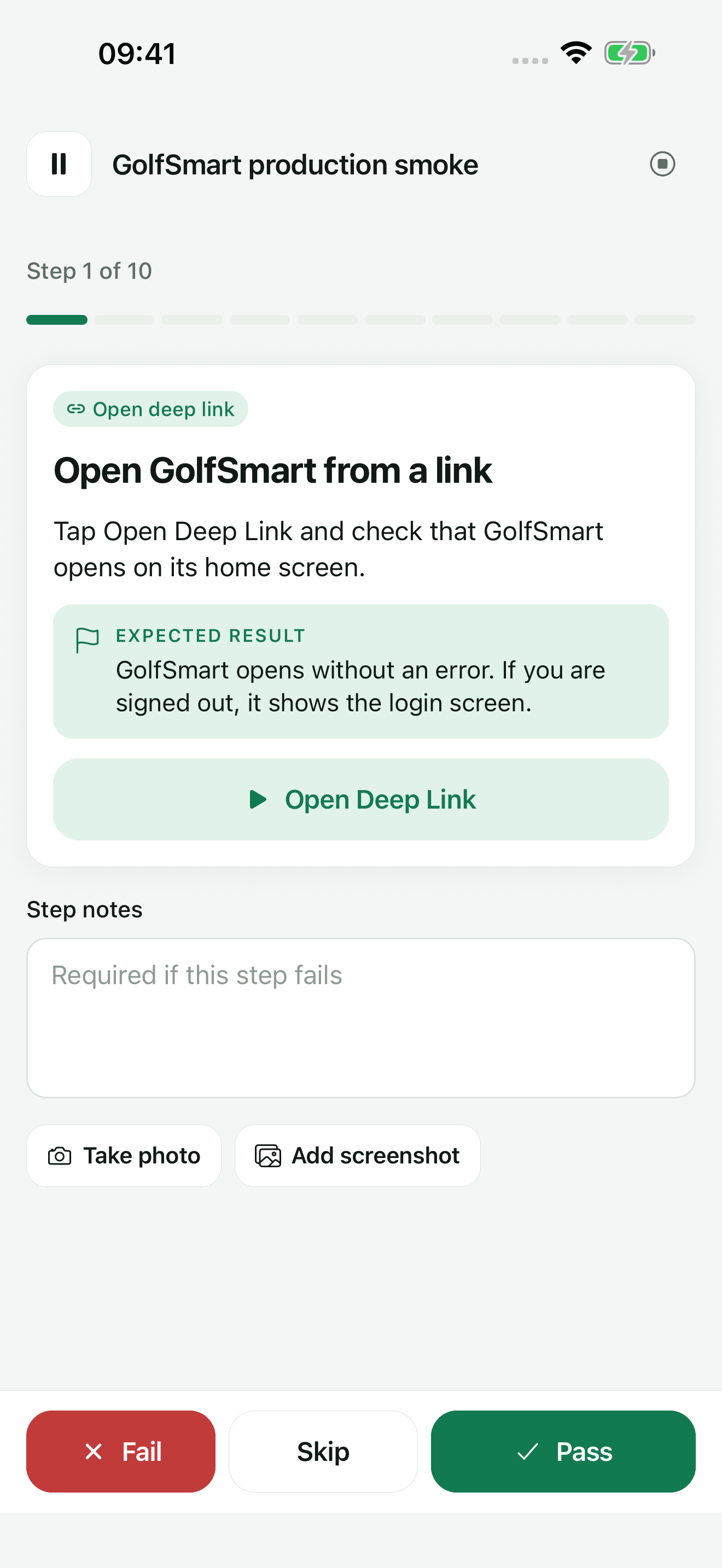
In TestDock, those checks become a scenario in the app's profile: ordered steps, each with an expected result. The tester marks every step on the phone and ends with a result listing passes, failures, and skips, with notes and photos. One scenario of your own is free; Pro makes them unlimited.
Scenarios are on the Tests tab. Steps can open a saved deep link or any URL, so routing checks run in the same pass. Copy test link puts the scenario in the release ticket, and opening that link on a test phone starts the run.
Recommended path
Write the checklist once, run it on each release candidate
Keep the scenario short enough that nobody skips it. Put the checks that decide whether the build ships at the top.
Start from the Smoke test template
It adds four required steps: launch the app, reach the starting state, complete the primary task, and check that the result is still correct after you return to it. Rewrite them for your app.
Add the routes that must work
Insert Open deep link steps for saved links or Open URL steps for web addresses, each followed by a checklist step stating what the screen should show.
Decide which failures need an explanation
Keep Required on where a failure must never be recorded without a note; turn it off for informative checks.
Run it on the candidate build
Tap Start Scenario, work through the steps, and mark each one Pass, Fail, or Skip. Attach a camera photo or an existing screenshot when the status alone would be unclear.
Share the result and recheck fixes
Use Share report to send the result as Markdown, PDF, JSON, or plain text. Once the fix lands, Rerun failed steps starts a new run containing only the steps that failed.
Capabilities involved
The parts of TestDock a smoke test draws on
Limits to know
What the runner records and what the tester decides
TestDock does not tap through your app. The tester performs each action and chooses Pass or Fail; a link step only hands its URL to the operating system.
The free version includes the sample scenario and one scenario of your own, with runs, evidence photos, and reports. More scenarios, and scenario import and export, need TestDock Pro.
Scenarios are tied to the platform of their profile, and a package imported on the other platform skips them, so keep one scenario per platform you release.
Completed runs and their photos are deleted once they are older than the History retention period, 30 days by default, when settings are saved. Share the report for any build whose result you need to keep.
Related manual
Test push delivery and repeatable app flows
Configure provider-specific push targets, reuse payload templates, and combine delivery checks with observable manual scenarios.
Its sections cover create a provider setup and a push target, build a reusable payload, validate, send, and inspect, turn behavior into a scenario. Use it when you are ready to reproduce this workflow with your own project data.
Read the guideDirect answers
Questions about this use case.
Can another tester run the same scenario?
Yes, if they have Pro on the same platform. Send one with Share Scenario JSON on its screen, or all with Share all on the Tests tab; they add them with Import package. Saved deep links the steps use are included, runs and photos are not. After that, a test link from the ticket starts the scenario on their phone.
Can I stop halfway through and continue later?
Yes. Pause keeps your place and the run can be resumed from the scenario. Cancelling a run keeps the steps you already recorded.
Are credentials removed from shared reports?
Bearer tokens and token, password, secret, or API-key values in URL query strings are replaced with [REDACTED] in notes and expected results. Any other text is exported as written, so keep credentials out of notes and photos.
Which report format includes the photos?
PDF, under Share report. It adds the evidence images to the step results, which makes it the format to attach to a release ticket.
Free & Pro: what’s included
Available on the App Store and Google Play. Free includes one app profile with unlimited saved links, Quick open, Paste, sharing links in, home-screen shortcuts, and the sample scenario plus one scenario of your own. A one-time Pro purchase unlocks unlimited profiles and scenarios, share fixtures, push testing, association inspection, links created from an apple-app-site-association file on iPhone, and profile or scenario import and export.