You have the same folder in two places: on your computer and on a USB stick, a NAS, or a colleague's drive. Both copies changed, and now you need to know what is different and bring them back together without losing anything. Diff Anything 1.8 makes that faster. Results appear while the folders are still being read, you can read a file's changes without leaving the list, and with Pro, one command brings both folders up to date.
Everything runs on your Mac or Windows PC. Your files are never uploaded, there is no account, and no AI is involved.
Two copies of a folder, one clear answer
See what changed, then bring both folders up to date.
- Read each changed file's differences right below the folder list
- See which folders changed and by how much before opening them
- With Pro, give each folder the newer files, with a preview and one undo
01 / Preview
Read a file's changes without leaving the folder list
Turn on Preview, and a pane under the folder list shows the differences of the file you click. Step through the list with the arrow keys and the preview follows, so you can check a dozen changed files in a minute instead of opening each one in its own tab.
When a file needs a closer look, open it as a full comparison. Preview is off until you turn it on, and it is included in the free version.
02 / Overview
Know which folders changed before you open them
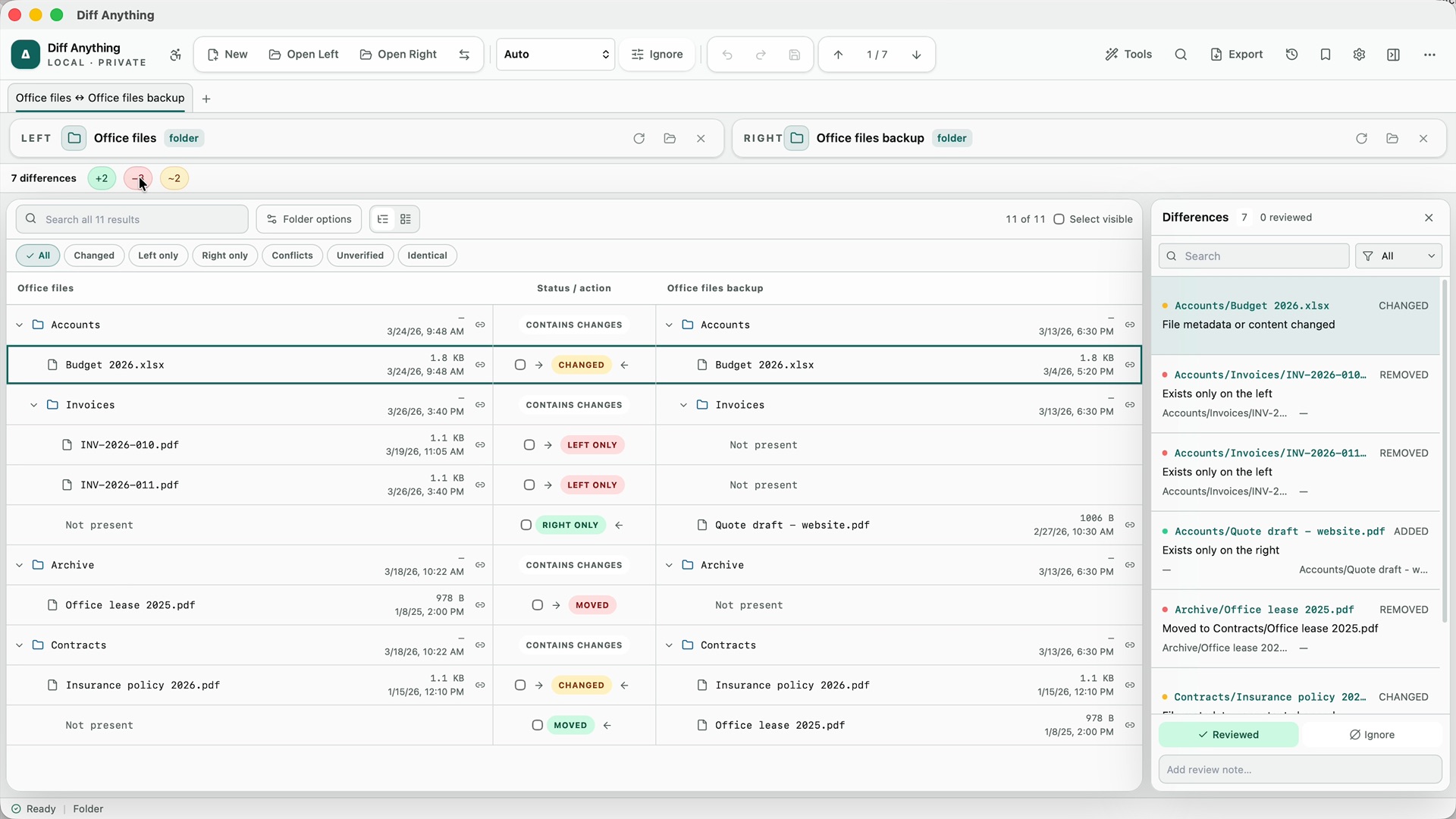
Each folder in the comparison now shows its size on both sides and how many of its files differ, such as “3 of 4 files differ”. In a large project or a photo library, that tells you where to look first.
A new filter lists entries by how they differ: changed content, moved or renamed, or only different permissions. You can also compare any two files you choose, even when their names do not match, and hide rows you have already dealt with until you show them again.
Large folders no longer mean waiting. Diff Anything 1.8 is much faster on large files and folders, and the folder comparison shows results as it finds them.
03 / Update both
Update both folders, with the newer file winning
When both copies have changed, copying one folder over the other loses work. Update both does the careful version: each folder gets the files only the other has, and for each file that changed on both sides, the newer one. Nothing is deleted.
You see a preview first, with what goes to each side. A file whose dates do not say which version is newer is left as it is, for you to decide. After you apply it, one undo puts both folders back.
Update both is part of Pro. On the free plan, the comparison shows the same differences, and the button opens the upgrade offer without changing any files.
04 / File actions
Tidy up both folders from the comparison
With Pro, you can now act on files right where you see the differences. Move a file to the Trash on a Mac or the Recycle Bin on Windows, rename it, or set its date to now or to the other side's date. You can also copy just the selected differences to another folder, keeping their paths. Each action can be undone.
To see the folder comparison step by step, read how to merge two folders on a Mac without losing a file.
05 / And more
Everything else in 1.8
- YAML and XML: applying a change now keeps the rest of the file exactly as you wrote it, with its quotes, comments, and layout.
- Command line on Windows: in the Microsoft Store version, folders can be synchronized from the command line, with a dry run that lists what would change and changes nothing. Synchronizing needs Pro; the dry run is free. The free command-line helper for the Mac App Store version is still at 1.7 and does not include folder sync.
- Accuracy: more accurate comparisons of CSV files and spreadsheets, and many fixes to editing, saving, merging, and accessibility.
See also how to compare two folders on a Mac and how to check that a backup matches the original folder.
The next time two copies of a folder drift apart, you will know exactly what changed.