Capability overview
How can I use folder and archive review in Diff Anything?
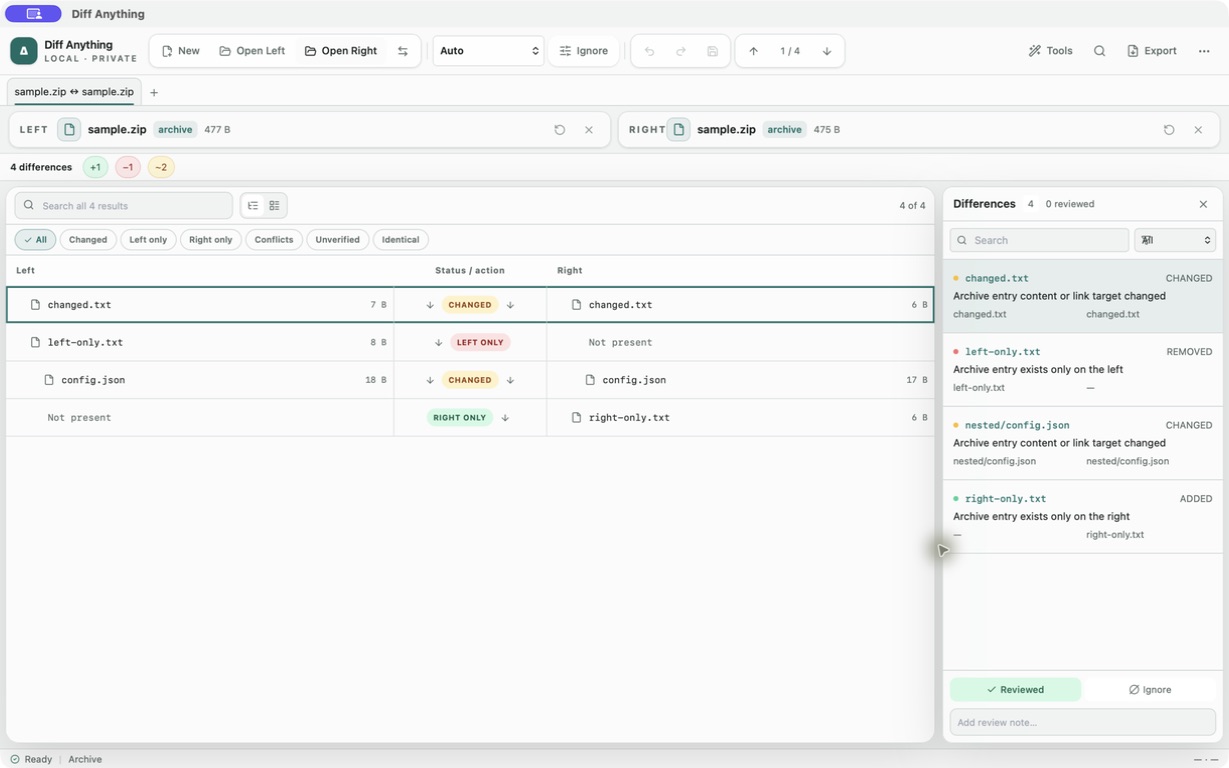
Compare folders in two-pane tree or table layouts with global search, filtering, progressive loading, semantic nested-file comparison, moved-file detection, ignore patterns, and direct opening of nested pairs. Archive mode compares normalized paths, types, sizes, link targets, and streamed SHA-256 hashes across ZIP/ZIP64/ZIPX and ZIP-based packages, 7z, RAR, TAR variants, Gzip, Bzip2, XZ, and Zstandard. It supports encrypted ZIP, 7z, and RAR archives plus multipart numbered 7z and common RAR volume sets, with separate in-memory passwords for each side, cancellation, and expansion safety limits; open changed text entries or extract them explicitly. Pro folder synchronization applies reviewed create, update, delete, and move plans transactionally with stale-result protection, progress, cancellation, metadata preservation, durable recovery, restart-safe rollback, and one-click undo.
Content-signature detection recognizes renamed containers and ZIP or RAR self-extracting archives; container timestamps, member order, compression level, and other packaging metadata do not create false content differences.
Split ZIP, ACE, ARJ, CAB, ISO/disk images, and filesystem images remain in binary mode; explicit archive mode reports that the format is unsupported.
Folder options
Deciding what counts as a folder difference
Folder settings control how much work the comparison does and which files it looks at. The defaults suit most project and release folders: subfolders are included, hidden files and timestamps are ignored, sizes are compared, and small files are checked by content.
Common build and dependency folders are skipped by default, including .git, node_modules, vendor, dist, build, target, DerivedData, Pods, and .venv. Change the list for one comparison in the folder settings, or for every new comparison under Default folder ignores in Settings. Include patterns such as src/** limit the comparison to part of the tree.
- Compare hashes checks every file by content, including large ones.
- Compare small-file content checks files up to the Maximum content size by content.
- Semantic structured files treats JSON, YAML, XML, CSV, and .env files as equal when their data matches, even if their bytes differ.
- Detect moved files pairs a file that disappeared from one path with the same content at another path.
- Case-sensitive paths, Follow symlinks, and Compare link targets control how names and links are treated.
Reading results
Statuses you will see in a folder result
The filter chips split the result into Changed, Left only, Right only, Conflicts, Unverified, and Identical. A conflict is an entry that is a file on one side and a folder or link on the other. Unverified means the selected details match but the content was not read, which happens for large files when Compare hashes is off.
Moved files are labelled Moved to or Moved from with the other path. Open a changed pair to see it in its own tab with the right comparison mode. Right-click a path to show it in Finder or File Explorer.
Synchronization
Applying selected changes to one folder (Pro)
Tick the entries you want, or use Select visible, then choose Mirror left to right or Mirror right to left. The Synchronization preview lists every operation. Update destination only creates, updates, and moves files. Mirror destination also deletes files that no longer exist on the source side, and the delete count is highlighted. You can untick single rows and choose whether to keep Timestamps and Permissions.
A journal and a backup are written before anything is changed. After the run, Recovery history offers Undo for the operation. Copying a single entry to the other side is also part of Pro.
Archives
Archives and ZIP-based packages
Archive mode also reads formats that are ZIP files under another name, such as JAR, APK, IPA, EPUB, VSIX, NuGet packages, Python wheels, and OpenDocument files. Open a changed text entry pair to see its content diff, or extract one entry to a location you choose.
When an archive is encrypted, each side is asked for its own password. Passwords stay in memory for the current pair and are not stored in settings, profiles, history, or reports. On the free plan, folder and archive results show the first 100 items; Pro shows every item.
In the workflow
How to use it
Choose two roots
Open two folders, or two archives, that represent the same thing, such as the last release and the new build.
Set the scope
Adjust ignore and include patterns and decide whether content, hashes, or data meaning should be checked.
Work through the filters
Start with Changed and the one-sided entries, and open individual pairs for their content diff.
Apply or extract
With Pro, apply a reviewed synchronization plan; from an archive, extract the entries you need.
Useful in practice
When to use it
Related manual
Compare ZIP, 7z, RAR, TAR, and compressed archives
Understand content-based archive comparison, encrypted and multipart inputs, supported codecs, streaming behavior, extraction, and safety boundaries in Diff Anything.
Read the guideDirect answers
Questions about folder and archive review.
Why don't I see node_modules or build folders?
They are in the default ignore list. Remove them from the folder settings for this comparison, or from Default folder ignores in Settings.
How does it decide that a file was moved?
A file that exists only on the left and a file that exists only on the right are paired when their size and SHA-256 hash match.
What is the difference between Update destination and Mirror destination?
Update destination adds, updates, and moves files without deleting anything. Mirror destination also removes files from the destination that are missing on the source side.
Does the free plan compare the whole folder?
It compares the whole tree but shows the first 100 items of the result. Pro shows every item and adds copying and synchronization.
Free & Pro: what’s included
Available on the Mac App Store and Microsoft Store. Free desktop use lets you try every comparison engine for files up to 5 MiB per side and 10 new comparison sessions per local day; collection previews show the first 100 items and PDF previews show the first 3 pages. The free CLI supports text and JSON. A one-time Pro purchase removes the preview and session limits and unlocks larger sources within technical limits, saved profiles and history, report export, three-way merge, folder synchronization, batch manifests, trusted preprocessors, and every CLI mode.