Problem solved by Diff Anything macOSWindows

Compare Excel, ODS, Numbers, CSV, and TSV without converting first

Compare stored cell values across different spreadsheet formats locally, including XLSX with ODS or Apple Numbers.

See it in the app

A focused workflow, on your computer.

No accounts, cloud comparison service, analytics, or telemetry.

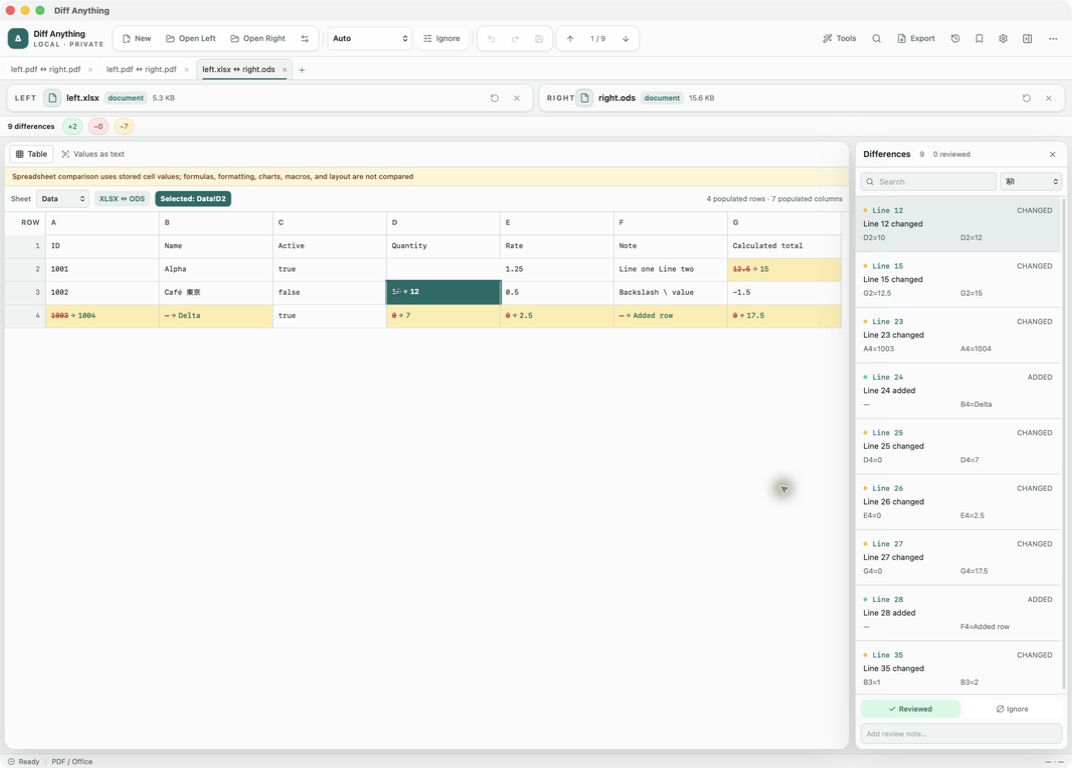
Diff Anything 1.3 comparing an XLSX workbook with an ODS workbook in a sheet-aware grid
Diff AnythingCompare stored values directly across formats; this real XLSX ↔ ODS result keeps changed cells and their coordinates visible.

The problem

Why the usual workflow gets in the way.

A workbook can move between Excel, LibreOffice, Apple Numbers, CSV, and TSV during a handoff or migration. Converting both files to one format adds another transformation and a line diff exposes container noise instead of answering whether the stored data changed.

The solution

How Diff Anything handles it.

Diff Anything normalizes sheets and populated cell coordinates across CSV, TSV, XLS/XLA, XLSX/XLSM/XLAM, XLSB, ODS, and Apple Numbers. The two formats can differ. A sheet-aware grid connects changed cells with the Differences pane while the files remain on the computer.

01 / Cross-format comparison

Use any supported format pair

Compare CSV, TSV, XLS/XLA, XLSX/XLSM/XLAM, XLSB, ODS, and Apple Numbers in any supported pairing. Examples include XLSX against ODS, Numbers against XLSX, or a workbook against a delimited export.

Sheets and cell coordinates provide the shared model, so unrelated workbook container structures do not become the result.

02 / Cross-format comparison

Review stored values in context

Choose a sheet and scan two aligned grids with row numbers and column letters. Selecting a changed cell connects its coordinate to the Differences pane.

Populated rows and columns are virtualized to keep large ranges navigable.

03 / Cross-format comparison

Keep the comparison boundary explicit

Diff Anything compares stored cell values. It does not compare formulas, formatting, charts, macros, or workbook layout.

A clean value comparison is useful evidence for a data handoff, but it does not prove that calculation logic, styling, automation, print setup, or editing behavior survived the format change.
Clear answers

Common questions about compare spreadsheets in different formats.

Can I compare an XLSX file directly with ODS or Apple Numbers?

Yes. Diff Anything supports mixed-format spreadsheet pairs and compares their stored values by sheet and cell coordinate.

Does a clean result mean the workbooks are identical?

No. It means the compared stored cell values are equivalent under this mode. Formulas, formatting, charts, macros, and workbook layout are not compared.

Is spreadsheet comparison private?

Yes. The files are extracted and compared locally; Diff Anything has no account, cloud comparison service, analytics, or telemetry.

Three short steps

Compare the data without inventing a conversion step.

  1. 01

    Open any two supported spreadsheet files.

  2. 02

    Choose a sheet and inspect the aligned values.

  3. 03

    Select changed cells and verify excluded workbook properties separately when they matter.

Available for macOS and Windows

Solve it with Diff Anything.