Direct answer
Does DevDock upload source code while scanning for secrets?
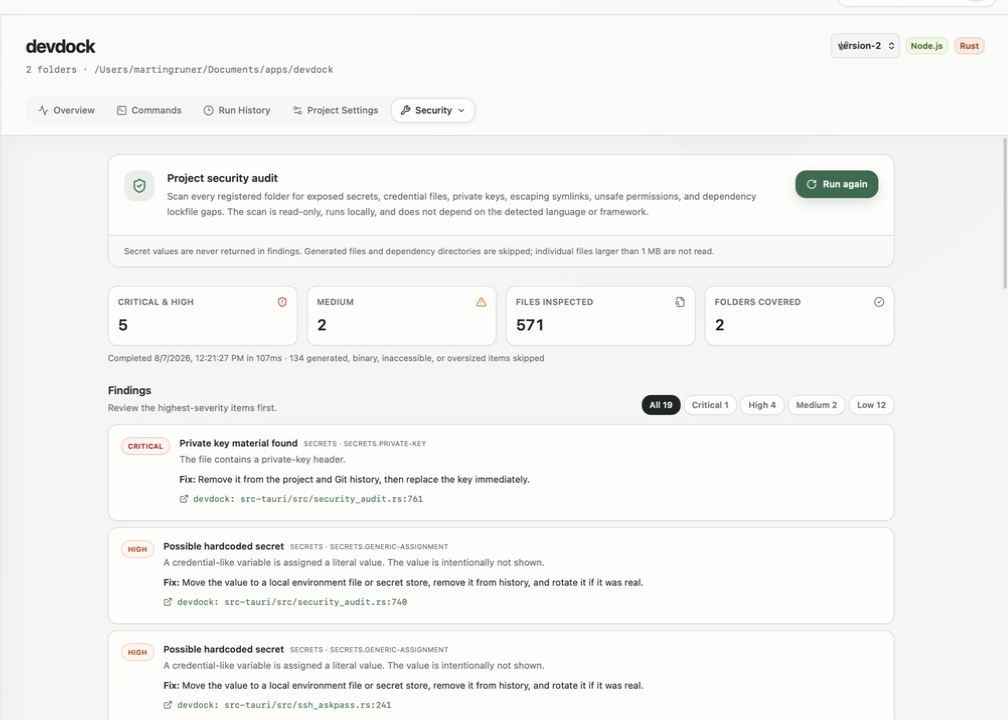
The Security section in DevDock runs a read-only audit of every registered folder on your own computer. It reports AWS access keys, GitHub, GitLab and Slack tokens, Stripe live secret keys, credential-like values assigned in code, private keys, credential files tracked by Git, symbolic links that point outside the project, and dependency manifests without a lockfile. Each finding shows the file, and the line where one applies, but never the matched value. The audit is included in DevDock Free.
What it finds
The rules the audit applies.
The audit reads the text files in each registered folder and applies a fixed set of rules. Every finding has a severity, a category, the rule that matched, a short explanation and a suggested fix.
- Critical: private key blocks (RSA, EC, OpenSSH or DSA), and values in the format of AWS access keys, GitHub tokens, GitLab personal access tokens, Slack tokens or Stripe live secret keys
- High: a password, secret, API key, access token or client secret assigned a literal value of eight or more characters
- High: sensitive files tracked by Git, such as .env files, .npmrc, .pypirc, .netrc, credentials.json, service-account.json, SSH private keys, and .pem, .key, .p12, .pfx, .jks or .keystore files
- Medium: symbolic links that resolve outside the registered folder
- Low: package.json, composer.json, Gemfile, go.mod, pubspec.yaml, mix.exs or Podfile with no lockfile next to it
Fewer false alarms
Placeholders, templates and build output are left out.
The generic secret rule ignores obvious placeholders: values containing words such as example, sample, placeholder or changeme, template syntax like ${ or {{, references such as process.env or getenv, and strings made only of asterisks or x characters. Files whose names include example, sample, template or dist, such as .env.example, are not reported as tracked credential files.
In a Git repository, a credential file that Git does not track, such as a local .env, is not scanned for token and secret patterns, because keeping local secrets there is the intended setup. Private key blocks are reported wherever they appear.
Dependency and build folders are skipped, including node_modules, vendor, target, dist, build, .next, .venv, Pods, .gradle and coverage. Binary files and files larger than 1 MB are not read.
Reviewing results
Findings point to the line without showing the secret.
Run audit starts the scan and Stop scan cancels it. The summary shows Critical & high and Medium counts, Files inspected and Folders covered, and the list can be filtered by severity. Each finding shows the folder label, the relative path and, where it applies, the line number, and clicking it opens the file at that line in Visual Studio Code. The matched value is never part of the result.
Below the findings, DevDock lists the package-manager audit commands it detected, such as Audit dependencies for Node projects and Audit Composer dependencies for PHP. Those check current vulnerability advisories, which the local rules do not cover.
Scope and limits
A baseline check that runs on your machine.
The scan only reads files. It does not change, move or upload anything, and it covers every registered folder of the project whatever the language.
It checks the files currently on disk, not earlier commits. One run stops after 25,000 files, 500 findings or 30 seconds and tells you when a limit was reached, so you can fix what it found and scan again. A clear result means none of these rules matched; it is not proof that the project has no vulnerabilities.
Best for
Where this workflow fits.
- A quick check for committed keys and tokens before a release, handoff or making a repository public
- Finding .env files, certificates and key stores that were committed to Git by mistake
- Projects in any language, including folders where no stack was detected
- Scanning all folders of a multi-folder project in one run (multi-folder projects need DevDock Pro)
Local project data, operating-system secret storage, read-only local audits, and no source upload.
Relevant capabilities
What DevDock brings to the job.
Practical workflow
From setup to a reviewed result.
Open Security
Pick the project and choose Security from the Tools menu.
Run the audit
Choose Run audit. It scans every registered folder of the project.
Fix the most serious findings first
Filter by severity, open each file at the reported line and follow the suggested fix, such as revoking and replacing a leaked key.
Scan again and check dependencies
Choose Run again after fixing, then run the package-manager audit commands listed below the findings.
Useful in practice
Direct answers
Questions about source-code secret scanner.
Does DevDock upload source code while scanning for secrets?
The Security section in DevDock runs a read-only audit of every registered folder on your own computer. It reports AWS access keys, GitHub, GitLab and Slack tokens, Stripe live secret keys, credential-like values assigned in code, private keys, credential files tracked by Git, symbolic links that point outside the project, and dependency manifests without a lockfile. Each finding shows the file, and the line where one applies, but never the matched value. The audit is included in DevDock Free.
Does the scanner look through Git history?
No. It reads the current files in each registered folder and uses Git only to check whether a sensitive file is tracked. If a secret was committed earlier, revoke it and clean the history with your Git tools.
Will it report my local .env file?
In a Git repository, only if Git tracks it: an untracked .env file is not scanned for credential patterns, and files such as .env.example are treated as templates. Outside a Git repository, a .env file is scanned like any other text file.
Which token formats does it recognize?
AWS access keys, GitHub tokens, GitLab personal access tokens, Slack tokens, Stripe live secret keys and private key blocks. A separate rule catches credential-like variables that are assigned a literal value.
Is the security audit part of the free version?
Yes. The audit is included in DevDock Free for every project you register.
Go deeper
Run DevDock's read-only local security audit, understand each finding, complement it with ecosystem advisory scanners, and respond without exposing secrets.
Read Local project security audits and dependency checksFree & Pro: what’s included
Available on the Microsoft Store. Free for up to three local projects with core commands, Git, Docker, project health checks, and security-audit tools. A one-time Pro purchase unlocks unlimited and multi-folder projects, custom workflows, full history and insights, database tools, SSH transfers, and configuration backup and restore.