The job to be done
Catch leaked keys and unlocked dependencies before you ship
An old API key in a config file, a committed .env or a private key in a test folder does the most damage right before a release, when the code is about to be pushed, packaged or published. Dependency advisories also change between releases, so last month's clean audit says little about today.
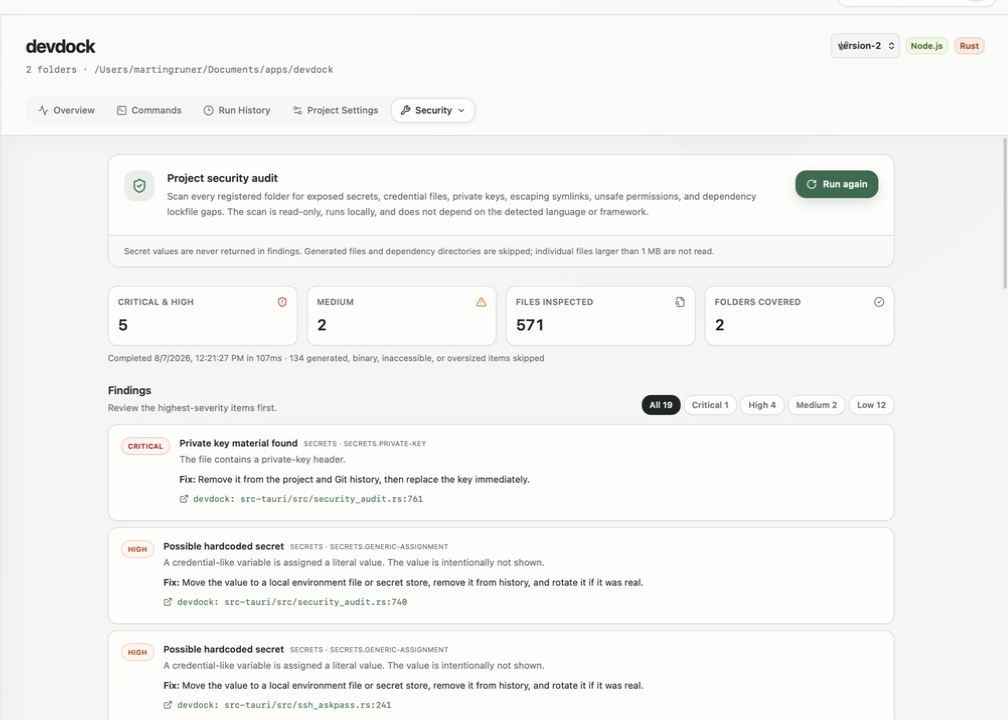
DevDock's Security section runs a read-only local scan across every folder in the project and groups the findings by severity with the file, line and a suggested fix. The matched secret is never displayed. Beside it, the Dependency advisory scanners panel lists the audit commands DevDock detected for your package managers.
The baseline audit and the detected advisory commands are part of DevDock Free, so the check fits into every release routine.
Recommended path
A release-day security pass
Run it on the branch you are about to release, after the last code change.
Run the baseline audit
Open Security from the project's Tools menu and choose Run audit. Check that Folders covered matches the folders you plan to ship.
Fix critical and high findings first
Filter by severity and open each finding in Visual Studio Code at the reported line. Rotate a real credential with its provider before you remove it from the code.
Check dependencies
Run the commands listed under Dependency advisory scanners, such as the npm or Composer audit, or use Audit all dependencies on Today to cover every project.
Scan again
Choose Run again until the Security section shows Baseline scan is clear, or only findings you have reviewed remain.
Push the release branch
Commit the fixes and push. DevDock checks the remote again just before sending and offers to pull first if the remote has new commits.
Capabilities involved
Moving from a finding to a fix
Limits to know
What the audit covers
The baseline scan checks files against fixed rules and has no vulnerability database. Current advisories come from the package-manager audit commands, which contact their registries.
The scan skips version-control data, dependency folders and build output such as dist and build, and it does not read files larger than 1 MB. Check packaged release files separately.
A scan stops after 25,000 files or 500 findings and reports that the limit was reached. Fix what it found and run it again to see the rest.
A clear result means the baseline rules found nothing in the files that were scanned. It is not a penetration test, and DevDock does not rotate or revoke credentials for you.
Related manual
Local project security audits and dependency checks
Run DevDock's read-only local security audit, understand each finding, complement it with ecosystem advisory scanners, and respond without exposing secrets.
Its sections cover run the universal local audit, know what the baseline checks, understand the privacy boundary, read the audit limits correctly, respond to secret findings, fix filesystem and dependency findings, run dependency advisory scanners. Use it when you are ready to reproduce this workflow with your own project data.
Read the guideDirect answers
Questions about this use case.
Which secrets does the audit recognize?
Private keys, AWS access keys, GitHub and GitLab tokens, Slack tokens and Stripe live secret keys. It also flags literal values assigned to names such as password, api_key or client_secret, and sensitive files that Git tracks.
Is my local .env file reported?
Not when it is in a Git repository and Git does not track it. A tracked .env is reported as a sensitive file tracked by Git, and in a folder without Git, a .env file is scanned like any other file.
Does the report show the leaked value?
No. Each finding shows the rule, file, line and suggested fix, but never the matched text.
What if DevDock detects no advisory scanner for my stack?
The panel shows No ecosystem advisory command detected. A command whose name contains audit, from a repository's .devdock/technology.json or a Pro custom command, is then listed there.
Free & Pro: what’s included
Available on the Microsoft Store. Free for up to three local projects with core commands, Git, Docker, project health checks, and security-audit tools. A one-time Pro purchase unlocks unlimited and multi-folder projects, custom workflows, full history and insights, database tools, SSH transfers, and configuration backup and restore.