Capability overview
How can I use project shortcuts in DevDock?
Open a registered folder in a terminal, Visual Studio Code, or File Explorer from the same workspace.
Shortcuts provide a direct route into a terminal, Visual Studio Code, or File Explorer while repeated operations remain available as explicit, reviewable commands.
Folder identity stays visible when a product includes several repositories with similar task names.
Open targets
Three ways into a registered folder
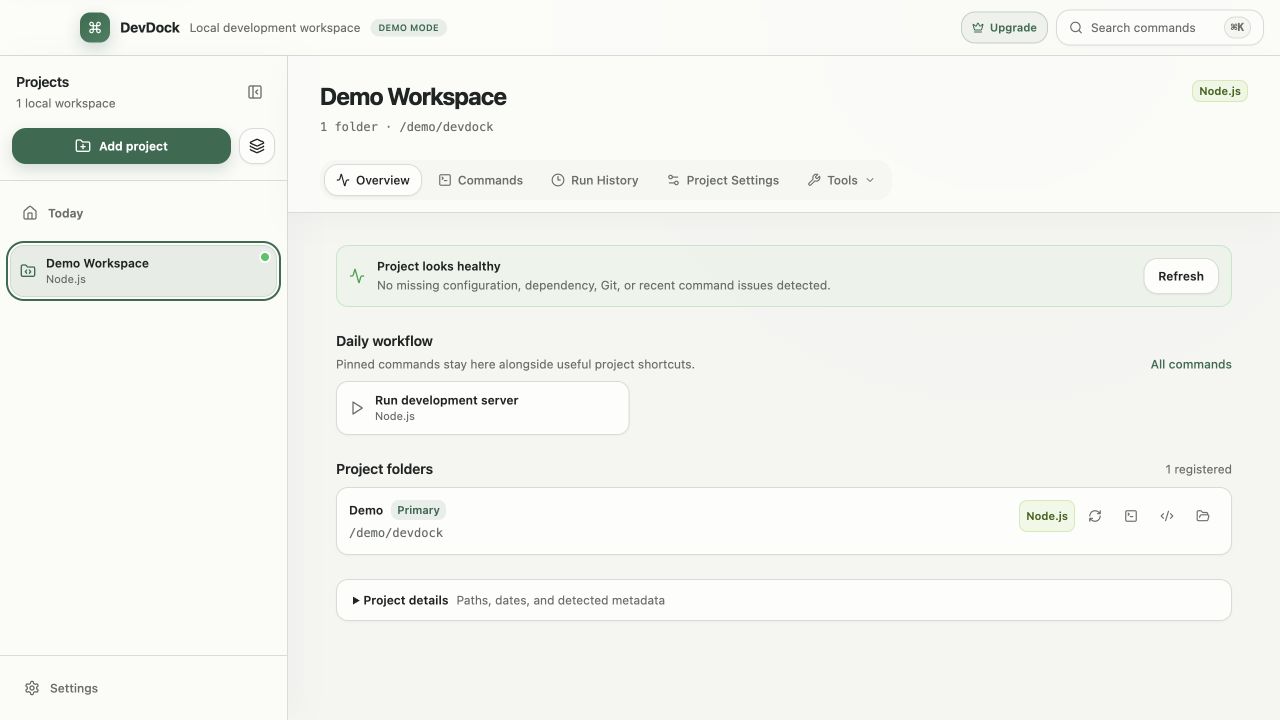
Every registered folder has buttons to open it in a terminal, in Visual Studio Code, or in File Explorer. The terminal opens in Windows Terminal when it is installed, and in Command Prompt otherwise, already in that folder. Visual Studio Code opens with the folder as its root, and File Explorer opens the folder itself.
The buttons sit next to each folder under Project folders on the Overview and in Project Settings, together with Rescan for that folder. In a project with several folders, each folder has its own set, labeled with the folder's name.
From the keyboard
Open folders from the command palette
The command palette opens with Ctrl+K by default; you can change the key in Application Settings under Command palette shortcut. It has an entry for every folder and target, such as "Open Shop API in Visual Studio Code". Type part of the project name, folder label or path and press Enter.
The same palette opens project sections and starts commands, so you can jump into the code and back to the commands without leaving the keyboard. Entries you opened recently are listed under Recent, so the folder you open every morning is near the top.
From results
Go from a result straight to the file
When command output mentions a source file with a line number, such as a failing test or a compiler error, the output panel lists it under Referenced files. Selecting a reference opens the file in Visual Studio Code at that line. References are recognized for common source and configuration files, including TypeScript, JavaScript, PHP, Python, Rust, Go, Java, Kotlin, Ruby, JSON and YAML, with Windows drive-letter paths and paths relative to the command's working directory.
Security audit findings open the same way, at the line where the finding was reported. The Edit .env action on an environment warning opens the project's .env file in the editor.
Requirements
What the shortcuts need
Visual Studio Code shortcuts use a standard Visual Studio Code installation or the code command on your PATH. Terminal and File Explorer shortcuts work on any Windows installation. The shortcuts are included in DevDock Free.
A shortcut opens the program and leaves it to you. DevDock does not record what you run in that terminal, so commands you want in Run History, with their output and exit code, should be started from Commands. If a shortcut cannot open, the folder row shows Failed next to its buttons.
In the workflow
How to use it
Find the folder
Open the project's Overview and locate the folder under Project folders.
Pick the target
Choose the terminal, Visual Studio Code or File Explorer button next to the folder.
Use the palette for speed
Press Ctrl+K, type the folder or project name, and choose the target you want.
Jump from output
When a run reports a file and line, open it from Referenced files to go straight to the problem.
Useful in practice
When to use it
Related manual
Organize multi-folder and multi-repository projects
With Pro, represent a complete product without forcing its API, web client, mobile app, and infrastructure into one repository.
Read the guideDirect answers
Questions about project shortcuts.
Which terminal does DevDock open on Windows?
Windows Terminal when it is installed, otherwise Command Prompt. The terminal starts in the selected folder.
Can I open a file at a specific line?
Yes. File references in command output and security audit findings open in Visual Studio Code at the reported line.
Does DevDock record commands I type in the opened terminal?
No. Only commands started from DevDock appear in Run History.
Are project shortcuts included in DevDock Free?
Yes. Terminal, Visual Studio Code and File Explorer shortcuts are available in Free and Pro.
Free & Pro: what’s included
Available on the Microsoft Store. Free for up to three local projects with core commands, Git, Docker, project health checks, and security-audit tools. A one-time Pro purchase unlocks unlimited and multi-folder projects, custom workflows, full history and insights, database tools, SSH transfers, and configuration backup and restore.