Capability overview
How can I use document and binary inspection in Diff Anything?
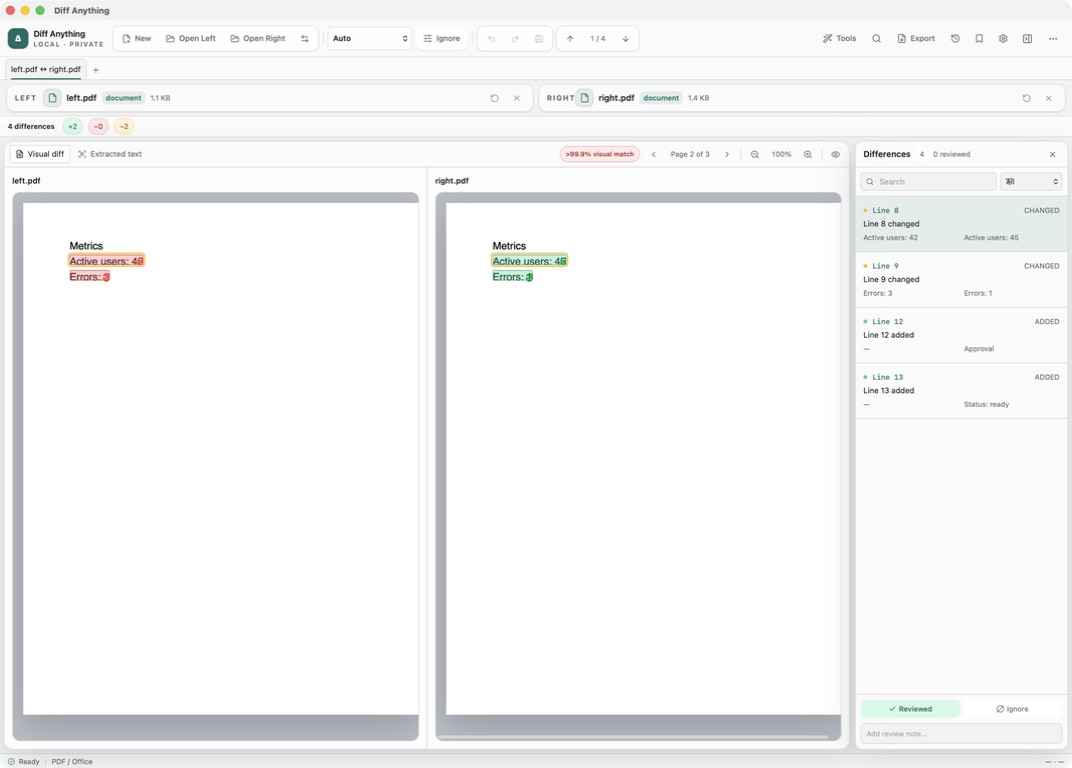
Compare PDF pages visually or by extracted text, extract comparable text from Word (DOCX, DOCM, DOTX, DOTM), PowerPoint (PPTX and related formats), OpenDocument text and presentations (ODT, ODP), and RTF, or inspect binary format, size, image dimensions, colour-profile label, SHA-256 hash, and supported image previews. Presentation differences are named by slide; other document differences are listed by line, with the changed words marked.
Spot meaningful code changes with Smart Diff across 117 editor languages. Switch to Line Diff whenever you want an exact line-by-line review. Both views keep syntax highlighting and editing close at hand.
Word, PowerPoint, RTF
What is read from Office and RTF files
For a Word document (DOCX, DOCM, DOTX, DOTM), Diff Anything reads the body text along with the headers, footers, footnotes, and endnotes. For a PowerPoint deck (PPTX, PPTM, POTX, POTM, PPSX, PPSM), it reads the text of each slide in slide order. OpenDocument text and presentation files (ODT, OTT, ODP, OTP) are read the same way, and for an RTF file the formatting codes are removed and the text kept. The two sides are then compared in the PDF / Office mode.
That answers questions like which clause changed in a contract, or which slide got a new number: each changed line is listed with the words that changed, and presentation changes are named by slide. Fonts, colours, images, and layout are not part of the comparison, and a notice above the result says so. Older .doc and .ppt files are not read as documents, so save them in the newer format first.
Reading the result
Working with extracted text
The Extracted text view shows both documents as plain text side by side, with each change listed in the Differences pane. The Ignore menu options apply, which helps when two exports break lines in different places. Mark changes Reviewed and add notes as you go, so the review of a long document can be picked up later in the same session. For RTF files only the text is kept, so a change of font or colour on its own produces no difference.
Workbooks opened in the same mode get an extra Table view that shows the cells in a grid.
Binary files
Checking whether two files are the same byte for byte
Binary / Image mode handles installers, libraries, archives you do not want to open, and any other non-text file. Files such as .exe, .dll, .dylib, .dmg, and common images open in it automatically. For each side it shows the detected format, the size in bytes, and the SHA-256 hash. When size and hash match, the two files are identical. When they differ, the changed fields are listed as differences. That makes it a quick check that a downloaded installer is the same file you built.
This mode tells you whether files differ, not where inside them. For a container, switch to Archive mode to see which entries changed; for a document, use PDF / Office mode. Supported images get a preview and image dimensions in the same mode, and PNG, JPEG, GIF, WebP, and BMP files also get a pixel comparison.
Free and Pro
Limits on the free plan
PDF / Office and Binary / Image are Preview modes on the free plan. They show their complete result for files up to 5 MB per side, and PDFs show the first 3 pages in Visual diff. Pro removes those limits, which matters for most build artifacts, and adds reports and the document and binary command-line modes. From the command line, document mode compares extracted text.
In the workflow
How to use it
Open the two files
Choose two documents, two builds, or two exports of the same file.
Check the mode
Documents open in PDF / Office and other non-text files in Binary / Image. Switch mode if Auto picked another one.
Read the result
Step through the wording changes, or compare the size and SHA-256 rows for binaries.
Keep a record
Mark items Reviewed and add notes, then export a report with Pro.
Useful in practice
When to use it
Related manual
Compare folders, spreadsheets, documents, and images
Review cross-format spreadsheet values, release trees, documents, and visual assets with purpose-built navigation, safety checks, and rollback.
Read the guideDirect answers
Questions about document and binary inspection.
Are Word headers and footers compared?
Yes. The body, headers, footers, footnotes, and endnotes of a Word file are all part of the extracted text.
Can I compare old .doc or .ppt files?
Not as documents. Save them as .docx or .pptx first, then compare the new files.
How do I confirm that two installers are exactly the same?
Open both in Binary / Image mode. If the size and SHA-256 hash match, every byte is the same.
What happens with an .odt file?
It opens in PDF / Office mode, and its wording is compared like a Word document's.
Free & Pro: what’s included
Available on the Mac App Store and Microsoft Store. Free desktop use lets you try every comparison engine for files up to 5 MiB per side and 10 new comparison sessions per local day; collection previews show the first 100 items and PDF previews show the first 3 pages. The free CLI supports text and JSON. A one-time Pro purchase removes the preview and session limits and unlocks larger sources within technical limits, saved profiles and history, report export, three-way merge, folder synchronization, batch manifests, trusted preprocessors, and every CLI mode.