The job to be done
Treat the previous release as a baseline, not a memory.
A release candidate can contain the expected application changes and still pick up an unintended configuration file, a missing asset, an old binary, a renamed bundle, or output left behind by the build environment. Comparing source commits alone does not show the exact folder or archive that will be distributed.
Diff Anything compares the last trusted artifact with the candidate itself. Folder mode inventories both trees; archive mode compares supported containers by normalized path and content instead of treating the package as one opaque binary. The result stays local on the Mac or Windows PC performing the review.
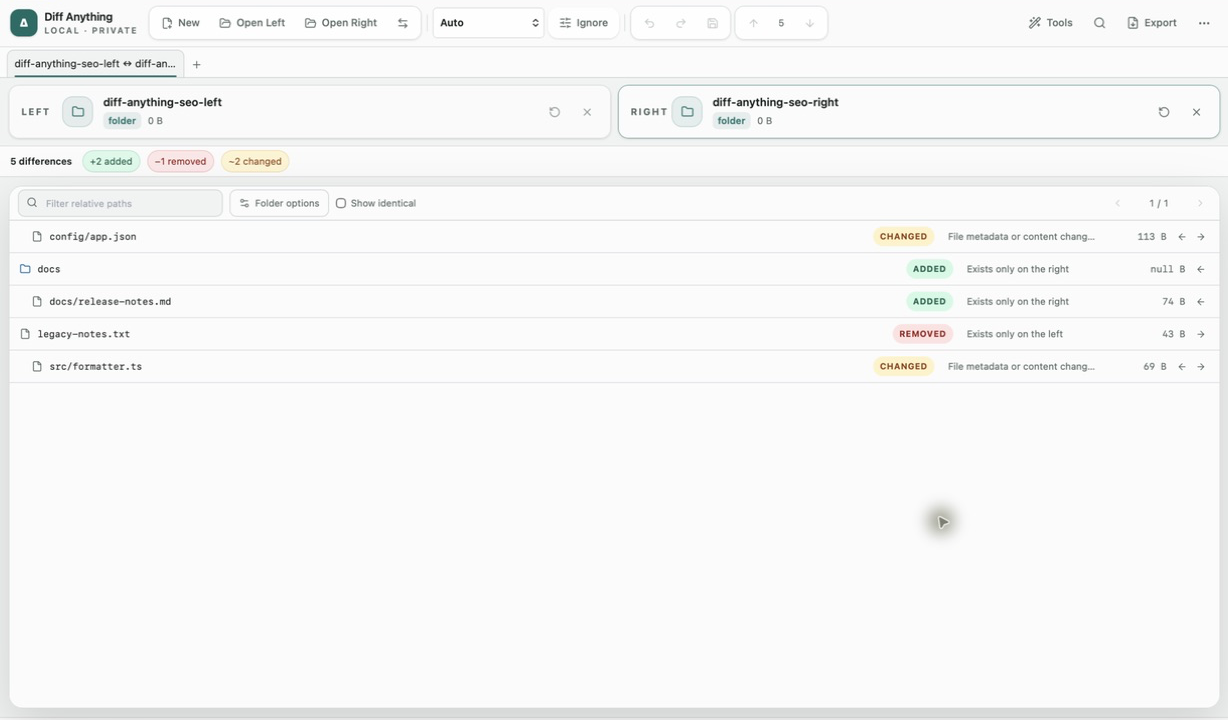
Recommended path
Review the artifact from the outside in.
Keep the previous shipped output unchanged on the left and place the candidate on the right. Then narrow the result before opening individual files.
Choose equivalent release outputs
Compare two release folders, or two supported archives that represent the same product and packaging target. Confirm which side is the trusted baseline before using any copy or synchronization action.
Remove known build noise
Use folder ignore patterns and visibility controls for caches or generated paths that are deliberately outside the review. Keep unexpected additions and removals visible instead of hiding them with a broad rule.
Triage the tree
Filter added, removed, changed, unchanged, and moved paths. Search for a specific bundle, manifest, configuration file, library, or asset when the release tree is large.
Open the changes that carry meaning
Open supported nested file pairs in their focused comparison view. Review structured files by parsed paths, images by pixels, documents by their supported visual or extracted-text evidence, and binaries by identity and metadata.
Treat synchronization as a separate decision
If the candidate folder must be corrected, Pro can preview selected create, update, delete, and move operations before applying them. Stale-result checks, recovery journals, rollback, and undo protect the operation; they do not replace a final build or release check.
Capabilities involved
Inspect the candidate at three levels.
Limits to know
Know what this review proves—and what it does not.
The comparison proves which supported paths and contents differ between the two selected artifacts. It does not prove that either artifact came from the intended commit or build pipeline.
Archive comparison ignores packaging noise such as member order, timestamps, and compression level when content is unchanged. Unsupported containers remain available only as binary comparisons.
A clean comparison does not run tests, validate code signing or notarization, scan for malware, or certify that the release is safe to publish. Keep those checks in the release pipeline that owns them.
Related manual
Compare folders, spreadsheets, documents, and images
Review cross-format spreadsheet values, release trees, documents, and visual assets with purpose-built navigation, safety checks, and rollback.
Its sections cover prepare folder sources, compare large trees, synchronize with a plan and an undo path, compare spreadsheets and documents, use visual image tools. Use it when you are ready to reproduce this workflow with your own project data.
Read the guideDirect answers
Questions about this use case.
What should I use as the release baseline?
Use the exact folder or supported archive from the last trusted release for the same product and target. A source checkout or differently packaged build can introduce unrelated differences and weaken the review.
Can Diff Anything look inside a release archive?
Yes, for the documented ZIP, ZIP64, ZIPX, 7z, RAR, TAR, and compressed-stream families. Archive mode compares normalized paths, entry types, sizes, link targets, and streamed content hashes while ignoring container timestamps, member order, and compression-level noise.
Does an identical result mean the candidate is ready to ship?
It means the selected artifacts produced no detected differences under the chosen mode and rules. It does not run tests, verify provenance, validate signing or notarization, scan for malware, or approve the release.
Free & Pro: what’s included
Available on the Mac App Store and Microsoft Store. Free desktop use lets you try every comparison engine for files up to 5 MiB per side and 10 new comparison sessions per local day; collection previews show the first 100 items and PDF previews show the first 3 pages. The free CLI supports text and JSON. A one-time Pro purchase removes the preview and session limits and unlocks larger sources within technical limits, saved profiles and history, report export, three-way merge, folder synchronization, batch manifests, trusted preprocessors, and every CLI mode.