Capability overview
How can I use visual image comparison in Diff Anything?
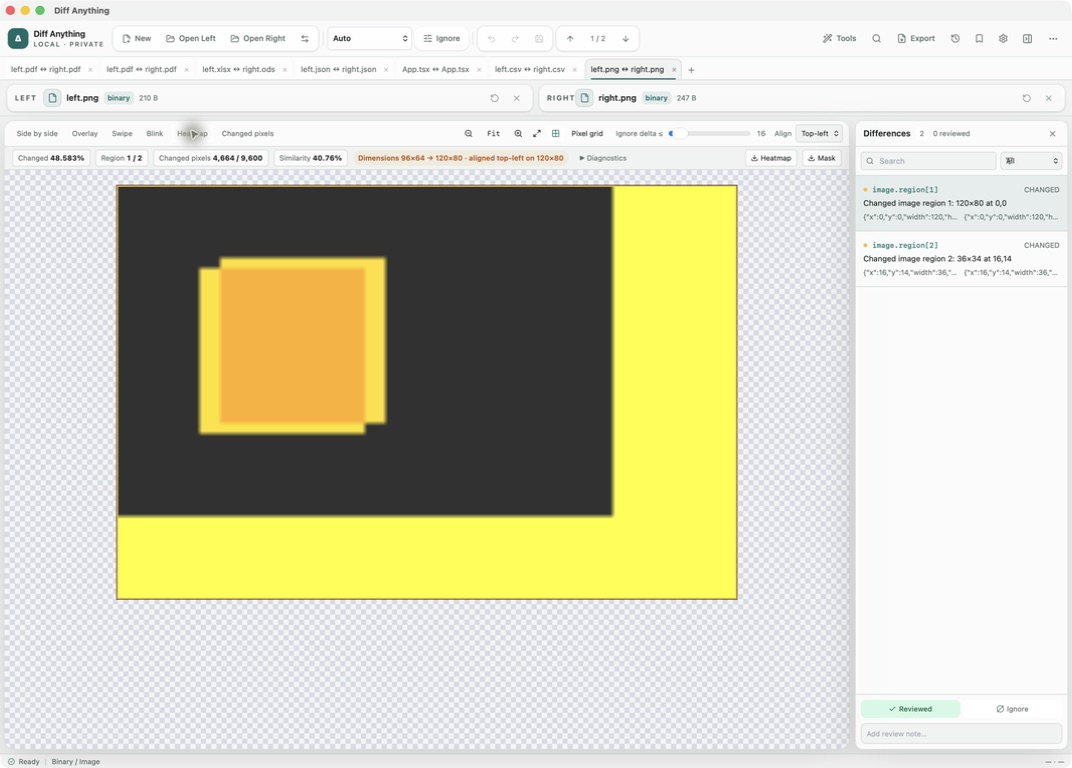
Inspect images with thresholds, overlay, swipe, blink, heatmap, changed-pixel masks, true-pixel zoom, dimension alignment, and detailed error metrics.
Spot meaningful code changes with Smart Diff across 117 editor languages. Switch to Line Diff whenever you want an exact line-by-line review. Both views keep syntax highlighting and editing close at hand.
Views
Choosing a view for the kind of change you are looking for
Different changes are easier to spot in different views. Switch between them from the image toolbar without reloading the files:
Every view except Side by side needs two images that can be decoded. If one side cannot be read as an image, the app says so and keeps the file details visible.
- Side by side keeps both images whole for context.
- Overlay places the right image over the left, with a Right opacity slider, which shows small shifts in position.
- Swipe reveals the right image across the left with a Reveal right slider, useful for checking where an edge or colour changes.
- Blink alternates the two images. It pauses when the system asks for reduced motion.
- Heatmap colours each pixel by how much it changed.
- Changed pixels shows only the pixels above the threshold, as a mask.
Threshold and alignment
Separating real changes from compression noise
Re-saving a JPEG or exporting from a different tool changes many pixels by one or two colour levels. The Ignore delta ≤ slider, from 0 to 255, ignores per-channel changes at or below the chosen value, so those tiny shifts drop out and the real edit remains.
When the images have different sizes, choose Align Top-left or Center. Both images are placed on a shared canvas, the area that exists on only one side counts as changed, and a badge shows the two sizes and the canvas used. Transparency is taken into account: two fully transparent pixels are equal even if their hidden colour values differ. Photo orientation from the camera is applied before comparing.
The threshold and alignment are saved with a Pro profile, so a screenshot check you repeat for every release uses the same settings each time.
Measurements
Numbers and files you can take away
The toolbar shows the changed share of the image, changed pixels out of the total, and similarity. Diagnostics adds mean error, RMS error, the largest single-channel change, and the bounds of the changed area.
Changed pixels are grouped into regions. Each region is listed in the Differences pane with its size and position, and F7 and F8 move between them while a box marks the current one. Mark regions Reviewed or add notes like any other difference. The Heatmap and Mask buttons save those views as PNG files. Zoom goes from 25% to 800%, Pixel grid keeps pixels sharp at high zoom, and the checkerboard button shows where an image is transparent.
Formats and limits
Which images get a pixel comparison
PNG, JPEG, GIF, WebP, and BMP files are compared pixel by pixel, up to 16 megapixels and 16,384 pixels on a side. For an animated file, only the first frame is compared pixel by pixel, and when the first frames match but the files differ, one difference says the animations differ after the first frame. HEIC photos and other formats without a pixel decoder get a file-level check of size, type, and hash instead. SVG files open in XML mode, which compares their markup.
Images open in Binary / Image mode. The free plan shows the complete result for files up to 5 MB per side, within 10 new comparison sessions per day; Pro removes those limits.
In the workflow
How to use it
Open both images
Choose the approved screenshot or asset and the new export. They open in Binary / Image mode.
Find the change
Start with Heatmap to see where pixels changed, then use Swipe or Overlay to see how.
Remove noise
Raise Ignore delta ≤ until compression artefacts disappear, and set Align if the sizes differ.
Review each region
Step through the regions, mark them Reviewed, and save the heatmap or mask if someone else needs to see it.
Useful in practice
When to use it
Related manual
Compare folders, spreadsheets, documents, and images
Review cross-format spreadsheet values, release trees, documents, and visual assets with purpose-built navigation, safety checks, and rollback.
Read the guideDirect answers
Questions about visual image comparison.
How do I stop JPEG compression from showing as a change?
Raise the Ignore delta ≤ slider. Per-channel changes at or below that value are ignored.
What happens when the two images have different dimensions?
Both are placed on one canvas, aligned top-left or centred. The area that exists on only one side counts as changed.
Can I save the heatmap as an image?
Yes. The Heatmap and Mask buttons save the current heatmap and changed-pixel mask as PNG files.
Can I compare SVG files visually?
SVG files open in XML mode and are compared as markup. Export both to PNG to compare how they look.
Free & Pro: what’s included
Available on the Mac App Store and Microsoft Store. Free desktop use lets you try every comparison engine for files up to 5 MiB per side and 10 new comparison sessions per local day; collection previews show the first 100 items and PDF previews show the first 3 pages. The free CLI supports text and JSON. A one-time Pro purchase removes the preview and session limits and unlocks larger sources within technical limits, saved profiles and history, report export, three-way merge, folder synchronization, batch manifests, trusted preprocessors, and every CLI mode.