Direct answer
What do Base, Ours, and Theirs mean in a three-way merge?
In a three-way merge, Base is the common starting version, Ours is one changed version, and Theirs is the other changed version. Comparing each changed source with Base reveals which edits were made independently and which overlap. In Diff Anything Pro's three-way merge, the current left text source is Ours, the current right text source is Theirs, and you select Base explicitly.
color: bluecolor: greencolor: red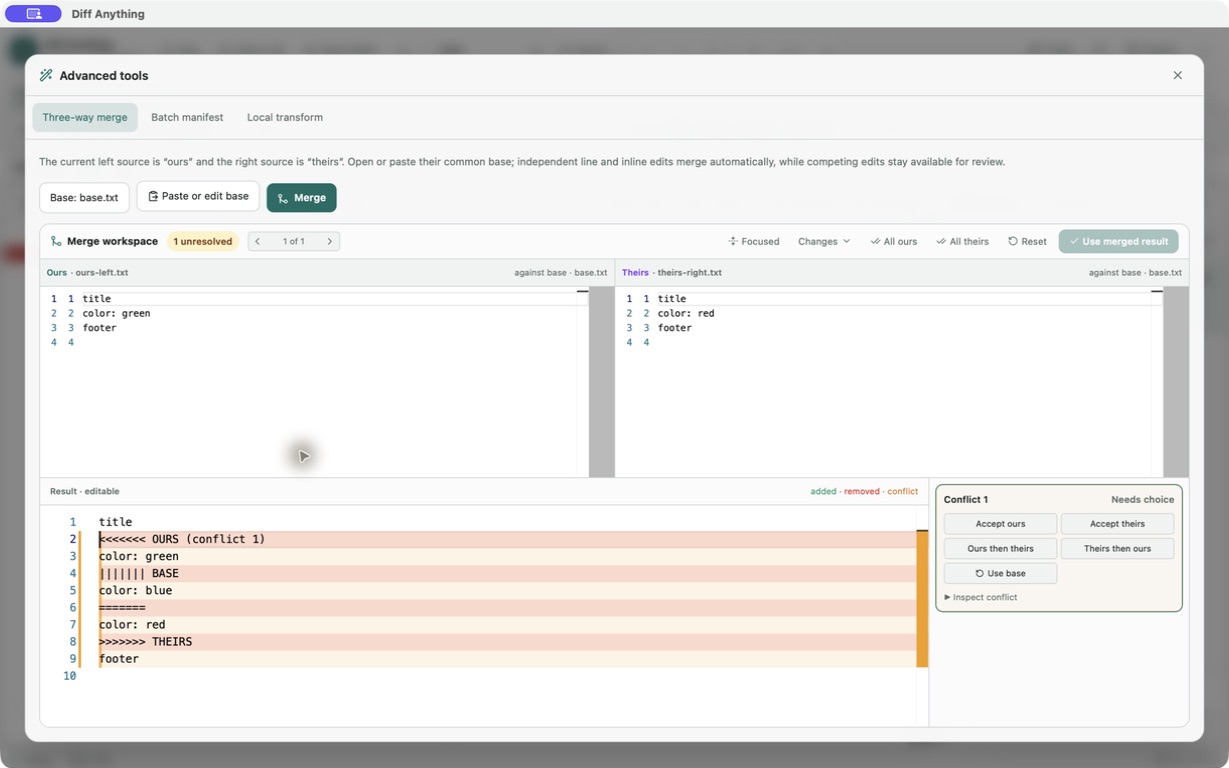
The common ancestor
Base turns disagreement into change history.
Without Base, a tool can show only that Ours and Theirs differ. With the true common starting version, it can see whether a line changed on one side, both sides, or neither side.
Base is not automatically the older-looking file, the left file, or the version you prefer. It must be the source both edited versions actually descended from.
In Diff Anything
The labels follow source position, not Git branch state.
The current left source is Ours and the current right source is Theirs. You select Base in Tools → Three-way merge. The app does not inspect Git history or infer branch roles.
This explicit setup makes the workspace useful for any related text files, but it also means you should verify the three roles before accepting a conflict choice.
Best for
Where this workflow fits.
- Understanding why a merge needs three files
- Avoiding reversed Ours and Theirs choices
- Choosing the correct common ancestor before resolving conflicts
No accounts, cloud comparison service, analytics, or telemetry.
Relevant capabilities
What Diff Anything brings to the job.
Practical workflow
From setup to a reviewed result.
Identify Base
Find the unchanged common ancestor from which both edited versions began.
Assign Ours
In Diff Anything, open the version you want treated as Ours on the left.
Assign Theirs
Open the other changed version on the right so it becomes Theirs.
Review the result
Independent changes combine; overlapping line regions remain explicit conflicts for you to resolve.
Useful in practice
Direct answers
Questions about Base Ours Theirs.
What do Base, Ours, and Theirs mean in a three-way merge?
In a three-way merge, Base is the common starting version, Ours is one changed version, and Theirs is the other changed version. Comparing each changed source with Base reveals which edits were made independently and which overlap. In Diff Anything Pro's three-way merge, the current left text source is Ours, the current right text source is Theirs, and you select Base explicitly.
Is Ours always the current Git branch?
Not in the standalone Diff Anything workspace. Ours is the current left text source and Theirs is the current right text source. The app does not infer Git branch state.
Can Base be the same as Ours or Theirs?
Yes. If Ours is unchanged from Base, the clean result is Theirs; if Theirs is unchanged from Base, the clean result is Ours.
What happens when Ours and Theirs make the same edit?
If both changed versions produce the same content for an overlapping region, that content is used without creating a conflict.
Go deeper
Choose sources, understand automatic detection, and select the engine that answers the question you are actually asking.
Read Choose the right comparison modeFree & Pro: what’s included
Available on the Mac App Store and Microsoft Store. Free desktop use lets you try every comparison engine for files up to 5 MiB per side and 10 new comparison sessions per local day; collection previews show the first 100 items and PDF previews show the first 3 pages. The free CLI supports text and JSON. A one-time Pro purchase removes the preview and session limits and unlocks larger sources within technical limits, saved profiles and history, report export, three-way merge, folder synchronization, batch manifests, trusted preprocessors, and every CLI mode.