Direct answer
How does the Diff Anything three-way merge tool work?
Diff Anything Pro provides a local, line-based three-way merge workspace for text sources on macOS and Windows, which also combines edits to separate words of the same line. The current left source becomes Ours, the right source becomes Theirs, and you select their common Base. Focused diff views show each side against Base. Independent changes combine automatically; competing edits offer Ours, Theirs, Ours then Theirs, Theirs then Ours, and Base choices.
color: bluecolor: greencolor: red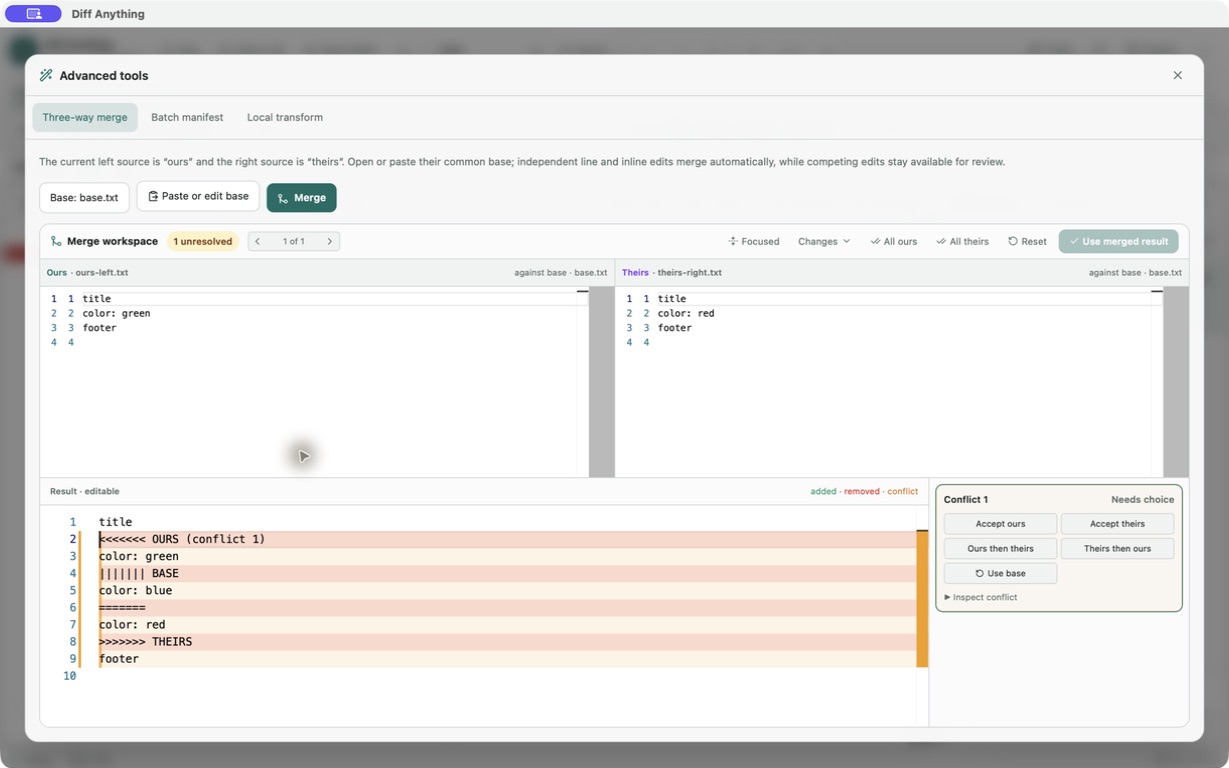
Why three sources
A two-way diff shows disagreement. A three-way diff explains where it came from.
A two-way diff can show that two files disagree, but it cannot reliably tell which side changed a line. Three-way merge adds the shared Base, so each side can be compared with the version it started from.
That extra source lets Diff Anything combine independent line changes automatically and reserve explicit conflicts for overlapping edits that need a decision.
Base, Ours, Theirs
Know which source is which before merging.
Base is the common starting text. Ours is the current left source. Theirs is the current right source. These labels describe the three inputs to this standalone workspace; Diff Anything does not infer a Git branch or choose the common ancestor for you.
Selecting the wrong Base can turn independent changes into misleading conflicts or hide the history needed to understand an edit. Confirm the source roles before running the merge.
Conflict resolution
Overlapping edits stay explicit until you resolve them.
When both sides change the same line region differently, Diff Anything creates a structured conflict and shows the relevant Ours, Base, and Theirs content. You can accept Ours, accept Theirs, combine both with Ours first and Theirs second, return to Base, or edit the result directly.
The result editor uses conventional conflict markers. Diff Anything disables Replace right with merged result while any marker remains, including a marker entered manually.
Exact scope
What the merge workspace does—and what it does not do.
Three-way merge is a Pro desktop feature for text sources. The merge algorithm is line-based rather than syntax-aware, and each of Base, Ours, and Theirs is limited to 500,000 lines.
Using the clean merge places it into the current right source in memory; it does not silently write the file. Comparison stays on the computer. Signed store builds may contact the Mac App Store or Microsoft Store for product, purchase, and entitlement checks, but the compared text is not sent to a cloud comparison service.
- macOS and Windows desktop app
- One-time Pro purchase required
- Text sources only
- 500,000 lines per source
- Explicit save after using the merged result
Best for
Where this workflow fits.
- Merging two text versions that descended from the same common Base
- Reviewing automatically combined edits before accepting the result
- Resolving private source or configuration text without pasting it into a web service
No accounts, cloud comparison service, analytics, or telemetry.
Relevant capabilities
What Diff Anything brings to the job.
Practical workflow
From setup to a reviewed result.
Open Ours and Theirs
Open the two text sources in the normal comparison workspace. The current left source becomes Ours and the current right source becomes Theirs.
Select the common Base
Open Tools, choose Three-way merge, and select the text file that both versions started from.
Run and review the merge
Independent line insertions, replacements, and deletions combine automatically. Review those automatic choices as well as any conflicts.
Resolve each overlapping edit
Navigate the remaining conflicts, then choose Ours, Theirs, Ours then Theirs, Theirs then Ours, or Base—or edit the merged result directly. All ours, All theirs, and Reset handle bulk decisions without hiding what changed.
Use and save the result
Replace right with merged result stays unavailable while conflict markers remain. When the result is clean, it becomes the right source in memory; save that modified source explicitly when ready.
Useful in practice
Direct answers
Questions about three-way merge tool.
How does the Diff Anything three-way merge tool work?
Diff Anything Pro provides a local, line-based three-way merge workspace for text sources on macOS and Windows, which also combines edits to separate words of the same line. The current left source becomes Ours, the right source becomes Theirs, and you select their common Base. Focused diff views show each side against Base. Independent changes combine automatically; competing edits offer Ours, Theirs, Ours then Theirs, Theirs then Ours, and Base choices.
What is the difference between a two-way diff and a three-way merge?
A two-way diff compares Ours with Theirs. A three-way merge also uses their common Base, which identifies changes made independently on each side and exposes overlapping edits as conflicts.
Which file is Base, Ours, and Theirs in Diff Anything?
The selected common ancestor is Base, the current left text source is Ours, and the current right text source is Theirs. Diff Anything does not infer Git branch roles or select the Base automatically.
Does three-way merge work with JSON, folders, images, or PDFs?
The workspace is line-based. A JSON or other text-format file can be merged as text, but this is not a semantic structured-data merge. Folders, images, and PDFs use separate two-source comparison modes and cannot be inputs to the interactive three-way merge.
Can Diff Anything save a merge with unresolved conflicts?
No. Replace right with merged result is disabled while conventional conflict markers remain. After the result is clean, it replaces the current right source in memory and can then be saved explicitly.
Is three-way merge free?
No. Three-way merge is included with the one-time Diff Anything Pro purchase. Free desktop use can preview every comparison engine within the published size, collection, PDF-page, and daily-session limits; the free CLI supports text and JSON.
Does the merge upload source files?
No. The merge runs locally without an account, cloud comparison service, analytics, or telemetry. Signed store builds may contact the platform store for product, purchase, and entitlement checks.
Go deeper
Choose sources, understand automatic detection, and select the engine that answers the question you are actually asking.
Read Choose the right comparison modeFree & Pro: what’s included
Available on the Mac App Store and Microsoft Store. Free desktop use lets you try every comparison engine for files up to 5 MiB per side and 10 new comparison sessions per local day; collection previews show the first 100 items and PDF previews show the first 3 pages. The free CLI supports text and JSON. A one-time Pro purchase removes the preview and session limits and unlocks larger sources within technical limits, saved profiles and history, report export, three-way merge, folder synchronization, batch manifests, trusted preprocessors, and every CLI mode.