Capability overview
How can I use text editing and merge in Diff Anything?
Use side-by-side or inline text views and apply selected changes. Pro adds a three-way workspace for Base, Ours, and Theirs with focused Ours-against-Base and Theirs-against-Base diffs, conflict navigation, bulk Ours or Theirs choices, reset, automatic merging of independent lines and of edits to separate words of the same line, ordered conflict choices, and an editable merged result.
Spot meaningful code changes with Smart Diff across 117 editor languages. Switch to Line Diff whenever you want an exact line-by-line review. Both views keep syntax highlighting and editing close at hand.
Editing both sides
Fix either file while you look at the differences
Turn on Editable and type directly into the left or right side. The comparison updates as you edit, so you can correct a typo, reword a paragraph, or remove a debug line and immediately see what still differs.
To take a change from the other file, select it and use Right → left or Left → right. Undo and Redo (⌘Z and ⌘⇧Z on Mac) step through source edits, and a source you have changed is labelled Modified. Copy left and Copy right put a whole side on the clipboard, which is how you take pasted text out of the app.
Inline shows both versions in one column, with removed and added lines under each other, which suits a narrow window. Default text layout in Settings decides whether new comparisons start in Side by side or Inline.
Saving
Saving is a separate step with safety checks
Save modified files (⌘S) writes every changed file in the current tab. By default the app asks before overwriting; the Confirm before overwriting files setting controls that prompt. The file keeps its original text encoding, and if a character cannot be stored in that encoding the save stops with an explanation.
If another program changed the file on disk after you opened it, the save is refused, so your edits never silently replace someone else's. Closing a tab or quitting with unsaved edits asks for confirmation first.
Three-way merge
Combining two edited copies of the same file (Pro)
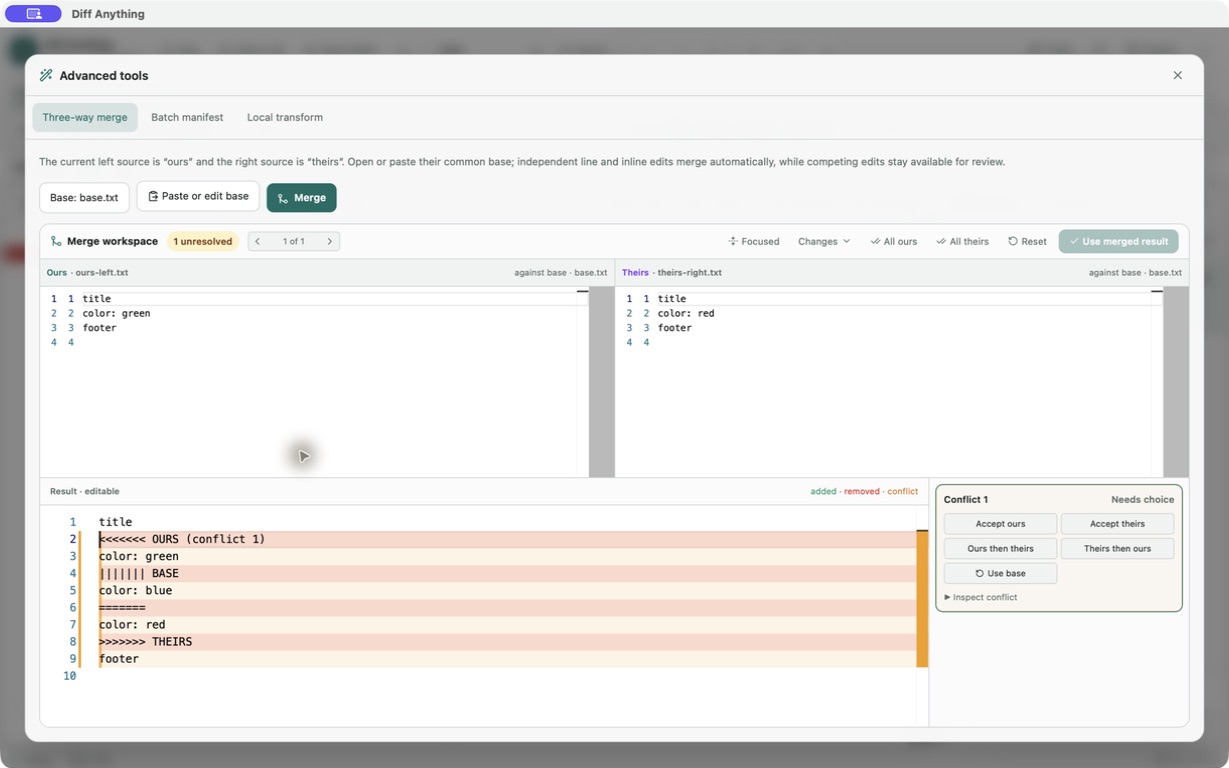
Put your version on the left and the other version on the right, then open Tools and choose Three-way merge. The left becomes Ours and the right becomes Theirs. Use Select merge base… to open the common original, or Paste or edit base, and click Merge.
Edits that do not overlap are combined automatically, including two separate edits on the same line. Overlapping edits become conflicts. Move between them with the conflict arrows and resolve each one with Accept ours, Accept theirs, Ours then theirs, Theirs then ours, or Use base. All ours and All theirs resolve every remaining conflict at once, and Reset returns to the automatic result.
The Changes panel shows Ours against Base and Theirs against Base, and Focused hides unchanged lines. The result pane stays editable and uses the same syntax highlighting as the left file. When the status reads Ready to use, Replace right with merged result replaces the right side, and you save it like any other edit.
Merge scope
What the merge works on
The merge compares lines. When both sides edited the same line, their edits are combined only if they changed separate words; otherwise the line is a conflict, so the merge never invents a value. It treats JSON or YAML as text, not as data, and folders, images, and PDFs cannot be merged. Editing, copying changes, and saving are free; the merge workspace and the command-line merge are part of Pro.
From Git, the Pro command line can act as a merge tool: --merge BASE OURS THEIRS --output MERGED writes the result and returns 1 when conflicts remain. Conflicts are written with OURS, BASE, and THEIRS sections, and --integration-help prints the Git settings to use.
In the workflow
How to use it
Place the versions
Open your copy on the left and the other edited copy on the right.
Choose the base
Open Tools, pick Three-way merge, then select or paste the common original and click Merge.
Resolve each conflict
Step through the conflicts, choose a resolution, and adjust the result by hand where needed.
Use and save
Click Replace right with merged result once nothing is unresolved, then save the right-hand file.
Useful in practice
When to use it
Related manual
Choose the right comparison mode
Choose sources, understand automatic detection, and select the engine that answers the question you are actually asking.
Read the guideDirect answers
Questions about text editing and merge.
Can I edit a file inside the comparison?
Yes. Turn on Editable in the text toolbar and type into either side. Save modified files writes the change to disk.
What if the file was changed by another program before I saved?
The save is refused and your edits stay in the app. Reopen the file to see the new version before saving again.
Why is Replace right with merged result greyed out?
At least one conflict is still unresolved or a conflict marker is still in the result. Resolve or delete it and the button becomes available.
Is three-way merge included in the free plan?
No. Two-way comparison, editing, and saving are free. Three-way merge in the app and from Git needs Pro.
Free & Pro: what’s included
Available on the Mac App Store and Microsoft Store. Free desktop use lets you try every comparison engine for files up to 5 MiB per side and 10 new comparison sessions per local day; collection previews show the first 100 items and PDF previews show the first 3 pages. The free CLI supports text and JSON. A one-time Pro purchase removes the preview and session limits and unlocks larger sources within technical limits, saved profiles and history, report export, three-way merge, folder synchronization, batch manifests, trusted preprocessors, and every CLI mode.