Problem solved by DevDock
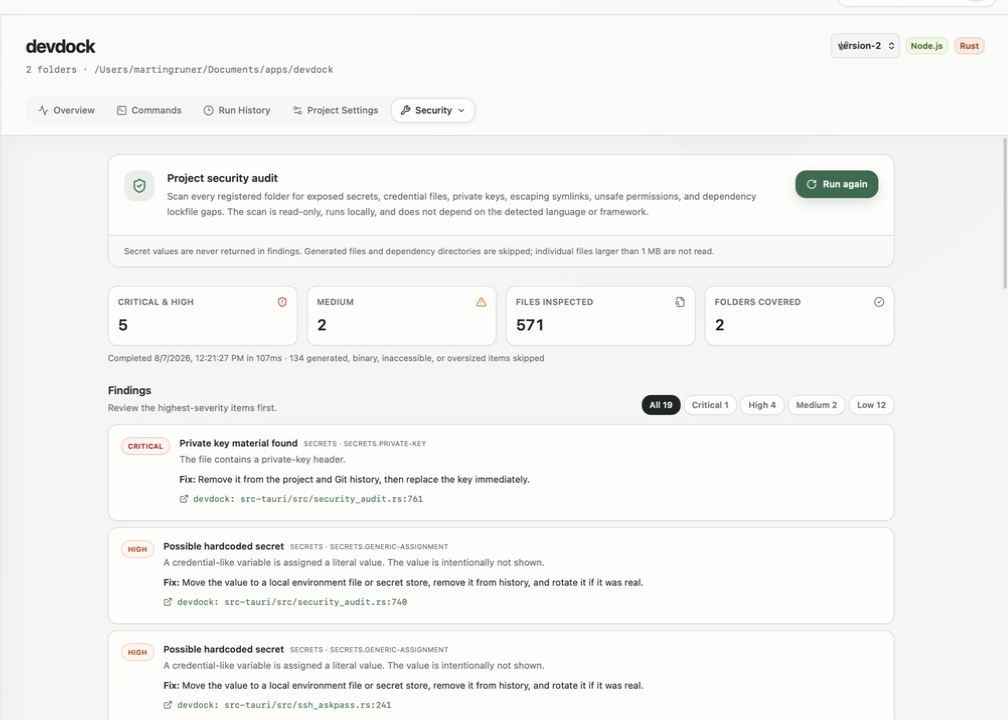
Check local source code for exposed secrets
Run a read-only local scan for tokens, private keys, credential files, escaping symlinks, and lockfile gaps on Windows.
See it in the app
A focused workflow, on your computer.
Local project data, operating-system secret storage, read-only local audits, and no source upload.
The problem
Why the usual workflow gets in the way.
A credential can slip into a repository long before a formal security review. Uploading the source to an unknown scanning service creates another risk for private code.
The solution
How DevDock handles it.
DevDock runs its baseline audit locally and read-only across registered folders. Findings identify the rule and file location while withholding the matched secret value.
Three short steps
From source to answer.
- 01
Register the folders that belong to the product.
- 02
Run the local read-only security audit.
- 03
Review each finding without exposing matched values.
Available for Windows