Capability overview
How can I use guided git workflows in DevDock?
Inspect repository state, switch branches, fetch, pull, commit, and review push destinations without losing the project context.
The project overview shows each repository's current branch, changed-file count, and known ahead or behind state, with fetch and branch actions beside it.
When ordinary branch switching is blocked by local edits, DevDock can create one protected stash for tracked, staged, and untracked changes, switch branches, and restore only that stash while leaving older stashes untouched.
Push rechecks the selected remote, shows the current branch and destination, and can guide a required pull with fast-forward, merge, or rebase before continuing the original push.
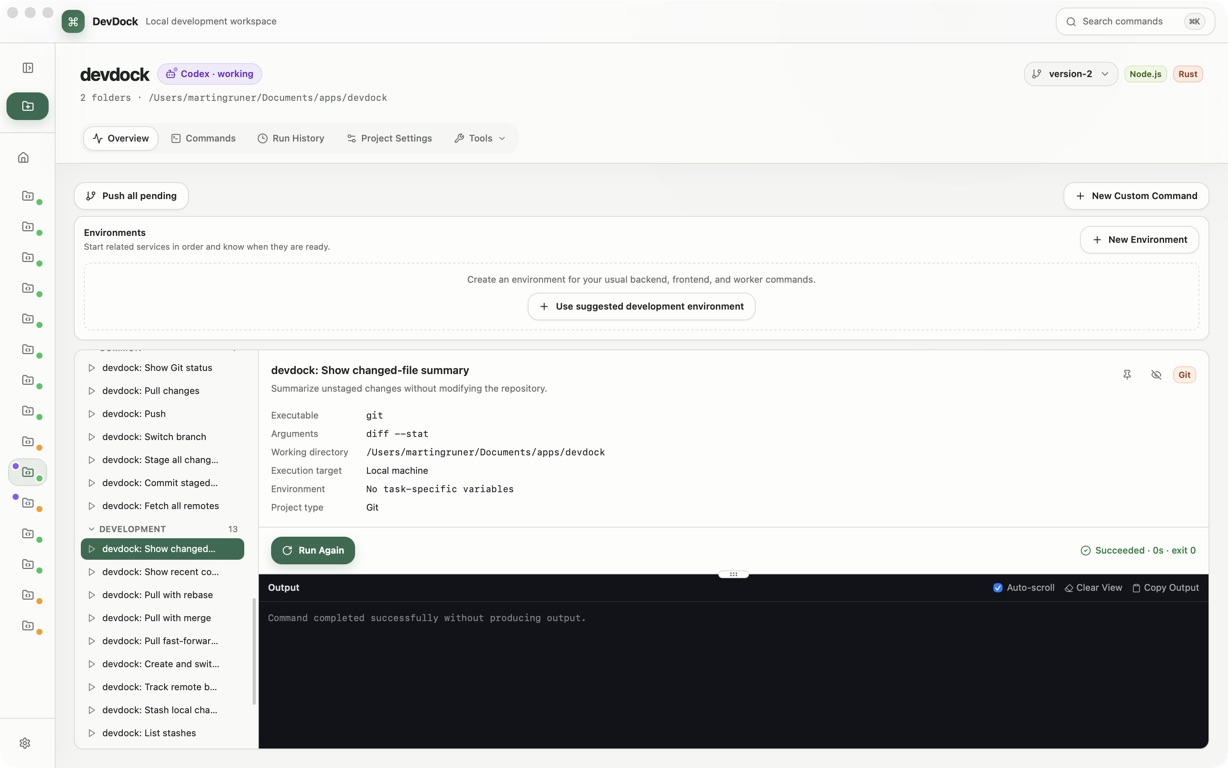
Repository state
Branch, changes, and remotes at a glance
The Overview shows each repository's current branch, changed-file count and ahead or behind count, with fetch and branch actions next to them. Git remotes lists the fetch and push destinations for each repository folder. From there you can Add remote, change a Remote URL, or delete a remote; deleting a remote keeps local commits and does not delete the hosted repository.
DevDock runs the Git installed on your computer, so your existing Git configuration and repository hooks apply. Git tools are included in DevDock Free.
Committing
Commit the files you choose
Commit changes lists the changed files. Select the ones to include and write the message under Describe this change; Current diff previews the changes before you commit. Commit files creates the commit, and Commit & Push creates it and continues to the push step.
Files that should not be committed can be added to .gitignore from the same dialog, and Stop tracking ignored files removes already tracked files from Git while keeping them on disk. If Git has no name or email set, Set Git identity asks for both and retries the commit.
Branches and pulls
Switch branches and pull without losing work
The branch menu lists the repository's branches and offers Fetch all remotes. Create and switch branch starts new work from the current commit, and Track remote branch creates a local branch for a fetched remote branch. In a multi-folder project, Switch all repositories moves every repository to a branch they all have.
If local edits block a switch, Keep your local changes stores tracked, staged and untracked changes in a protected stash, switches, and restores exactly that stash. Older stashes are left alone. When the branch and the remote have both moved, Choose how to combine the changes offers Fast-forward only, Merge both histories, or Rebase my local commits, each with a plain explanation. If conflicts occur, Git stops without discarding either side.
Pushing and recovery
Review where a push goes
Push Git repositories shows each repository's current branch and the remotes that can receive it. DevDock checks the remote again just before sending. If the remote has commits you do not have, it offers to pull first and then continues the push. DevDock does not force-push.
When Git needs a password, access token or SSH key passphrase, DevDock asks in its own dialog and uses the answer only for that operation. When a Git command fails, How to fix this Git problem explains the cause, such as a missing upstream, a rejected push, a lock file or a network problem, and Copy fix request copies the details for a colleague or coding assistant.
In the workflow
How to use it
Check the repository
Read the branch, changed files and ahead or behind count on the Overview.
Commit selected files
Open Commit changes, pick the files, review Current diff and write the message.
Update the branch
Fetch or pull, and choose how to combine changes if both sides have new commits.
Push to the right remote
Select the destinations in Push Git repositories and let DevDock recheck the remote before sending.
Useful in practice
When to use it
Related manual
Commands, workflows, and run history
Create dependable project commands, choose safe execution targets, manage long-running work, and use history to diagnose failed runs.
Read the guideDirect answers
Questions about guided git workflows.
Can I switch branches with uncommitted changes?
Yes. DevDock can store your tracked, staged and untracked changes in a protected stash, switch branches, and restore them. If the switch is interrupted, Project health shows Branch switch recovery is waiting until you restore it.
Does DevDock ever force-push?
No. If the remote has commits you do not have, DevDock offers to pull first and then continues the original push.
Does DevDock store my Git password?
No. Answers to Git sign-in prompts are used for the running operation and forgotten when it finishes.
Can I undo a commit from DevDock?
Yes. Undo last local commit removes the latest unpushed commit and keeps its files staged. It asks for confirmation before running.
Free & Pro: what’s included
Available on the Microsoft Store. Free for up to three local projects with core commands, Git, Docker, project health checks, and security-audit tools. A one-time Pro purchase unlocks unlimited and multi-folder projects, custom workflows, full history and insights, database tools, SSH transfers, and configuration backup and restore.