Capability overview
How can I use project workspace in DevDock?
Keep each project's overview, commands, run history, and security checks together. The Database, Files, and Insights & Audit tools require Pro.
A DevDock project represents one repository or folder. With Pro, it can also include a monorepo's subprojects or several separately located folders.
Each registered folder retains its own detection results, task working directories, and shortcuts while contributing to one coherent project overview.
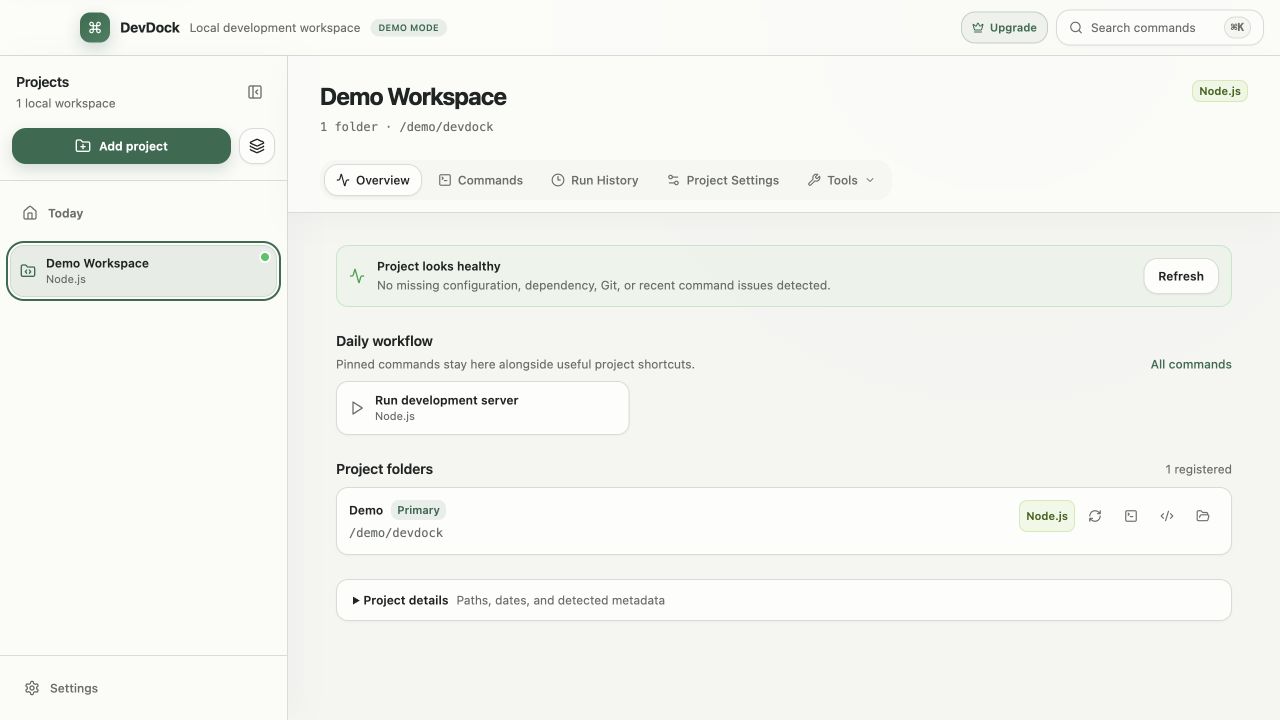
Project sections
What a DevDock project contains
A project opens on Overview. Next to it are Commands, Run History and Project Settings, and a Tools menu holds Security, Database, Files, Docker, Services, Logs and Insights & Audit. Docker, Services and Logs only appear when the project has something for them: a detected Docker setup, a readiness URL or published port, or a Laravel or PHP framework that writes logs.
Overview is arranged by what you usually need first. Commands that are running right now sit at the top, followed by Project health, the Daily workflow shortcuts and the list of project folders. A collapsed Project details panel holds the primary folder path, the date the project was added, when it was last opened, and the metadata found for each detected technology.
Commands lists every generated command in groups such as Common, Testing, Build and Dependencies, with a search field that also matches folder and executable names. Before a command runs, it shows the Executable, Arguments, Working directory and Execution target it will use.
Adding a project
What happens when you add a folder
Choose Add project and select a local folder. DevDock reads its manifest and build files to identify languages, frameworks, package managers and Docker configuration, then shows the result before anything is saved. Detection only reads files; it does not run package managers, build tools or project scripts. You can clear a detected technology to leave out its commands, change the project name, and place the project in a group.
The folder stays where it is on disk. DevDock stores a reference to it, and Remove Project in Project Settings removes that reference without deleting files. A folder with no recognized technology can still be registered and scanned again later.
Organizing projects
Keeping many projects in order
Each project gets a row in the sidebar. The row's context menu offers Add to Favorites and Hide Project, and hidden projects return when Show hidden projects is turned on in Application Settings. Groups separate client work, products or side projects, and the Today view can be limited to one group.
The command palette, opened with Ctrl+K by default, finds any project or project section by name. It can also start a command or open a folder, so moving between projects does not require the mouse.
Free and Pro
Project limits in Free and Pro
DevDock Free holds up to three projects, each based on one folder. Overview, Commands, Run History, Project Settings, Security, Docker, Services and Logs work in Free.
DevDock Pro is a one-time purchase. It removes the project limit, lets one project include several folders, and unlocks Database, Files and Insights & Audit, which show a lock icon in the Tools menu on Free.
In the workflow
How to use it
Add the folder
Choose Add project, select the repository or app folder, and give the project a name you will recognize in the sidebar.
Check what was detected
Review the detected technologies and clear any that belong to unrelated tooling before saving the project.
Read the Overview
Look at Running now, Project health and Daily workflow to see the project's state before starting work.
Organize the sidebar
Add the project to a group or to Favorites, and hide projects you rarely open so the list stays short.
Useful in practice
When to use it
Related manual
Getting started with DevDock
Build a dependable DevDock workspace: register a project, verify detection, run commands safely, and create a daily workflow you can return to.
Read the guideDirect answers
Questions about project workspace.
Does a DevDock project have to be a Git repository?
No. Any local folder can be registered. Git status, branch actions and push destinations appear for folders that are Git repositories.
What happens to my files when I remove a project?
Nothing. Remove Project deletes DevDock's reference to the folder. The source files stay where they are.
Why does my project not show Docker, Services or Logs?
Those sections appear only when they have content: Docker needs a detected Docker setup, Services needs a readiness URL or published Docker port, and Logs needs a Laravel or PHP framework project.
How many projects can I add in DevDock Free?
Three. DevDock Pro removes the limit and lets a project contain several folders.
Free & Pro: what’s included
Available on the Microsoft Store. Free for up to three local projects with core commands, Git, Docker, project health checks, and security-audit tools. A one-time Pro purchase unlocks unlimited and multi-folder projects, custom workflows, full history and insights, database tools, SSH transfers, and configuration backup and restore.