Direct answer
Which databases can DevDock inspect and manage?
DevDock Pro includes database tools for SQLite, MySQL, MariaDB and PostgreSQL. Connect to a SQLite file or a MySQL, MariaDB or PostgreSQL server, browse the schema, look up rows by an exact field value, count records, and export or import native backups. Laravel projects can also use the connection from the project's .env file, with migration status, table sizes and slow-table checks. The tools are built for inspection and backups, not as a general SQL editor.
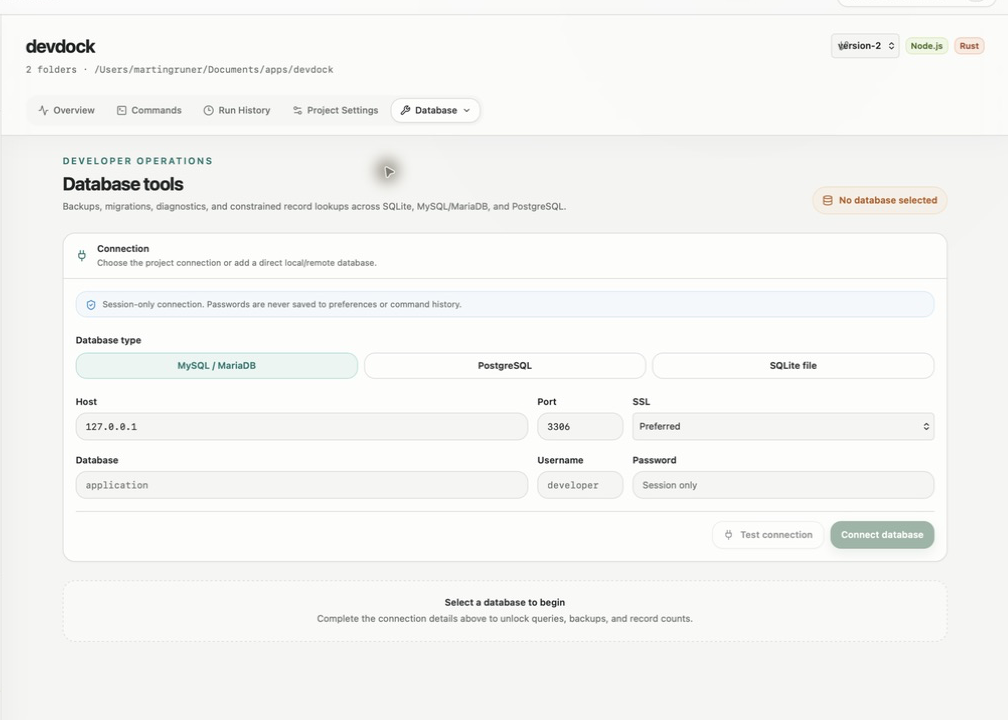
Connections
Connect directly, or use a Laravel project's own settings.
For a direct connection, choose Add database and pick MySQL / MariaDB, PostgreSQL or SQLite file. Enter the host, port, database, username, password and SSL mode (Preferred, Required or Disabled), or choose the database file. Test connection confirms the connection and shows the response time. A direct connection lasts for the current session, and its password is never saved to preferences or command history.
In a Laravel project, Project (.env) uses the database already configured in the project, so there is nothing to re-enter. Lookups, counts, backups and diagnostics then run through the project's PHP installation.
Direct MySQL, MariaDB and PostgreSQL connections use the command-line clients installed on your computer: mysql and mysqldump, or psql and pg_dump. Backups and imports in a Laravel project call the same clients. SQLite works without extra software.
Schema and records
Browse the structure, then find the rows you need.
The Schema browser lists tables and fields with their type, required or nullable status, primary keys and foreign keys. Search tables or fields by name, open a related table from its foreign key, or use Preview rows for a quick sample. A direct connection reads the live database; in a Laravel project the schema is built from its migrations and models.
Find records is a read-only lookup that needs no SQL. Pick the table in Show records from, optionally pick a field in Filter by, enter the exact value, and choose how many rows to return, up to 200. Leave the filter empty to see sample rows. Record count returns the number of rows in a table without loading them.
Backups
Native backups, with a review step before anything is replaced.
Export backup uses the database's own tooling: a complete copy for SQLite, mysqldump with routines and triggers for MySQL and MariaDB, or pg_dump without owner and privilege statements for PostgreSQL. Import backup loads a backup file into the selected database. Because an import can replace data, DevDock shows what will run and waits for your confirmation.
For a Laravel project, Backup & maintenance also offers Wipe database and Seed database, both behind a confirmation. Checks & diagnostics adds Pending migrations, Table sizes and Slow tables, which times record counts for up to 50 tables and lists the slowest first. In a Laravel project, Slow tables and Import backup only run when the application environment is local or testing.
Scope
Made for everyday development checks.
Use it to check data while you work, find a specific record, or back up a database before a risky change. Lookups match exact values, and there is no free-form SQL editor. For ad-hoc queries, reporting or editing rows, keep a full database client next to it.
The database tools are part of DevDock Pro. In the free version, the Database entry in the Tools menu opens the upgrade screen.
Best for
Where this workflow fits.
- Checking what a development database contains while you work on the code
- Finding a row by email, ID or another exact value without writing SQL
- Taking a native backup before a migration and restoring it if needed
- Laravel projects that want migration status, table sizes and seeding on one screen
Local project data, operating-system secret storage, read-only local audits, and no source upload.
Relevant capabilities
What DevDock brings to the job.
Practical workflow
From setup to a reviewed result.
Open Database
With DevDock Pro, open the project and choose Database from the Tools menu.
Connect
Use Project (.env) in a Laravel project, or choose Add database and check a direct connection with Test connection.
Find what you need
Browse the schema, preview rows, or run Find records with an exact filter and a row limit.
Back up before changes
Use Export backup before a migration or import, and review any restore before it runs.
Useful in practice
Direct answers
Questions about local database client.
Which databases can DevDock inspect and manage?
DevDock Pro includes database tools for SQLite, MySQL, MariaDB and PostgreSQL. Connect to a SQLite file or a MySQL, MariaDB or PostgreSQL server, browse the schema, look up rows by an exact field value, count records, and export or import native backups. Laravel projects can also use the connection from the project's .env file, with migration status, table sizes and slow-table checks. The tools are built for inspection and backups, not as a general SQL editor.
Does DevDock store my database password?
No. Direct connections last for the current session only, and passwords are not written to preferences or command history. Laravel projects use the credentials already in the project's .env file.
Can I edit rows or run my own SQL?
No. Find records and Record count are read-only, and there is no SQL editor. Data changes only through explicit actions such as Import backup, or Wipe database and Seed database in Laravel projects, and each of those asks for confirmation first.
Do I need MySQL or PostgreSQL tools installed?
Yes, for direct connections to those engines and for backups. DevDock uses the mysql and mysqldump clients for MySQL and MariaDB, and psql and pg_dump for PostgreSQL. In a Laravel project, lookups and diagnostics run through the project's PHP instead. SQLite needs nothing extra.
Can it connect to a database on another server?
Yes, as long as the server is reachable from your computer. Enter its host and port, choose the SSL mode, and use Test connection to check it before browsing.
Go deeper
Use DevDock with SQLite, MySQL/MariaDB, PostgreSQL, and detected Laravel databases for safe lookups, schema review, diagnostics, exports, and confirmed restores.
Read Database tools, schema inspection, and backupsFree & Pro: what’s included
Available on the Microsoft Store. Free for up to three local projects with core commands, Git, Docker, project health checks, and security-audit tools. A one-time Pro purchase unlocks unlimited and multi-folder projects, custom workflows, full history and insights, database tools, SSH transfers, and configuration backup and restore.