Capability overview
How can I use accessible workspace in Diff Anything?
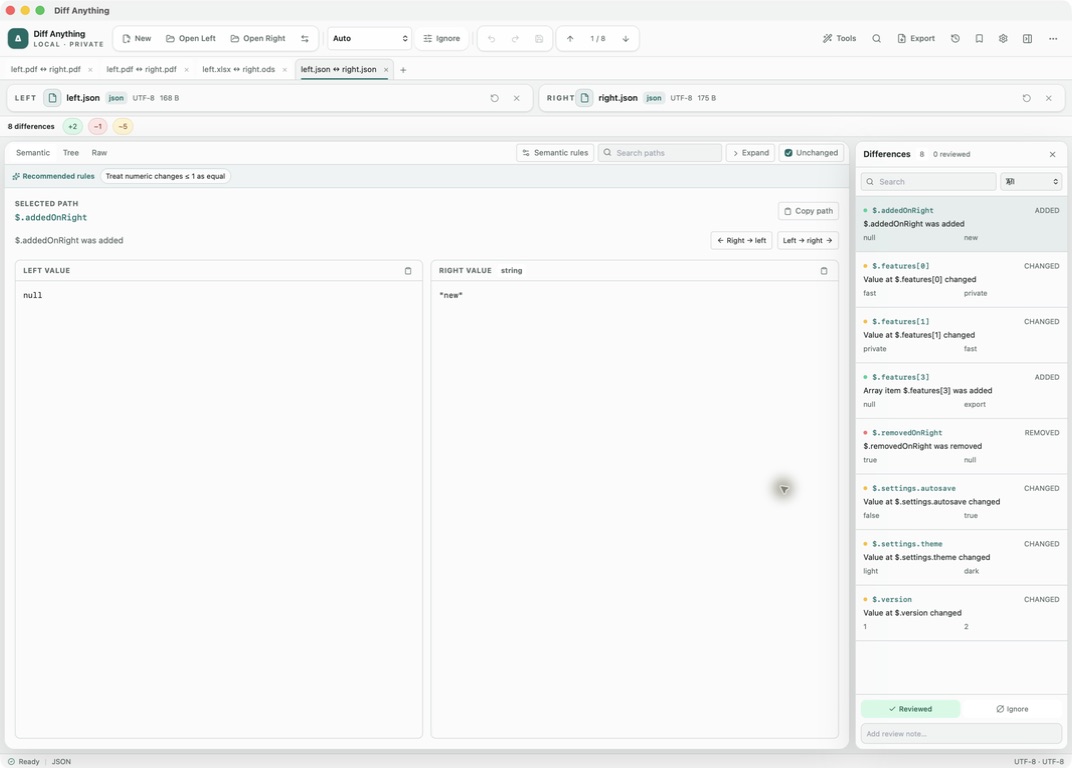
Press Command-Shift-A on a Mac or Control-Shift-A on Windows to turn a comparison into one ordered page: the sources, a summary, and every difference in words with its location, the change, and the original and updated values. Step through differences, search them, mark them reviewed or ignored, add notes, and apply supported changes from the keyboard. On a Mac it opens automatically when VoiceOver is running. It is included in the free plan; three-way merge is not part of it.
Spot meaningful code changes with Smart Diff across 117 editor languages. Switch to Line Diff whenever you want an exact line-by-line review. Both views keep syntax highlighting and editing close at hand.
In the workflow
Review and resolve
Navigate stable differences, apply supported changes, resolve three-way conflicts, or approve a folder synchronization plan without losing source context.
Diff Anything keeps the source pair, selected mode, comparison rules, result, and review state together so the same decision can be revisited or automated.
Useful in practice
When to use it
Related manual
Choose the right comparison mode
Choose sources, understand automatic detection, and select the engine that answers the question you are actually asking.
Read the guideDirect answers
Questions about accessible workspace.
How can I use accessible workspace in Diff Anything?
Press Command-Shift-A on a Mac or Control-Shift-A on Windows to turn a comparison into one ordered page: the sources, a summary, and every difference in words with its location, the change, and the original and updated values. Step through differences, search them, mark them reviewed or ignored, add notes, and apply supported changes from the keyboard. On a Mac it opens automatically when VoiceOver is running. It is included in the free plan; three-way merge is not part of it.
Do compared files leave the computer?
No. Comparison is local. The application has no account, cloud comparison service, analytics, or telemetry.
How does automatic mode choose a comparison?
Compatible spreadsheet formats can use the shared stored-value comparison even when their extensions differ, matching structured formats use their semantic engine, two folders use folder comparison, and other compatible inputs fall back to text. You can always choose a concrete mode.
Free & Pro: what’s included
Available on the Mac App Store and Microsoft Store. Free desktop use lets you try every comparison engine for files up to 5 MiB per side and 10 new comparison sessions per local day; collection previews show the first 100 items and PDF previews show the first 3 pages. The free CLI supports text and JSON. A one-time Pro purchase removes the preview and session limits and unlocks larger sources within technical limits, saved profiles and history, report export, three-way merge, folder synchronization, batch manifests, trusted preprocessors, and every CLI mode.