Capability overview
How can I use repeatable review rules in Diff Anything?
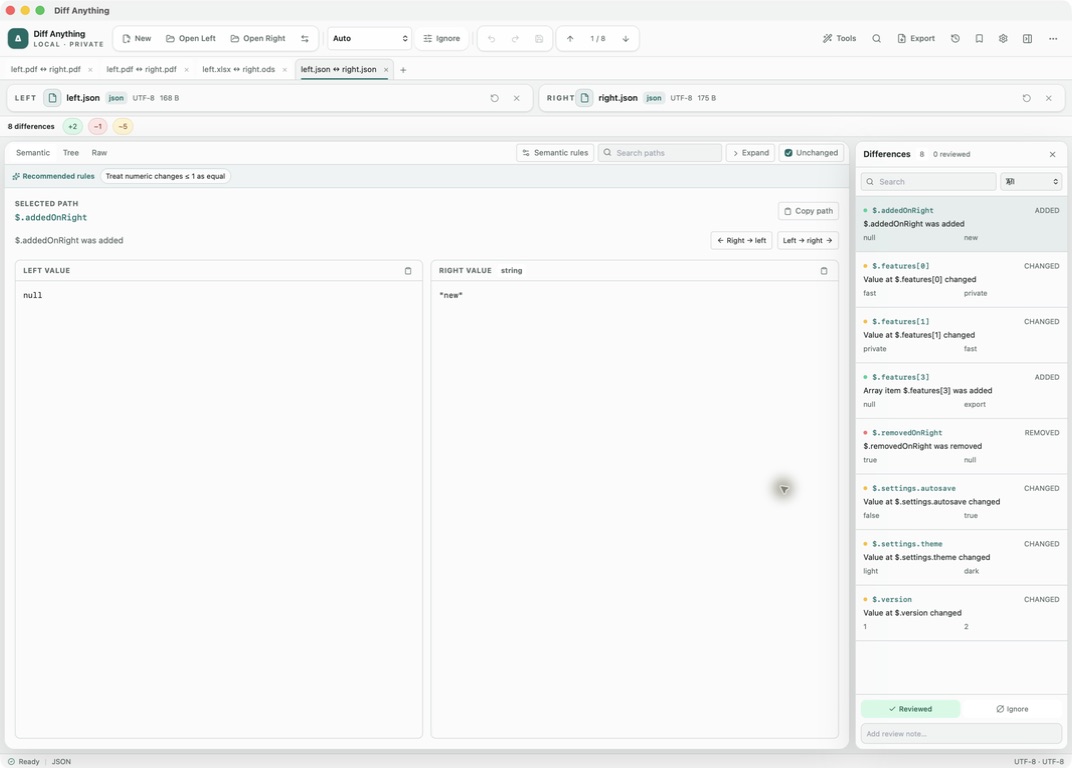
JSON and YAML share the same semantic rules: ignored paths, keyed or unordered arrays, case behavior, and numeric tolerances. Pro saves them in profiles with reviewed states, notes, and live watch.
Spot meaningful code changes with Smart Diff across 117 editor languages. Switch to Line Diff whenever you want an exact line-by-line review. Both views keep syntax highlighting and editing close at hand.
Rules by mode
Where each kind of rule lives
Rules tell a comparison which differences to expect and leave out. They are free to use in any comparison, and each mode keeps them next to its result:
- Plain Text and PDF / Office: the Ignore menu in the main toolbar, which handles whitespace, blank lines, letter case, and line endings.
- JSON and YAML: Semantic rules, with Ignore paths, Unordered array paths, Ignore case at paths, Array keys, and Numeric tolerance. Recommended rules suggests entries from the current result.
- XML: Unordered elements, for parents whose child order does not matter.
- CSV: the Key menu, plus Key columns, Columns to ignore, Case-sensitive values, and Trim cell whitespace under CSV options.
- HTTP Response: Ignored headers. Environment File: Compare presence only.
- Folders: ignore and include patterns, JSON ignore paths for nested files, and a timestamp tolerance. Images: Ignore delta ≤ and Align.
Saved profiles
Saving a comparison you will run again (Pro)
Open Saved profiles (⌘⇧S on Mac) and use Save current comparison. Give it a Profile name and optional tags. The profile keeps both source locations, the comparison mode, every rule and option currently set, and your review marks and notes.
Opening a profile reads the current files from disk and applies everything again, so a monthly export or a release checklist starts from the same settings every time. Search saved profiles by name, mode, path, or tag. Export profiles writes them to a JSON file and Import profiles reads one, which lets you move them to another computer where the same paths exist.
Watch and Run all
Re-running profiles without setting them up again (Pro)
Tick Recompare automatically when either file changes before saving, and the profile is marked Live watch. While that profile is open, a change to either file reruns the comparison, and if notifications are allowed you get a Diff Anything profile changed alert.
Run all checks every profile that points to files on disk and reports how many are clean, changed, or failed. It uses each profile's files and comparison mode; the saved rules apply when you open the profile itself.
Rules and marks
Using narrow rules and review marks together
Start with the smallest rule that removes the noise. In JSON, a path such as $.metadata.generatedAt hides one timestamp, while a path ending in .* hides everything below it, including values that appear later and might matter. The same applies to folder ignore patterns and CSV columns to ignore.
An Ignore mark in the Differences pane is different from an ignore rule. The difference stays in the result, and the mark records that someone looked at it and decided it does not matter.
A Reviewed or Ignore mark is attached to the difference itself: its location and the values on each side. When you rerun a comparison and the same difference appears, the mark and note are still there. When the values change, the difference shows as Pending review again, so nothing new slips through under an old approval.
In the workflow
How to use it
Tune the comparison
Run it once and add the rules that remove differences you expect every time.
Review what remains
Mark each remaining difference Reviewed or Ignore and write a note where the reason matters.
Save a profile
With Pro, save it with a name and tags, and turn on automatic recompare if the files change often.
Run it again
Open the profile next time, or use Run all for a quick clean or changed check across every profile.
Useful in practice
When to use it
Related manual
Profiles, rules, review state, and reports
Turn a useful one-off comparison into a repeatable review with explicit ignore rules, notes, and, with Pro, saved profiles and exported reports.
Read the guideDirect answers
Questions about repeatable review rules.
Do I need Pro to use ignore rules?
No. Every rule works on the free plan for the current comparison. Pro is needed to save rules in a profile.
Does Run all use my saved rules?
No. Run all uses each profile's files and mode. Open a profile to compare with its saved rules and review marks.
What happens to my review marks when a file changes?
Marks stay on differences that are unchanged. A difference whose values changed returns to Pending review.
Can I give my profiles to a colleague?
Yes. Use Export profiles to save them as a JSON file and Import profiles on the other computer. The file paths in them must exist there.
Free & Pro: what’s included
Available on the Mac App Store and Microsoft Store. Free desktop use lets you try every comparison engine for files up to 5 MiB per side and 10 new comparison sessions per local day; collection previews show the first 100 items and PDF previews show the first 3 pages. The free CLI supports text and JSON. A one-time Pro purchase removes the preview and session limits and unlocks larger sources within technical limits, saved profiles and history, report export, three-way merge, folder synchronization, batch manifests, trusted preprocessors, and every CLI mode.