The job to be done
Confirm the numbers survived the move to a new format.
Workbooks change format as they pass between people and tools. A budget built in Excel is opened in Numbers, a partner saves it as ODS, or an old XLS file is brought forward to XLSX. Any step can drop a sheet, empty a cell, or alter a value, and checking by eye stops working after a few dozen rows.
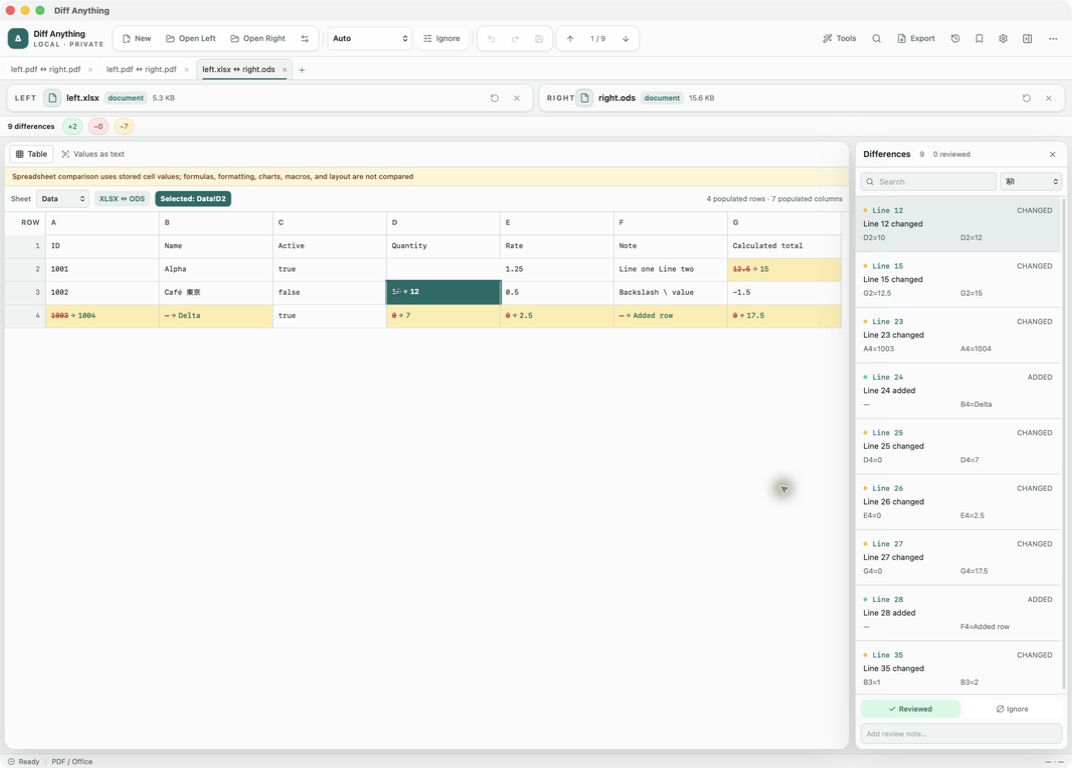
Diff Anything reads both workbooks, pairs their sheets by name, and compares them row by row, even when one side is XLSX and the other is Numbers or ODS. Rows are matched by their content, so an inserted row is one added row rather than a shifted sheet. Neither file is converted first, and every changed row is shown with its changed cells marked.
Recommended path
Check a converted workbook against its source.
Keep the original workbook on the left and the migrated or returned copy on the right.
Open the two workbooks
Choose any pairing of XLS, XLSX, XLSM, XLSB, ODS, and Numbers files, or a CSV export and its workbook. Auto opens them in PDF / Office mode in the table view.
Work through the sheets
Use the Sheet menu to move between sheets. A sheet left out of the new file is reported as removed with its rows, and a sheet renamed without other changes is reported as renamed.
Match rows by an ID when the order changed
If the rows were sorted differently, choose the ID column under Match rows by, or type several under Key columns. Rows with the same key are compared wherever they are, and a key that appears twice is a warning.
Step through the changed rows
Each changed row has an entry in the Differences pane that names its changed cells, such as Summary row 5 changed: B5, D5, and the table view marks those cells with their values on both sides.
Record your decisions
Mark each difference Reviewed or Ignored and add a review note, for example to explain a figure that was corrected on purpose. The Pending review filter shows the cells nobody has checked yet.
Confirm an untouched copy when needed
If a file was only meant to be forwarded, choose Binary / Image mode; a matching SHA-256 hash shows the files are byte-for-byte the same.
Capabilities involved
What each capability contributes to a handoff check.
Limits to know
What a clean result tells you.
The comparison covers rows and stored values, and formulas between two workbooks of the same format, such as two XLSX files. Formulas are not compared between formats or in Numbers files, and a note says whether they were compared. Formatting, charts, macros, and layout are outside the comparison.
Rows are matched by their content, so an inserted row is one added row. An inserted or removed column is reported as the cells that changed in each row.
Values are compared as each format stores them, not as they are displayed. Dates and times are read as ISO 8601, such as 2024-01-01, whether a workbook stores them as Excel serial numbers or as OpenDocument dates.
A CSV or TSV export can be compared with one sheet of a workbook, the first by default, but its values are compared as stored text, so 20 and 20.0 or two spellings of a date count as different. Free compares workbooks up to 5 MB each, 10 comparisons a day, and Pro removes the file-size limit.
Related manual
Compare folders, spreadsheets, documents, and images
Review cross-format spreadsheet values, release trees, documents, and visual assets with purpose-built navigation, safety checks, and rollback.
Its sections cover prepare folder sources, compare large trees, synchronize with a plan and an undo path, compare spreadsheets and documents, use visual image tools. Use it when you are ready to reproduce this workflow with your own project data.
Read the guideDirect answers
Questions about this use case.
Can I compare an Excel workbook with a Numbers file?
Yes. Open the XLSX, XLS, or XLSB file on one side and the .numbers file on the other. Sheets are paired by name and rows by their content, without converting either workbook.
Does an inserted row make every row below it a change?
No. Rows are matched by their content, so an inserted row is one added row and the rows after it still match. For sheets whose rows were re-sorted, match the rows by a key column.
Are formula changes detected?
Yes, between two workbooks of the same format, such as two XLSX or two ODS files: a changed formula is a difference even when its result is the same. Between different formats, or with Numbers files, only the stored results are compared.
Is cross-format workbook comparison part of the free plan?
Yes. Free shows the complete workbook result, within the 5 MB file limit and the daily allowance of 10 comparisons. Pro lifts the size limit and adds saved profiles, history, and report export.
Free & Pro: what’s included
Available on the Mac App Store and Microsoft Store. Free desktop use lets you try every comparison engine for files up to 5 MiB per side and 10 new comparison sessions per local day; collection previews show the first 100 items, binary comparisons the first 100 byte differences, and PDF previews the first 3 pages. Plain text, JSON, and Jupyter notebook comparison are complete, and opening files from Finder or File Explorer, diffanything:// links, and AppleScript are free. The free CLI supports text, JSON, and notebooks. A one-time Pro purchase removes the preview and session limits and unlocks larger sources within technical limits, saved profiles and history, saving folder snapshots, report export and printing, JSON Patch export, applying patches, three-way merge and conflict resolution, the Git merge driver and merge tool, folder synchronization, batch manifests, trusted preprocessors, and every CLI mode.