Direct answer
What is a developer project manager?
DevDock is a Windows app that keeps the operational side of each local codebase in one place: its folders, detected technologies, ready-made commands, Git state, Docker services, health checks and recent runs. It is not a ticket tracker. It helps you open a project and get it running. DevDock Free covers three projects; DevDock Pro adds unlimited and multi-folder projects, custom commands, launch environments and database tools.
The usual setup
Why a folder list and a terminal stop being enough.
Most developers keep projects as folders on disk plus a few notes on how to start them. That holds up until there are five or ten codebases in different languages. Each has its own install command, dev server, test runner, environment file and Git branch, and remembering them costs time on every switch.
An issue tracker does not cover this part of the job. It knows what needs to be built, not how the code runs on your machine. DevDock handles that side: what is in the folder, which commands it supports, and whether it is ready to run.
One project
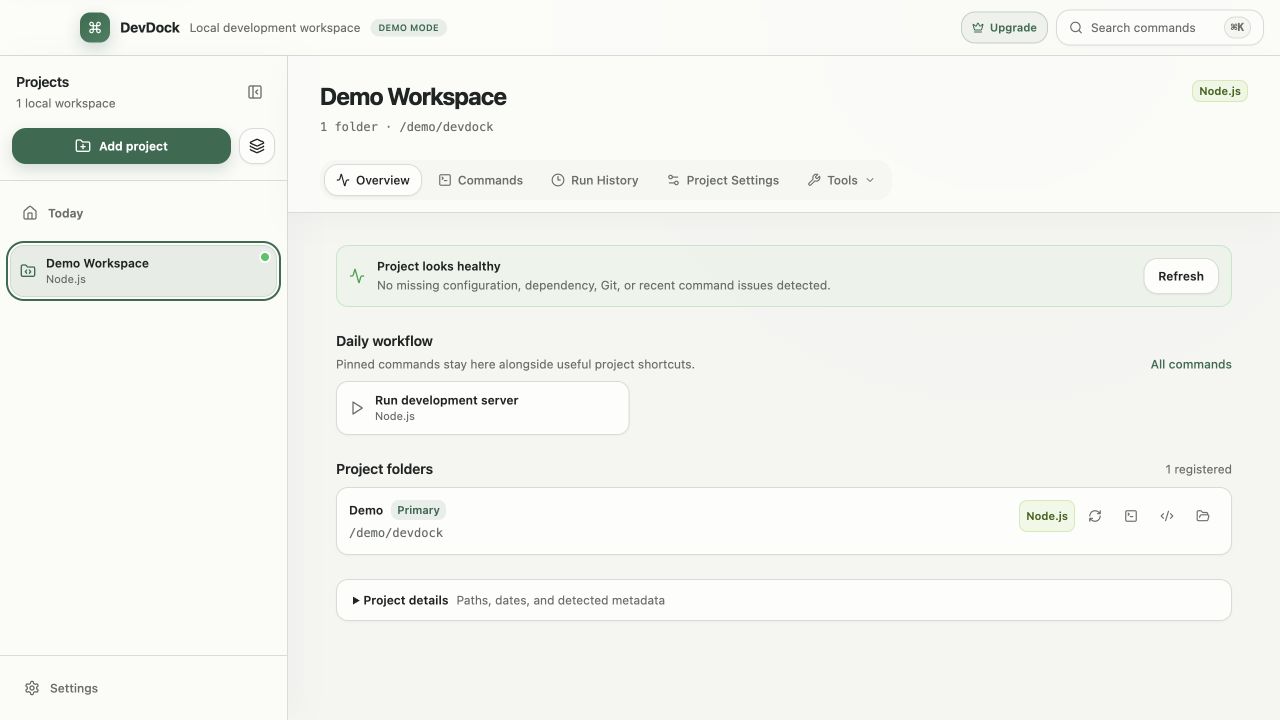
Each project opens to an overview of its current state.
When you add a folder, DevDock reads its manifest and build files to detect the stack, without running project code. Supported families include JavaScript and TypeScript, Python, PHP and Laravel, Rust, Go, Ruby, Java and Kotlin, .NET, Dart and Flutter, Elixir, C and C++, Android and Docker. You review what was detected before the project is saved.
The Overview shows the commands running now, project health, a Daily workflow with your pinned and suggested commands, and the registered folders. Project health lists problems such as uncommitted changes, commits waiting to push, remote changes available, Node or Composer dependencies that are not installed, a missing .env file or keys missing compared with the example file, and a failed latest command. Several of these link straight to the command that fixes them, such as installing dependencies or pulling changes.
The rest of the project sits in the same window: Commands, Run History, Project Settings with the Git synchronization status of each repository, and a Tools menu with Security, Docker, Logs, Services and other sections, depending on what the project contains.
Across projects
Start the day from the Today dashboard.
Today brings every project together. Needs attention collects health problems from all projects, Recent projects takes you back to what you were doing, and Quick actions holds the commands you pinned. Workspace actions run one safe action across all projects and report a separate result for each: Check all repositories for updates, Audit all dependencies and Test all projects.
In the sidebar you can sort projects into collapsible groups, drag them into your own order, keep favorites at the top and hide projects you rarely open. Any registered folder opens in File Explorer, a terminal or Visual Studio Code. Removing a project from DevDock leaves its files where they are.
Ctrl+K opens the command palette by default, where you can jump to a project or section, or start a command by name. You can change the shortcut in Application Settings.
Free and Pro
What the free version includes.
DevDock Free includes three projects, automatic detection, every generated command with live output, the 20 most recent runs per project, and the core Git, Docker, project log, project health and security audit tools.
DevDock Pro is a one-time purchase, not a subscription. It adds unlimited projects, projects made of several folders, custom and combined commands, launch environments, every retained run in Run History with Insights & Audit, database tools, SSH file transfer, and configuration backup and restore.
Best for
Where this workflow fits.
- Developers who move between several local codebases in different languages
- Getting back into a project you have not opened for weeks or months
- Seeing Git state, missing dependencies and failed commands across all projects in one Today view
Local project data, operating-system secret storage, read-only local audits, and no source upload.
Relevant capabilities
What DevDock brings to the job.
Practical workflow
From setup to a reviewed result.
Add a folder
Choose a repository or a folder that contains several apps. DevDock detects the stack without running project code.
Review what was found
Keep or clear detected technologies, name the project and, if you use groups, choose its group.
Pin your everyday commands
Pin the dev server, tests or Git actions so they appear in Daily workflow and on Today.
Check health before you start
Open Today or the project Overview and fix what Project health reports before you begin work.
Useful in practice
Direct answers
Questions about developer project manager.
What is a developer project manager?
DevDock is a Windows app that keeps the operational side of each local codebase in one place: its folders, detected technologies, ready-made commands, Git state, Docker services, health checks and recent runs. It is not a ticket tracker. It helps you open a project and get it running. DevDock Free covers three projects; DevDock Pro adds unlimited and multi-folder projects, custom commands, launch environments and database tools.
Does DevDock manage tickets or sprints?
No. DevDock manages local codebases: their folders, commands, Git state, Docker services and health. Keep using your issue tracker for planning.
How many projects can I add for free?
Three. DevDock Pro removes the limit and lets one project contain several folders or repositories.
Does adding a project change my files?
No. Detection only reads manifest and build files. DevDock keeps its own data, history and logs in its application data folder, not inside the project. Files change only when you run a command that changes them, such as installing dependencies.
What if my stack is not detected?
You can still register the folder. A repository can also add its own detection markers and direct commands with a .devdock/technology.json file, which DevDock reads without executing anything.
Go deeper
Build a dependable DevDock workspace: register a project, verify detection, run commands safely, and create a daily workflow you can return to.
Read Getting started with DevDockFree & Pro: what’s included
Available on the Microsoft Store. Free for up to three local projects with core commands, Git, Docker, project health checks, and security-audit tools. A one-time Pro purchase unlocks unlimited and multi-folder projects, custom workflows, full history and insights, database tools, SSH transfers, and configuration backup and restore.