Direct answer
Can DevDock work as a Docker Compose manager?
DevDock provides a project-centered view of Docker Compose development. It reads Compose configuration without starting containers, then layers in engine availability, service state, health, published ports, resource snapshots, and explicit host or container execution targets.
Discovery
DevDock reads your Compose files without starting anything.
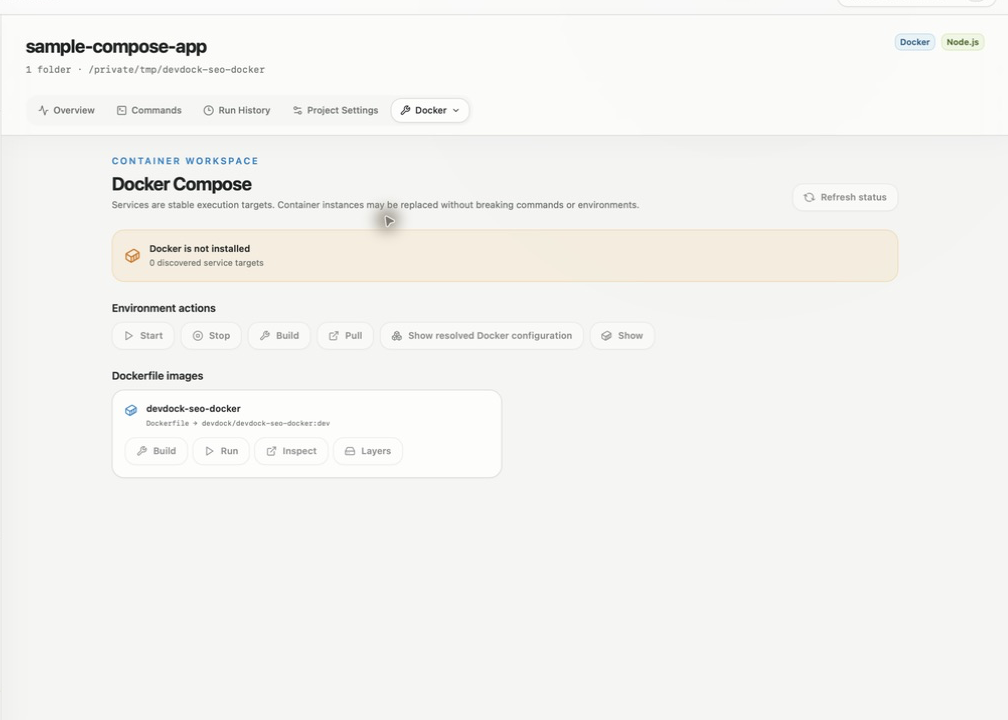
When a registered folder contains compose.yaml, compose.yml, docker-compose.yaml or docker-compose.yml, DevDock parses it together with a matching override file. It records services, images, build contexts, Dockerfiles, working directories, profiles, ports, healthchecks, mounts and networks. No container starts during detection, and rescanning the folder picks up changes to the files.
For a non-standard layout, add .devdock/docker.json to the folder. It can define several Compose projects, list extra Compose files in order and name env files, and DevDock passes them to every Compose command it generates. Standalone Dockerfile and Containerfile files at the folder root are detected as well, with Build, Run, Inspect and Layers actions for each image.
Compose actions
The Compose commands you would otherwise type, one click each.
The Docker section shows whether Docker is ready, installed but not running, or not installed, and disables actions until the engine is available. Every Compose project gets generated commands: Start, Run, Stop, Restart and Remove Docker environment, Build and Pull Docker images, Show Docker service status, Show resolved Docker configuration and Show Docker images. The Docker section puts Start, Stop, Build, Pull, Show resolved Docker configuration and Show images on buttons; the rest are in Commands.
Each service row shows state, health, image, exit code, restart count and published ports, with buttons to start or restart the service, stop it, follow its logs, or open a shell inside it in a terminal window. Expand a row to see the image ID, CPU and memory use, network and block I/O, process count, mounts and networks.
- Remove Docker environment runs compose down, keeps named volumes and asks for confirmation first
- Build Docker images uses plain progress output so the full build log stays readable
- Each Compose profile gets its own start command
- Run Docker environment runs in the foreground, streams output into DevDock and stops with the normal Stop button
Host or container
Choose where each command runs.
If a service bind-mounts a registered folder, DevDock also lists that folder's compatible built-in commands a second time with the service name in front. Those versions run inside the container with docker compose exec, in the matching container directory, so the service needs to be running. When several services mount the same code, set a Preferred execution service in the Docker section to rank one of them first.
With DevDock Pro, a custom command can target a Compose service instead of the local folder, either as an Existing service container or a One-off container, removed afterward. Commands point at the Compose project and service name rather than a container ID, so they keep working when Compose recreates the container. Pro launch environments can include the foreground Docker environment next to host commands, and DevDock offers a suggested Docker environment to start from.
Status and limits
Container problems show up in project health.
Unhealthy, restarting, out-of-memory and non-zero exited services appear as attention items on the project Overview and on Today, where you can also pin individual Docker services. The Services section lists published Docker ports together with environment readiness URLs and warns when two of them use the same port.
DevDock works with local Compose projects through the docker compose command of your installed Docker. It has no controls for Swarm, Kubernetes or Docker contexts, and it does not prune images or delete volumes. Compose files must sit inside a registered folder. Docker detection, Compose actions, service controls and runtime status are included in DevDock Free.
Best for
Where this workflow fits.
- Applications with several Compose services and published ports
- Workflows that mix host commands with commands inside containers
- Developers who need a repeatable way to start and inspect local environments
Local project data, operating-system secret storage, read-only local audits, and no source upload.
Relevant capabilities
What DevDock brings to the job.
Practical workflow
From setup to a reviewed result.
Register the Compose folder
DevDock finds services, profiles, ports and mounts without starting any container.
Check the engine
The Docker section tells you whether Docker is ready before any action runs.
Start what you need
Start the whole environment, a single profile or one service, and follow each service's logs.
Run commands in the right place
Run built-in commands on the host or inside a bind-mounted service, and check attention items if a container fails.
Useful in practice
Direct answers
Questions about Docker Compose manager.
Can DevDock work as a Docker Compose manager?
DevDock provides a project-centered view of Docker Compose development. It reads Compose configuration without starting containers, then layers in engine availability, service state, health, published ports, resource snapshots, and explicit host or container execution targets.
Which Docker command does DevDock use?
It runs docker compose through the Docker CLI installed on your computer. If Docker is installed but not running, the Docker section says so and keeps the actions disabled.
Will Remove Docker environment delete my volumes?
No. It runs compose down with --remove-orphans, which removes containers and networks but keeps named volumes. It always asks for confirmation before running.
Can I use several Compose files or env files?
Yes. A matching compose.override or docker-compose.override file is applied automatically. For other combinations, list the files and env files in .devdock/docker.json inside the folder.
Which Docker features need DevDock Pro?
Custom commands that target a container and saved launch environments. Detection, Compose and service actions, logs, service shells and runtime status are in the free version.
Go deeper
Connect Compose discovery, runtime health, host-versus-container execution, and safe daily environments into one repeatable DevDock workflow.
Read Docker and Compose workflowsFree & Pro: what’s included
Available on the Microsoft Store. Free for up to three local projects with core commands, Git, Docker, project health checks, and security-audit tools. A one-time Pro purchase unlocks unlimited and multi-folder projects, custom workflows, full history and insights, database tools, SSH transfers, and configuration backup and restore.