Direct answer
Can one DevDock project contain multiple repositories?
A DevDock project can hold one repository, a monorepo, or several separate repositories that make up one product. With DevDock Pro, each part is registered as its own folder with a label, its own detected technologies and its own working directory, and all their commands appear in one list prefixed with that label. DevDock Free registers one folder per project, so a monorepo is added by its root folder.
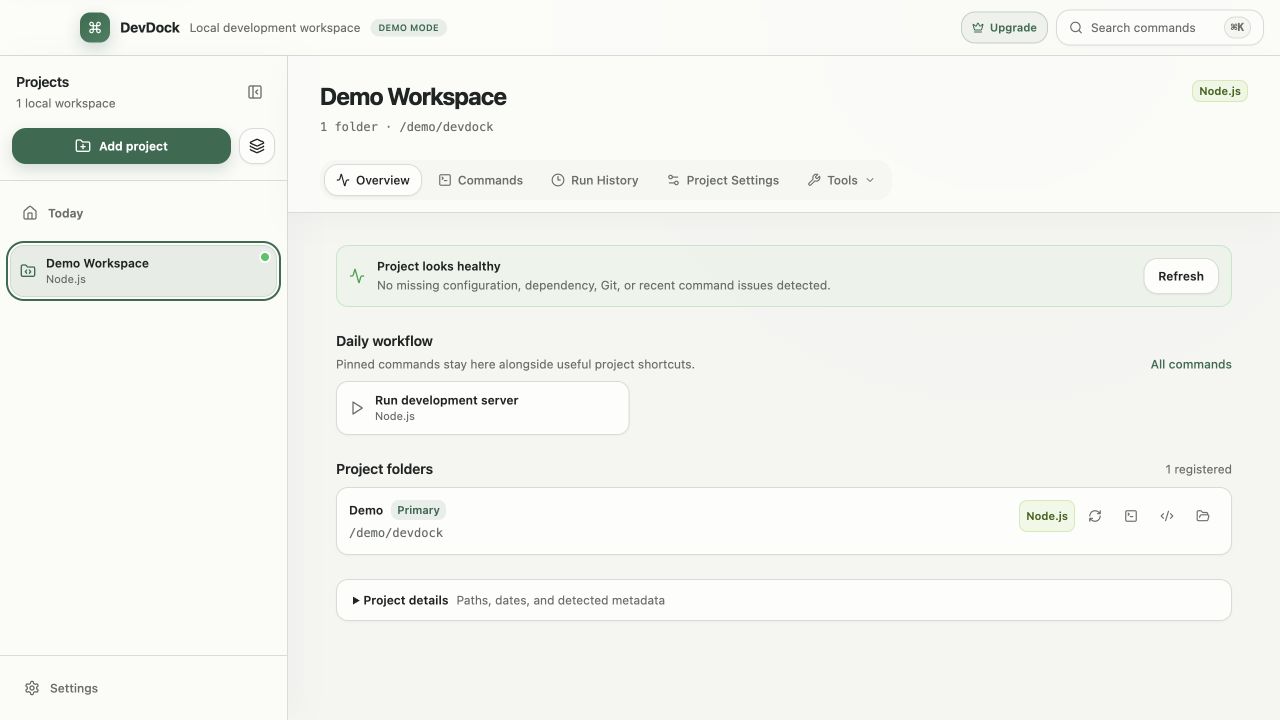
Finding the parts
DevDock finds the apps inside a monorepo.
When you add a folder, DevDock also scans its subfolders, up to four levels deep and 600 folders, for apps and services it recognizes. Dependency and build folders such as node_modules, vendor, target, dist and build are skipped. The review screen lists every subproject it found with its detected technologies, and with DevDock Pro you choose which ones to include before saving.
Included subprojects are registered as separate folders, so each keeps its own working directory. An API in api/, a web app in web/ and a Flutter app in mobile/ each get their own commands, and each command runs from its own folder.
Large monorepos produce long command lists. On the review screen you can clear a detected technology to leave out its commands, and later you can hide individual commands or whole technologies you do not use. Anything hidden can be restored from Project Settings.
Separate repositories
Combine repositories that live in different places.
A product does not have to live in one repository. Under Project folders in Project Settings, choose Add Folder to attach another folder from anywhere on disk. DevDock scans it and shows the detected technologies before it is added, and nothing is moved or copied.
Each folder can be renamed, rescanned after its setup changes, opened in File Explorer, a terminal or Visual Studio Code, or removed from the project without deleting its files. The first folder is marked Primary.
Working across folders
One project view, with each folder kept distinct.
Commands from all folders appear in one Commands list, each prefixed with its folder label, for example Backend: or Frontend:. Two folders that both have a test or dev script stay easy to tell apart. Run history, project health and the security audit cover every folder in the project.
Git is handled per repository. Project health reports uncommitted changes, commits to push and remote changes for each folder, and the project's Git menu can fetch all repositories at once or switch them all to a branch they have in common.
With Pro, a launch environment can start commands from several folders, such as a backend server, a queue worker and a frontend dev server, in order or in parallel. A combined custom command can run steps from different folders in sequence, and each step keeps its own folder.
Free and Pro
Multi-folder projects need DevDock Pro.
In DevDock Free a project has one registered folder. You can add a monorepo by its root, and DevDock still shows the subprojects it found, but including them as separate folders requires Pro. The same applies to Add Folder in Project Settings.
DevDock Pro is a one-time purchase and also removes the three-project limit of the free version.
Best for
Where this workflow fits.
- Monorepos where apps and services live in separate subfolders with their own tooling
- Products split across backend, web and mobile repositories stored in different places
- Keeping several repositories on the same branch while you work across them
- Developers who do not want to move or restructure existing source folders
Local project data, operating-system secret storage, read-only local audits, and no source upload.
Relevant capabilities
What DevDock brings to the job.
Practical workflow
From setup to a reviewed result.
Add the root or first repository
DevDock scans subfolders up to four levels deep and lists the subprojects it found.
Choose what to include
Keep the apps and services you work on and clear the rest. Rename folder labels later if needed.
Attach other repositories
Under Project folders in Project Settings, choose Add Folder for repositories stored elsewhere.
Work from one view
Run labelled commands, check Git state per repository, and fetch or switch branches across all of them together.
Useful in practice
Direct answers
Questions about monorepo workspace.
Can one DevDock project contain multiple repositories?
A DevDock project can hold one repository, a monorepo, or several separate repositories that make up one product. With DevDock Pro, each part is registered as its own folder with a label, its own detected technologies and its own working directory, and all their commands appear in one list prefixed with that label. DevDock Free registers one folder per project, so a monorepo is added by its root folder.
Does DevDock move or restructure my repositories?
No. Folders stay where they are. DevDock keeps their paths and settings in its own data folder, and removing a folder from a project leaves its files in place.
How deep does DevDock look for subprojects?
Up to four levels below the folder you add, across at most 600 folders, skipping dependency and build output. With Pro, anything it did not find can be added with Add Folder.
What happens when two folders have commands with the same name?
Both stay available. In a multi-folder project every command name starts with its folder label, such as Backend: or Frontend:, so the list shows which folder each one runs in.
Can one folder have its own custom commands?
Yes. A .devdock/technology.json file in a registered folder adds commands that run in that folder. With Pro you can also create custom commands in the app and choose the working folder for each.
Go deeper
With Pro, represent a complete product without forcing its API, web client, mobile app, and infrastructure into one repository.
Read Organize multi-folder and multi-repository projectsFree & Pro: what’s included
Available on the Microsoft Store. Free for up to three local projects with core commands, Git, Docker, project health checks, and security-audit tools. A one-time Pro purchase unlocks unlimited and multi-folder projects, custom workflows, full history and insights, database tools, SSH transfers, and configuration backup and restore.