Direct answer
How does TestDock test mobile deep links?
TestDock opens any URL you paste or type through the operating system on the real device, and keeps reusable deep links inside the profile for the app that owns them. Custom schemes and web links can use saved parameters, defaults, tags, favorites, and open history.
The usual way
Typing test URLs by hand stops working after a few routes.
Without a dedicated tool, testing a deep link means building the URL yourself and getting it onto the device. On the iOS Simulator that is xcrun simctl openurl booted "myapp://…"; on Android it is adb shell am start -a android.intent.action.VIEW -d "myapp://…". On a physical phone, people paste links into Notes or send them to themselves in a chat and tap them there.
That is fine for one link. It breaks down when a route needs a real order ID or user ID, when the same links have to be checked on every build, and when nobody remembers which parameter values reproduced last month's bug.
Link templates
Save each route once, with its variables and defaults.
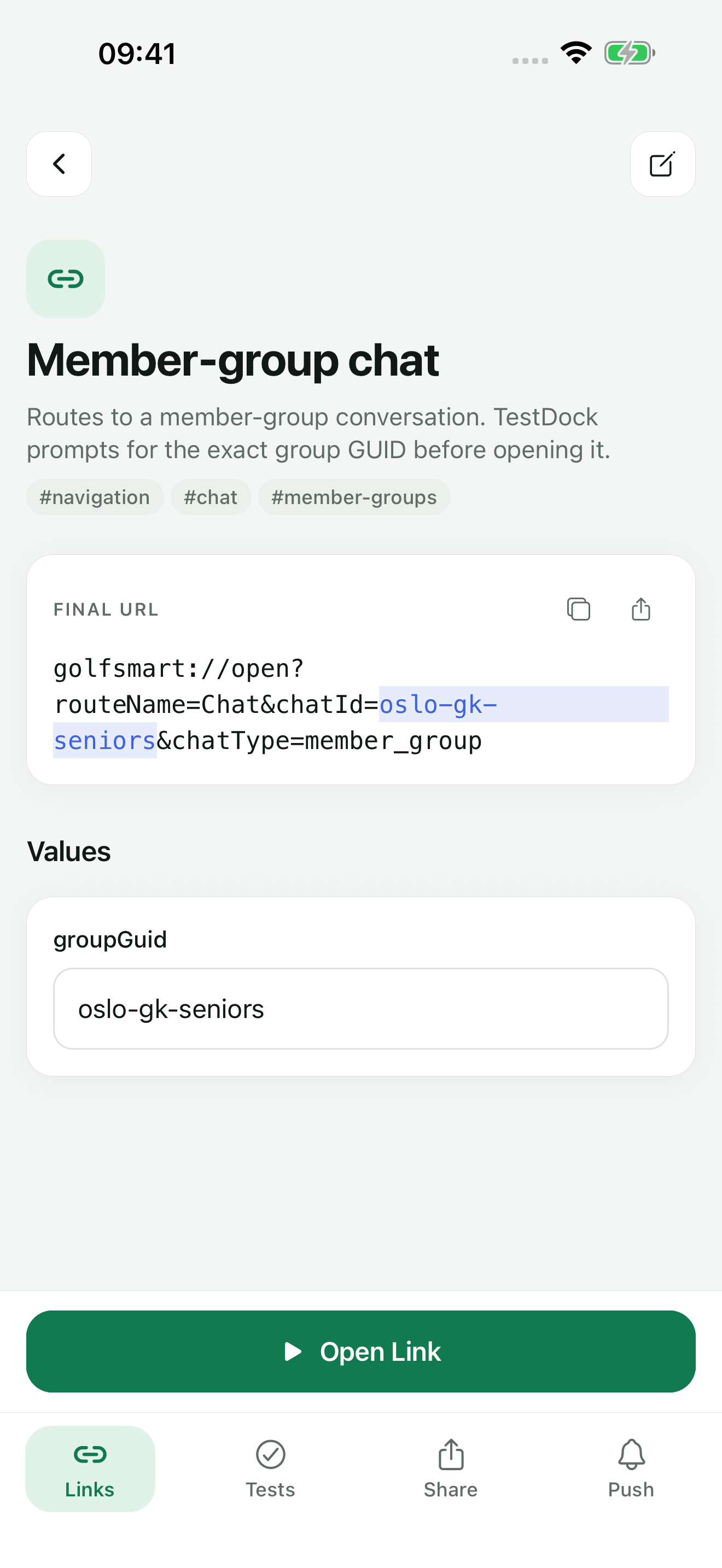
In TestDock a deep link is a saved record with a name, description, URL template, tags, and a favorite flag. Parts of the URL that change go in double braces, for example myapp://orders/{{orderId}}?tab={{tab}}, and the editor lists the detected variables as you type.
Default values are entered one NAME=value per line. On the link's detail screen, every variable gets its own field under Values, showing its default or marked Required, and the Final URL updates as you type. Values are URL-encoded when they are inserted, so spaces and symbols do not break the link. Built-in values such as {{$uuid}}, {{$timestamp}}, {{$isoTimestamp}}, {{$randomInt}}, and {{$randomString}} are generated by TestDock and need no default.
The play button on a saved link opens it directly when every value is known; otherwise it opens the detail screen to collect the missing values. Open Link stays disabled until every variable has a value and the final URL is valid, so a half-filled URL is never sent.
Quick open
Open a link someone sent you without saving it first.
Quick open at the top of the Links tab opens any URL you type or paste. When the clipboard holds text, a Paste button appears; on iPhone it is the system paste button, so iOS does not ask to allow pasting. TestDock finds the link in the copied text, for example a message with a URL in it, and opens it.
Copied text with two or more links offers Save all, which saves the new ones with generated names and skips links already saved. You can also share text or a link into TestDock from Slack, Mail, Safari, or another app; the first link in it arrives in Quick open of your current app profile.
- The last five opened URLs are listed, each marked opened or failed, with a button to save it as a link
- Long-press the TestDock icon for Quick open and up to three saved links, favorites first
- Custom schemes from links that open successfully are added to the app profile
Opening links
Open through the operating system and keep a record.
Open Link hands the final URL to iOS or Android, the same way a tap in another app would. TestDock records the result for that link: accepted when the system took the request, or rejected when the system refused it. Recent opens on the detail screen lists each result with the time and the exact URL that was sent.
Saved links can be searched by name, URL, or tag, filtered to favorites, edited, and duplicated, and favorites stay at the top of the list. The detail screen can also copy the final URL or share it through the system share sheet, which is useful when a teammate needs the exact link that was tested.
Limits
What an accepted result does and does not tell you.
Accepted means the operating system took the open request. TestDock cannot see which app opened or which screen it showed, so you check the route by looking at the app. A scenario step can record that check as pass or fail with a screenshot.
A URL needs a scheme followed by ://, cannot contain spaces, and a web link needs a host. Quick open, deep-link templates, variables, opening, and history are all in the free version for one app profile.
Best for
Where this workflow fits.
- Custom URL schemes with repeated parameters
- Universal links and Android app links that should open installed content
- Debugging routes without rebuilding each URL by hand
Profiles and logs stay on the device, provider credentials use platform secure storage, and exports omit secrets.
Relevant capabilities
What TestDock brings to the job.
Practical workflow
From setup to a reviewed result.
Register the app's schemes
Add each custom URL scheme to the app profile, such as a release scheme and a debug alias.
Save the route as a template
Replace the changing parts with {{variables}} and add default values, one NAME=value per line.
Fill in values and open
Enter any value that has no default, or replace a default for this open, check the Final URL, and tap Open Link.
Check the app and the history
Confirm the app reached the right screen, then use the open history to see which URL was sent and whether the system accepted it.
Useful in practice
Direct answers
Questions about deep-link tester.
How does TestDock test mobile deep links?
TestDock opens any URL you paste or type through the operating system on the real device, and keeps reusable deep links inside the profile for the app that owns them. Custom schemes and web links can use saved parameters, defaults, tags, favorites, and open history.
Can I change a default value for one test?
Yes. On the detail screen every variable has a field; type a value to use it for this open, or leave the field empty to use the saved default. Edit the link to change the default itself.
Are variable values URL-encoded?
Yes. Values inserted into a {{variable}} are URL-encoded. Text you type directly into the template is sent as written.
Is deep-link testing included in the free version?
Yes. The free version includes Quick open, Paste, sharing links in, and complete deep-link creation, launching, and history for one app profile. Pro adds more profiles and AASA and assetlinks inspection.
Can a deep link be part of a longer test?
Yes. A scenario step can open one of the profile's saved deep links during the run, followed by steps that check the screen it reached. The free version includes one scenario of your own; Pro makes them unlimited.
Go deeper
Save reusable custom schemes and web links, resolve their parameters, open them on device, and inspect association files.
Read Test deep links and app associationsFree & Pro: what’s included
Available on the App Store and Google Play. Free includes one app profile with unlimited saved links, Quick open, Paste, sharing links in, home-screen shortcuts, and the sample scenario plus one scenario of your own. A one-time Pro purchase unlocks unlimited profiles and scenarios, share fixtures, push testing, association inspection, links created from an apple-app-site-association file on iPhone, and profile or scenario import and export.