Direct answer
What evidence can TestDock retain for a manual test case?
TestDock turns a short mobile QA checklist into an ordered scenario with observable outcomes. Each step can pass, fail, or skip, with notes and screenshot evidence, and a completed run becomes an immutable result that can be reviewed or shared. Free includes the sample scenario and one scenario of your own; TestDock Pro makes scenarios unlimited.
Why a runner
A checklist in a document does not record what happened.
Release smoke tests often live in a spreadsheet or a notes page. The steps are written down, but the result is not: which step failed, what the tester saw, and the screenshot that shows it end up scattered across chat threads and photo galleries.
TestDock runs those checks on the phone, one step at a time, and saves the outcome of every step with the run.
Building a scenario
Ordered steps, each with an expected result.
A scenario has a name, a description, an estimated time in minutes, and an ordered list of steps. Each step has a type, a title, instructions, an expected result, and a Required switch. Steps can be moved up or down, duplicated, or deleted.
Start from a blank scenario or from the Smoke test or Deep-link validation template. With Pro, Add Example Scenarios builds short deep-link checks from links already saved in the profile.
- Instruction and checklist steps for things the tester does and verifies
- Deep-link steps that open one of the profile's saved links during the run
- URL steps that open any URL you enter
- Expected result and note steps for checking state and recording observations
Running
Pass, fail, or skip each step, with notes and photos.
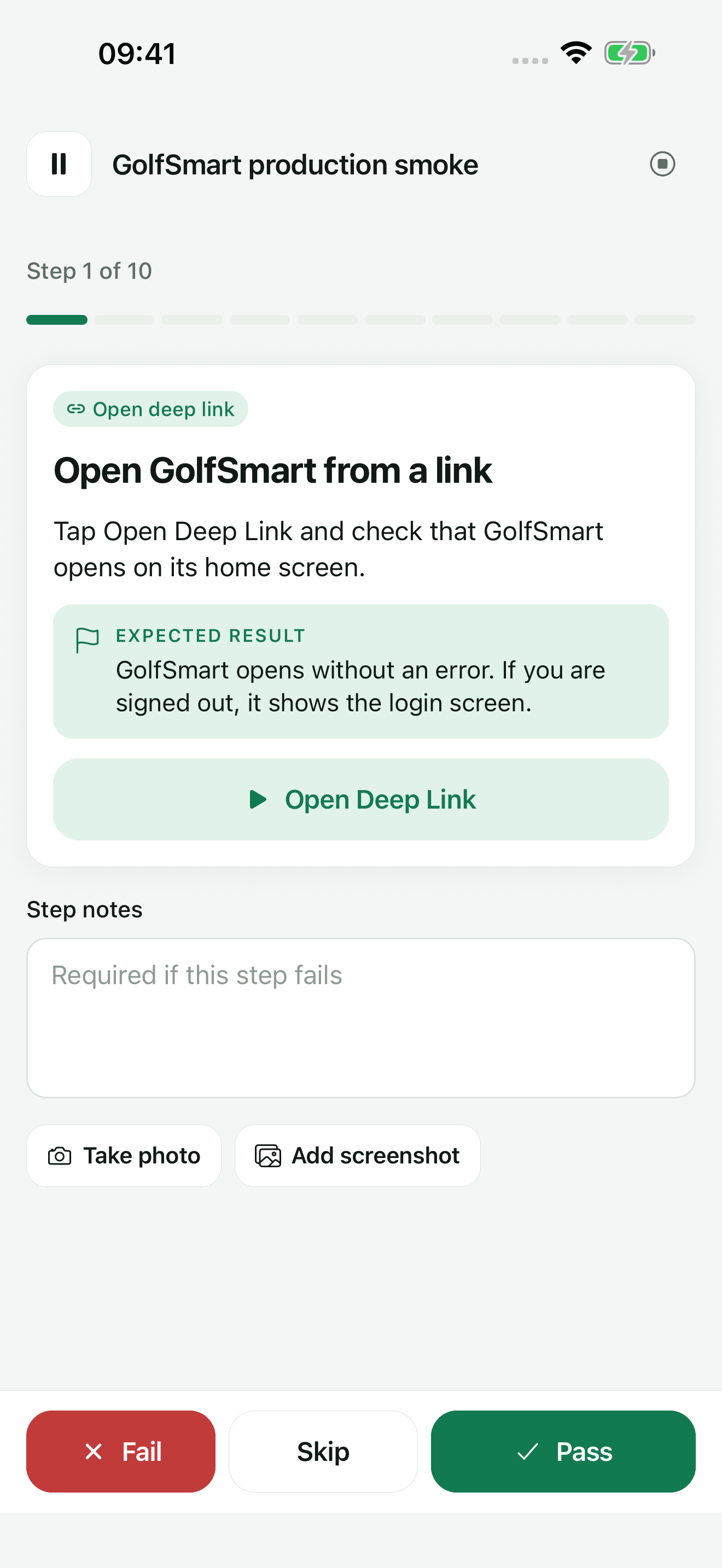
Start Scenario walks through the steps in order. Link steps have a button that opens the link through the operating system. Each step is marked Pass, Fail, or Skip, with Step notes, and a required step cannot be failed without a note. Take photo uses the camera, and Add screenshot attaches an image from the photo library to the current step.
A run can be paused and resumed later from the scenario's run history, or cancelled while keeping the steps already recorded. Each run keeps a copy of the scenario as it was when the run started, so later edits do not change past results.
Results
Share the result, then rerun only what failed.
The result screen shows the passed, failed, and skipped counts, the duration, the device model, each step's outcome and notes, and the attached evidence. Share it as Markdown, JSON, plain text, or PDF; the PDF includes the evidence images. In exported notes and expected results, Bearer tokens and token, password, secret, or API-key values in URL query strings are replaced with [REDACTED].
Rerun failed steps starts a new run with only the steps that failed, and Duplicate as new run repeats the whole scenario. With Pro, scenarios can be shared as JSON one at a time or all together, including the deep links they reference but not run history or evidence.
Test links
Start a run from a link in the ticket.
Copy test link on a scenario produces a testdock://run link. Paste it into a ticket or a message. Opening it on a phone with TestDock and the matching scenario shows that scenario and starts a run after one tap. The link can also carry run values, for example orderId=1234, which fill the matching variables in the scenario's link steps.
Some issue trackers only make http and https links clickable, so a testdock:// link may appear as plain text there.
Free and Pro
One scenario is free.
TestDock Free includes the sample scenario and one scenario of your own. You can create it, run it, attach photos and screenshots, and share the result report. TestDock Pro, a one-time purchase, makes scenarios unlimited and adds scenario import and export.
Best for
Where this workflow fits.
- Release smoke tests that must be repeated the same way on each build
- Deep-link routes where a person has to confirm the screen that opened
- Handing a developer a failed step with the note and photo attached
- Starting the right scenario from a test link pasted into a ticket
Profiles and logs stay on the device, provider credentials use platform secure storage, and exports omit secrets.
Relevant capabilities
What TestDock brings to the job.
Practical workflow
From setup to a reviewed result.
Write the steps
Add ordered steps with instructions and an expected result, and mark steps Required where a failure must be explained.
Add the entry points
Add steps that open a saved deep link or a URL so the run opens the routes it checks.
Run on the device
Mark each step Pass, Fail, or Skip, add notes, and attach a photo or an existing screenshot.
Share and rerun
Share the result, and after the fix use Rerun failed steps to check only what broke. Copy test link puts the scenario in the ticket for the next run.
Useful in practice
Direct answers
Questions about manual test-case runner.
What evidence can TestDock retain for a manual test case?
TestDock turns a short mobile QA checklist into an ordered scenario with observable outcomes. Each step can pass, fail, or skip, with notes and screenshot evidence, and a completed run becomes an immutable result that can be reviewed or shared. Free includes the sample scenario and one scenario of your own; TestDock Pro makes scenarios unlimited.
Can I pause a run and finish it later?
Yes. Pause keeps the run at the current step, and Resume in the scenario's run history continues from there.
Can I rerun only the steps that failed?
Yes. Rerun failed steps on the result screen starts a new run containing just the failed steps, while the original result stays in the history.
Can teammates use the same scenarios?
Yes, with Pro. Share Scenario JSON exports one scenario and Share all exports the collection, including referenced deep links. A teammate with TestDock Pro adds them with Import package. To have someone run a scenario they already have, send a test link instead.
Does a scenario tap through my app automatically?
No. Link steps open a URL through the operating system, and every other action and check is done by the tester, who records the outcome.
Go deeper
Configure provider-specific push targets, reuse payload templates, and combine delivery checks with observable manual scenarios.
Read Test push delivery and repeatable app flowsFree & Pro: what’s included
Available on the App Store and Google Play. Free includes one app profile with unlimited saved links, Quick open, Paste, sharing links in, home-screen shortcuts, and the sample scenario plus one scenario of your own. A one-time Pro purchase unlocks unlimited profiles and scenarios, share fixtures, push testing, association inspection, links created from an apple-app-site-association file on iPhone, and profile or scenario import and export.