Direct answer
What can TestDock test on a mobile device?
TestDock is an on-device mobile app testing tool for focused integration and smoke tests. It keeps deep links, share fixtures, push setup, notification templates, manual scenarios, and recorded outcomes attached to a persistent profile for each installed app. Deep-link testing, the sample scenario, and one scenario of your own are free for one app profile; unlimited scenarios, share fixtures, and push testing are part of TestDock Pro.
What it covers
The entry points that are slow to test by hand.
Many mobile release problems appear where something outside the app hands it control: a link opened from an email, a file shared from another app, a push notification, or a route a tester has to reach the same way on every build. TestDock is built for those entry points.
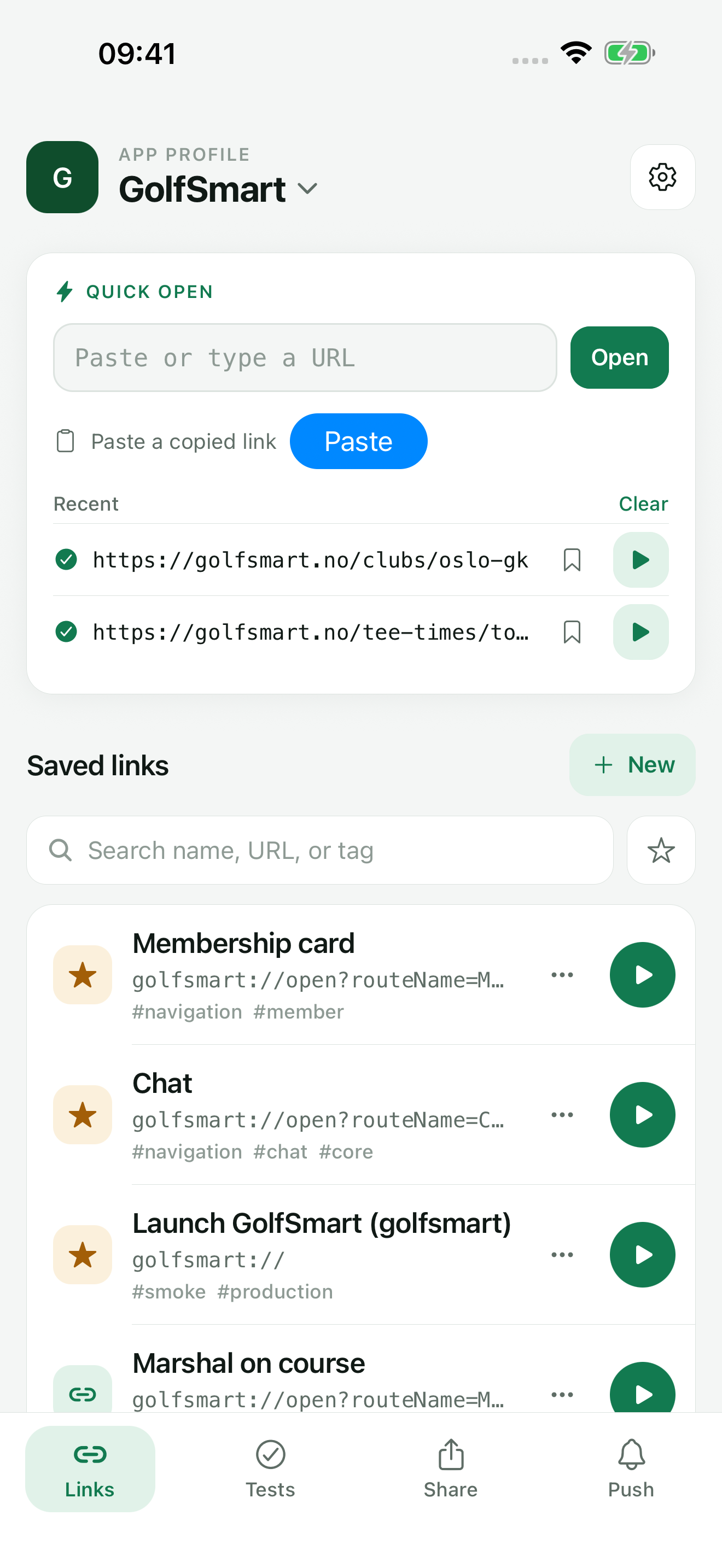
You install TestDock on the phone you test with. From there it opens pasted or saved links through the operating system, opens the system share sheet with saved inputs, sends test pushes directly to the push provider, and walks a tester through ordered manual checks. Each area has its own tab in the app profile: Links, Tests (scenarios), Share, and Push. TestDock reopens the last profile you used on the Links tab.
- Links: Quick open for any pasted or typed URL, custom URL schemes and https links with {{variables}}, default values, tags, favorites, open history, and home-screen shortcuts
- Share (Pro): saved text, URL, and file inputs opened in the system share sheet
- Push (Pro): Expo Push, Firebase / FCM, or, on iOS, APNs setups, device-token targets, reusable templates, pre-send checks, and a delivery log
- Tests: ordered manual steps marked pass, fail, or skip, with notes, photo evidence, shareable reports, and test links that start a run from a ticket. The sample scenario and one of your own are free; Pro makes scenarios unlimited
App profiles
Every app you test gets its own profile.
Everything in TestDock belongs to an app profile: the app's name, its bundle identifier on iOS or package name on Android, its custom URL schemes, its associated or app-link domains, and the links, share inputs, push setups, and scenarios you create for it. If you test a client app and an internal app on the same phone, each gets a profile, and a push token saved in one never shows up in the other.
A profile belongs to the platform TestDock is running on. On an iPhone you create iOS profiles and see iOS options such as APNs and notification category IDs; on Android you see Android options such as notification channel IDs and assetlinks.json inspection.
With Pro, a profile can be exported to a file and imported on another device. Provider credentials and device tokens are left out of the export, so they are entered again on the new device.
Free and Pro
Deep links and one scenario are free. Pro is a one-time unlock.
The free version includes one app profile with unlimited saved links, Quick open, Paste, sharing links in from other apps, and home-screen shortcuts. It also includes the sample scenario and one scenario of your own that you can create, run, attach photos to, and share results from.
TestDock Pro is a one-time in-app purchase. It adds unlimited app profiles and scenarios, share-input testing, push testing, AASA and assetlinks inspection, links created from an AASA file on iPhone, and import and export of profiles and scenario packages.
Limits
What TestDock reports and what you confirm yourself.
TestDock works through the operating system, not inside the app under test. It reports whether the system accepted a link, that the share sheet opened and closed, and whether a push provider accepted the request. Whether the right screen appeared is something the tester sees and records, which is what scenario steps are for.
It does not tap through another app's UI, record that app's network traffic, sign into it, or switch its backend environment. There is no TestDock account or server: profiles, logs, and results stay on the phone until you export or share them.
Best for
Where this workflow fits.
- Developers checking links, pushes, and share entry points on a real iPhone or Android phone
- Testers who repeat the same short release checks on every build
- Anyone testing several apps from one phone who needs their links, tokens, and results kept apart
Profiles and logs stay on the device, provider credentials use platform secure storage, and exports omit secrets.
Relevant capabilities
What TestDock brings to the job.
Practical workflow
From setup to a reviewed result.
Create a profile for the app
Enter the app name, its bundle identifier or package name, and each custom URL scheme it registers.
Save the entry points you retest
Add deep links with variables and a scenario, and, with Pro, share inputs, push setups and templates, and more scenarios.
Run them on the phone
Open links, share sheets, and test pushes from TestDock and watch what the app under test does.
Record and share the outcome
Mark scenario steps pass, fail, or skip with notes and photos, then share the report as Markdown, JSON, text, or PDF.
Useful in practice
Direct answers
Questions about mobile app testing tool.
What can TestDock test on a mobile device?
TestDock is an on-device mobile app testing tool for focused integration and smoke tests. It keeps deep links, share fixtures, push setup, notification templates, manual scenarios, and recorded outcomes attached to a persistent profile for each installed app. Deep-link testing, the sample scenario, and one scenario of your own are free for one app profile; unlimited scenarios, share fixtures, and push testing are part of TestDock Pro.
Does TestDock replace XCTest, Espresso, or Maestro?
No. Those frameworks automate UI inside your own build. TestDock is a manual tool for the entry points around an app: links, shared inputs, pushes, and step-by-step checks that a person runs on a real phone.
Do I need a computer or cable while testing?
No. TestDock runs on the phone itself. Links and share sheets open locally; push sends and association inspection need an internet connection.
Can I test more than one app?
The free version has one app profile. With TestDock Pro you can create a profile for every app you test, each with its own links, push setups, share inputs, and scenarios.
Can I open a link someone sent me without saving it?
Yes. Paste or type it into Quick open on the Links tab, or share it into TestDock from Slack, Mail, Safari, or another app. The last five URLs you opened stay listed with a button to save each one as a link.
Where is test data stored?
On the device. Push credentials and device tokens are kept in the operating system's secure storage and are left out of exports, and the push log shows only a shortened form of each token. TestDock has no account or sync service.
Go deeper
Create a persistent profile for an installed mobile app and record the schemes and platform metadata its tests depend on.
Read Set up your first TestDock app profileFree & Pro: what’s included
Available on the App Store and Google Play. Free includes one app profile with unlimited saved links, Quick open, Paste, sharing links in, home-screen shortcuts, and the sample scenario plus one scenario of your own. A one-time Pro purchase unlocks unlimited profiles and scenarios, share fixtures, push testing, association inspection, links created from an apple-app-site-association file on iPhone, and profile or scenario import and export.