Capability overview
How can I use cross-format spreadsheet comparison in Diff Anything?
Compare Excel (XLS, XLA, XLT, XLSX, XLSM, XLTX, XLTM, XLAM, and XLSB), OpenDocument (ODS and OTS), and Apple Numbers workbooks row by row—even when the two formats differ. Rows are matched by their content, so an inserted row is one added row and a changed row names the cells that changed on each side; Match rows by matches a sheet's rows by key columns instead, with duplicate keys reported as warnings. Formulas are compared between two workbooks of the same format, so a changed formula counts even when its result stays the same. Open a CSV or TSV file beside a workbook to check an export against the sheet it came from: the first sheet is used by default, and Compare with sheet picks another. Formatting, charts, macros, and workbook layout are not compared.
Spot meaningful code changes with Smart Diff across 117 editor languages. Switch to Line Diff whenever you want an exact line-by-line review. Both views keep syntax highlighting and editing close at hand. Ignore rules leave timestamps, IDs, comments, or fixed columns out of a text comparison, and Align these lines pairs two lines by hand where the automatic match is not the one you want.
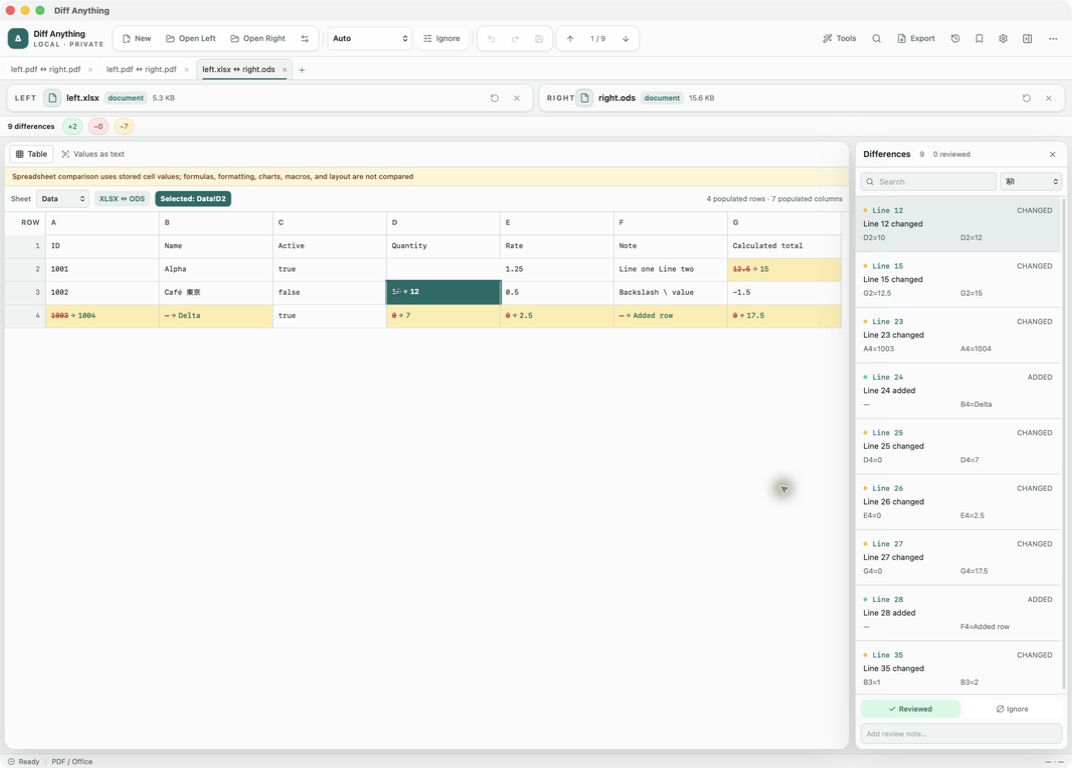
Stored values
What a stored cell value is, and why it matters
Spreadsheet files normally save the result of each formula next to the formula itself. Diff Anything reads those saved results, so a cell that holds 1250 is compared as 1250 whether it was typed in or calculated. Between two workbooks of the same format, such as two XLSX or two ODS files, it also reads the formulas, and a cell whose formula changed is a difference even when its result is the same. A note says whether formulas were compared.
That makes the comparison useful when a file has passed through another program. A budget saved from Excel to ODS, a Numbers sheet exported for a colleague on Windows, or an XLSB report rebuilt as XLSX can be checked cell by cell without opening either application and without converting anything first.
Because cell values go through the text comparison, the Ignore menu applies to them. Turn on Ignore case or Ignore whitespace when two exports differ only in capitalisation or stray spaces.
Table and text views
Reading the result in Table or Values as text
Workbooks open in PDF / Office mode and start in the Table view. Use the Sheet menu to switch sheets. Matched rows are shown side by side with their row number in each workbook, added and removed rows are marked with their sign and colour, and the changed cells of a changed row are marked, each with its value and formula.
Values as text lists each sheet as lines like C14=1250. It is the quickest way to search for a value or to read a long run of changes in order.
Each difference is one row, named by the cells that differ on each side, such as Summary row 5 changed: B5, D5, or Summary row 5 → 6 changed: B5 → B6 for a row that also moved down. A removed row whose cells come back elsewhere is reported as moved.
Matching and limits
Rows are matched by content or by key columns
Sheets are paired by name, so a sheet in another position is not a difference, and rows are matched by their content: an inserted row is one added row, and the rows after it still match. When rows were sorted differently, choose a key column under Match rows by, or type several header names or column letters under Key columns. Rows with the same key are then compared wherever they are, and a key a sheet has more than once is a warning.
Number formats, fonts, colours, charts, macros, and layout are left out. Formulas are compared only between two workbooks of the same format, not between formats or in Numbers files. Open the original application when one of those is what you need to check. A CSV or TSV export can be paired with a workbook: it is compared with the first sheet, or with the sheet you choose under Compare with sheet, and values are matched as stored text, so 20 and 20.0 count as different.
Free and Pro
Workbook size and what Pro adds
The free plan shows the complete workbook result for files up to 5 MB per side, within 10 new comparison sessions per day. Pro opens larger workbooks and adds HTML, JSON, or Markdown reports of the changed cells, comparison history, and saved profiles for workbooks you check again every month.
A saved profile keeps the two file locations and your review marks. When next month's version replaces the file at the same path, opening the profile compares it against the other side straight away.
In the workflow
How to use it
Open both workbooks
Choose any pair of XLS, XLSX, XLSB, ODS, or Numbers files, or a CSV export and its workbook. The formats do not have to match.
Pick a sheet
Use the Sheet menu in the Table view, and choose a key column under Match rows by if the rows were re-sorted. Changed cells are marked on both sides.
Step through the rows
Press F8 and F7, or click entries in the Differences pane, to jump from one changed row to the next.
Record the outcome
Mark each cell Reviewed or add a note. With Pro, export the list for whoever sent the file.
Useful in practice
When to use it
Related manual
Compare folders, spreadsheets, documents, and images
Review cross-format spreadsheet values, release trees, documents, and visual assets with purpose-built navigation, safety checks, and rollback.
Read the guideDirect answers
Questions about cross-format spreadsheet comparison.
If I change a formula but its result stays the same, is it reported?
Yes, when both workbooks are the same format, such as two XLSX files. Between different formats, or with Numbers files, only the saved results are compared, so the cell compares as equal.
Does inserting a row mark the rest of the sheet as changed?
No. Rows are matched by their content, so the inserted row is one added row and the rows after it still match. If the rows were re-sorted, match them by a key column under Match rows by.
Do I need Excel or Numbers installed?
No. Diff Anything reads the workbook files itself on Mac and Windows.
Can I compare a Google Sheets spreadsheet?
Download it as XLSX or ODS first. Diff Anything compares workbook files on your computer.
Free & Pro: what’s included
Available on the Mac App Store and Microsoft Store. Free desktop use lets you try every comparison engine for files up to 5 MiB per side and 10 new comparison sessions per local day; collection previews show the first 100 items, binary comparisons the first 100 byte differences, and PDF previews the first 3 pages. Plain text, JSON, and Jupyter notebook comparison are complete, and opening files from Finder or File Explorer, diffanything:// links, and AppleScript are free. The free CLI supports text, JSON, and notebooks. A one-time Pro purchase removes the preview and session limits and unlocks larger sources within technical limits, saved profiles and history, saving folder snapshots, report export and printing, JSON Patch export, applying patches, three-way merge and conflict resolution, the Git merge driver and merge tool, folder synchronization, batch manifests, trusted preprocessors, and every CLI mode.