Direct answer
Can Diff Anything compare CSV files locally?
Diff Anything recognizes CSV as structured tabular data rather than an arbitrary sequence of lines. That makes row and field changes easier to inspect, while Pro profiles preserve the rules, review state, and reporting choices that matter for the dataset.
Matching rows
Match rows by a key column, not by line number.
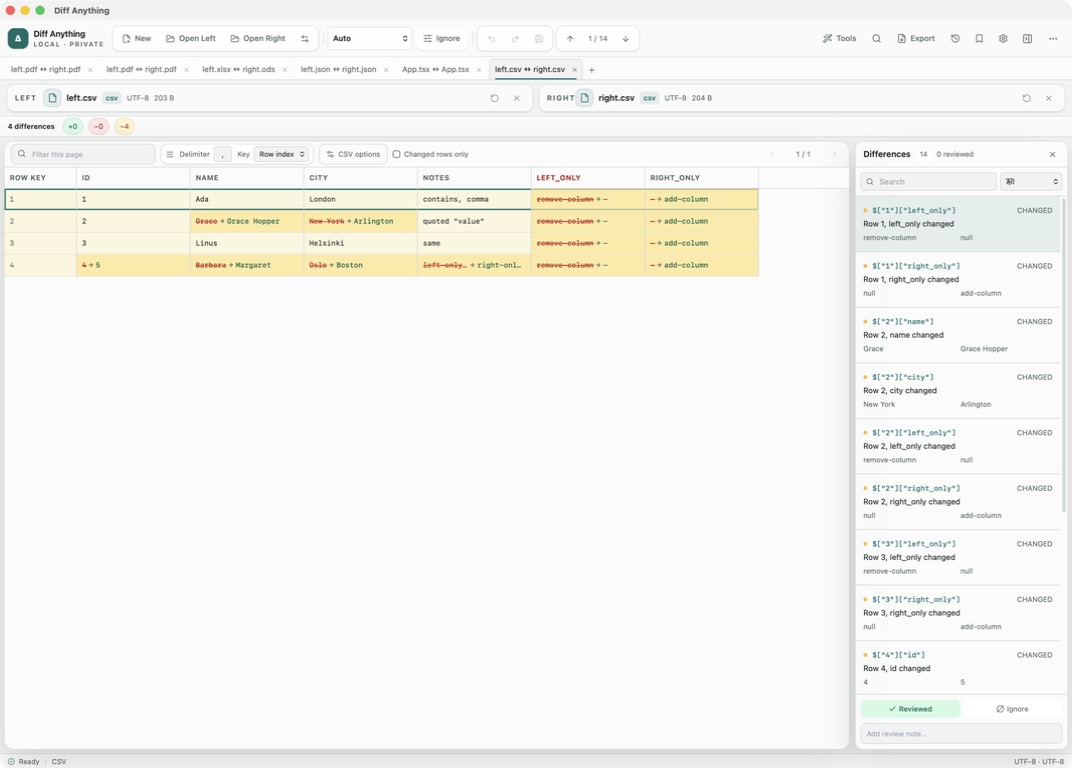
When one row is inserted near the top of a CSV export, a line diff reports every row below it as changed. Diff Anything compares rows by position by default, and you can switch to a key column from the Key menu in the toolbar. Rows with the same key are then paired, wherever they appear in each file.
For records identified by more than one field, enter them under Key columns (comma-separated), for example account_id, region. If a key value appears more than once in a file, the result shows a duplicate-key warning.
Columns and parsing
Columns are matched by header name.
With First row has headers on, columns are matched by their header, so a column moved to a different position is not a change. Added and removed columns are highlighted. Turn the option off to compare the columns as Column 1, Column 2, and so on.
The delimiter is detected separately for each file: comma, tab, semicolon or pipe, so a comma-separated export can be compared with a semicolon-separated one. To override detection, type a character in Delimiter in the toolbar; it is then used for both files, and \t means tab. Quote character is under CSV options, and quoted values may contain line breaks.
Reducing noise
Leave out the columns you expect to change.
Under CSV options, Columns to ignore (comma-separated) removes fields such as updated_at or a checksum from the comparison. Turn off Case-sensitive values to treat Paris and PARIS as equal, and turn on Trim cell whitespace to ignore spaces around values.
Changed rows only hides unchanged rows, and the filter box searches the current page. There is no numeric tolerance in CSV mode; values are compared as text.
- First row has headers
- Case-sensitive values
- Trim cell whitespace
- Key columns (comma-separated)
- Columns to ignore (comma-separated)
- Changed rows only
Large files
Page through large exports and step through every change.
Results are shown 500 rows per page, with Previous and Next buttons to move between pages. The difference list and difference navigation cover every page: selecting a difference opens the page that holds it, for up to 50,000 changed values. The filter box searches the page you are viewing. Each side can hold up to 500,000 rows and 2,000,000 cells.
The free plan shows the first 100 rows of the result for files up to 5 MB. Pro shows every page, removes the 5 MB limit, and adds a CSV changed rows export. A CSV or TSV file opened beside an Excel, OpenDocument or Numbers workbook is compared with one sheet of it by cell values, in PDF / Office mode.
Best for
Where this workflow fits.
- Checking a database or report export against the previous run
- Comparing CSV files where rows are sorted differently or have new columns
- Reviewing tabular data you cannot upload to a web tool
No accounts, cloud comparison service, analytics, or telemetry.
Relevant capabilities
What Diff Anything brings to the job.
Practical workflow
From setup to a reviewed result.
Open the two CSV files
Choose the old and new export. The delimiter of each file is detected automatically.
Choose a key
Select a key column from the Key menu, or enter several under Key columns, so inserted or re-sorted rows pair correctly.
Ignore expected changes
List timestamp or checksum columns under Columns to ignore and adjust case and whitespace handling.
Review changed rows
Turn on Changed rows only and step through each changed cell; navigation moves to the next page for you.
Useful in practice
Direct answers
Questions about CSV diff tool.
Can Diff Anything compare CSV files locally?
Diff Anything recognizes CSV as structured tabular data rather than an arbitrary sequence of lines. That makes row and field changes easier to inspect, while Pro profiles preserve the rules, review state, and reporting choices that matter for the dataset.
Can Diff Anything compare CSV files with rows in a different order?
Yes. Choose a key column from the Key menu, or enter several key columns, and rows are paired by key instead of by position.
Does column order matter?
No, when the first row has headers. Columns are matched by header name, and added or removed columns are highlighted.
Can I compare semicolon-separated files?
Yes. Semicolons, tabs and pipes are detected automatically, separately for each file, so the two files may even use different separators. To force one delimiter for both files, type it in Delimiter.
How many rows does the free plan show?
The first 100 rows of the result, for files up to 5 MB each. Pro shows every page.
Go deeper
Choose sources, understand automatic detection, and select the engine that answers the question you are actually asking.
Read Choose the right comparison modeFree & Pro: what’s included
Available on the Mac App Store and Microsoft Store. Free desktop use lets you try every comparison engine for files up to 5 MiB per side and 10 new comparison sessions per local day; collection previews show the first 100 items and PDF previews show the first 3 pages. The free CLI supports text and JSON. A one-time Pro purchase removes the preview and session limits and unlocks larger sources within technical limits, saved profiles and history, report export, three-way merge, folder synchronization, batch manifests, trusted preprocessors, and every CLI mode.