Capability overview
How can I use background systems in Screen Studio Kit?
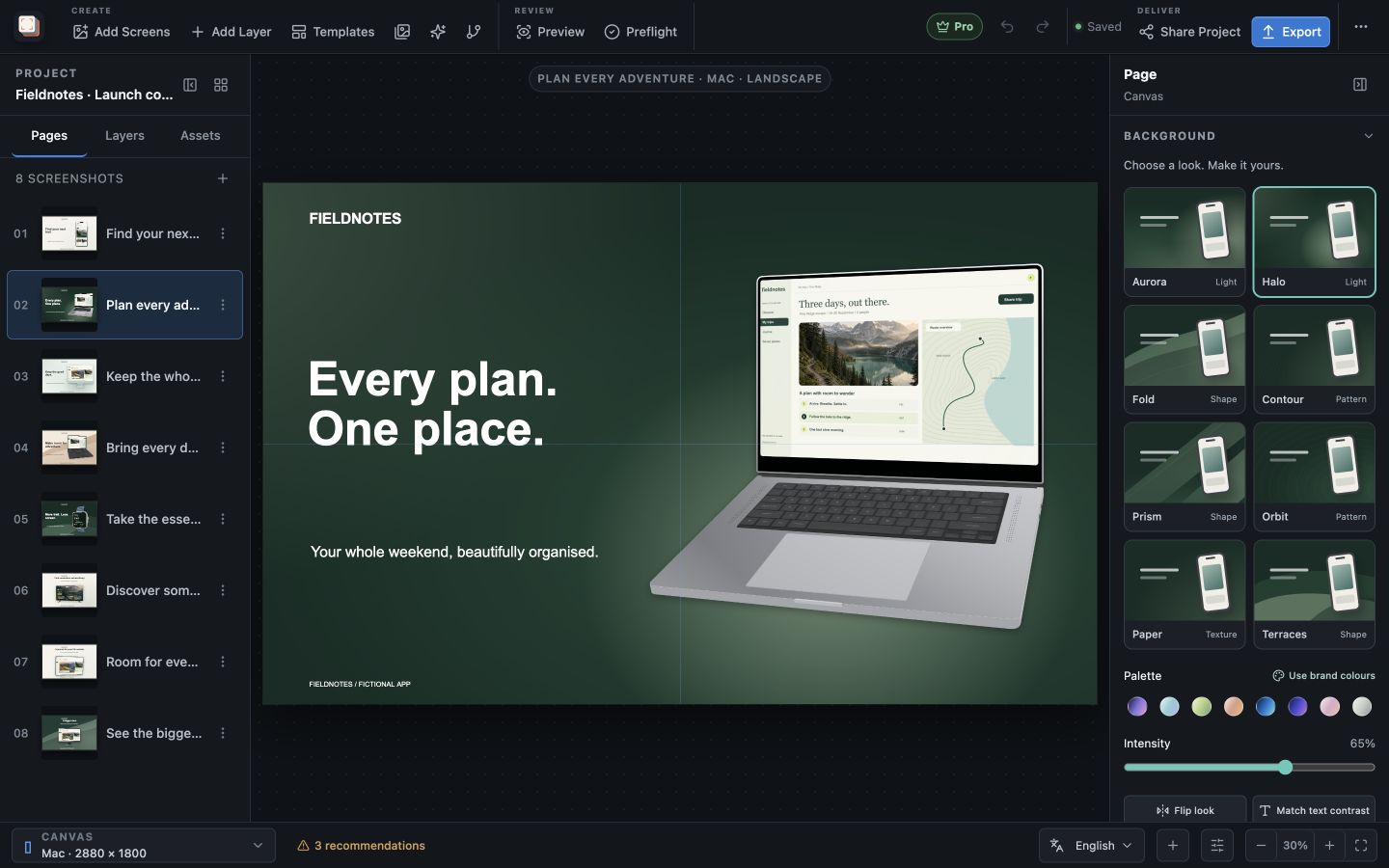
Choose from eight editable looks: Aurora, Halo, Fold, Contour, Prism, Orbit, Paper, and Terraces. Change the palette, use brand colours, adjust intensity, flip the look, and apply it across pages.
Switching looks keeps custom colours. Match text contrast updates the text colour on the current page, and Apply background to all pages gives every page the same background.
Solid, gradient and custom-image backgrounds remain available, including panoramic images across ordered pages.
Background looks
Choose from eight designed looks
Choose Backgrounds at the top of the inspector, or deselect all layers, to open the background gallery for the page: Aurora, Halo, Fold, Contour, Prism, Orbit, Paper and Terraces. Each card previews the look in the current colours behind a simple device-and-headline sketch, so you can compare them before choosing one.
Eight palettes sit below the gallery: Iris, Glacier, Orchard, Clay, Electric, Cobalt, Rose and Stone. Use brand colours takes the primary and secondary colours from Project settings → Brand system instead, and an Accent colour picker under Customise background fine-tunes the look's third colour.
Tuning
Adjust intensity, direction and text contrast
The Intensity slider runs from 0 to 100 percent and controls how strongly the look's shapes show over the base colour. A lower setting gives a calmer field when a detailed capture or a long headline needs attention. Flip look mirrors the design horizontally, moving its emphasis to the other side of the device.
Moving from one look to another keeps your chosen colours, while picking a palette replaces them. Text colour is never changed silently: after switching between a light and a dark look, choose Match text contrast to set every text layer on the page to a readable colour.
At 0 percent only the base colour remains, so the slider also works as a quick way to compare a designed look with a plain field. A full drag of the slider counts as one step in the undo history.
Other styles
Use a solid colour, a gradient or your own image
Customise background → Style also offers Solid, Linear gradient, Radial gradient and Image. Gradients use two colours, and these styles add Noise and Vignette controls. An Image background uses any picture from the asset library, with its own Image opacity.
Span image across ordered screenshot pages turns one wide image into a panorama that continues from page to page in sidebar order, so neighbouring screenshots join up in a store gallery. The inspector shows how many pages the panorama spans, and promotional artwork pages are left out of it.
Across the set
Apply one background to every page
Apply background to all pages copies the current page's background settings to every page in the project. Use it once the first screenshot looks right, then vary individual pages afterwards if the story needs contrast between them. A panorama is not copied by this action; set it up with the panorama option instead.
Keep the headline and device in the calmer part of the look. When the capture is busy, a lower Intensity or a Solid background often does more for readability than a stronger design.
Background looks, palettes, gradients, image backgrounds and panoramas are all included in Free.
In the workflow
How to use it
Open the page background
Deselect all layers or choose Backgrounds in the inspector.
Pick a look and colours
Choose one of the eight looks, then a palette or Use brand colours.
Tune it around the content
Lower Intensity or use Flip look until the capture and headline stand out, then choose Match text contrast if needed.
Apply to the set
Use Apply background to all pages, then adjust any page that needs a different treatment.
Useful in practice
When to use it
Related manual
Create your first screenshot project
Set up target stores, organize assets, create pages, and build a reusable composition that survives the next release.
Read the guideDirect answers
Questions about background systems.
Will changing the background move my screenshots?
No. Background changes affect only the page background. Layers stay where they are.
Does switching looks change my text colour?
No. Choose Match text contrast when you want text layers on the page updated to suit the new background.
Can I use my own background image?
Yes. Choose Image under Customise background → Style and select a picture from the asset library. You can also span it across pages as a panorama.
Can I use my brand colours?
Yes. Set them under Project settings → Brand system, then choose Use brand colours in the background gallery.