Capability overview
How can I use inline copy and rich typography in Screen Studio Kit?
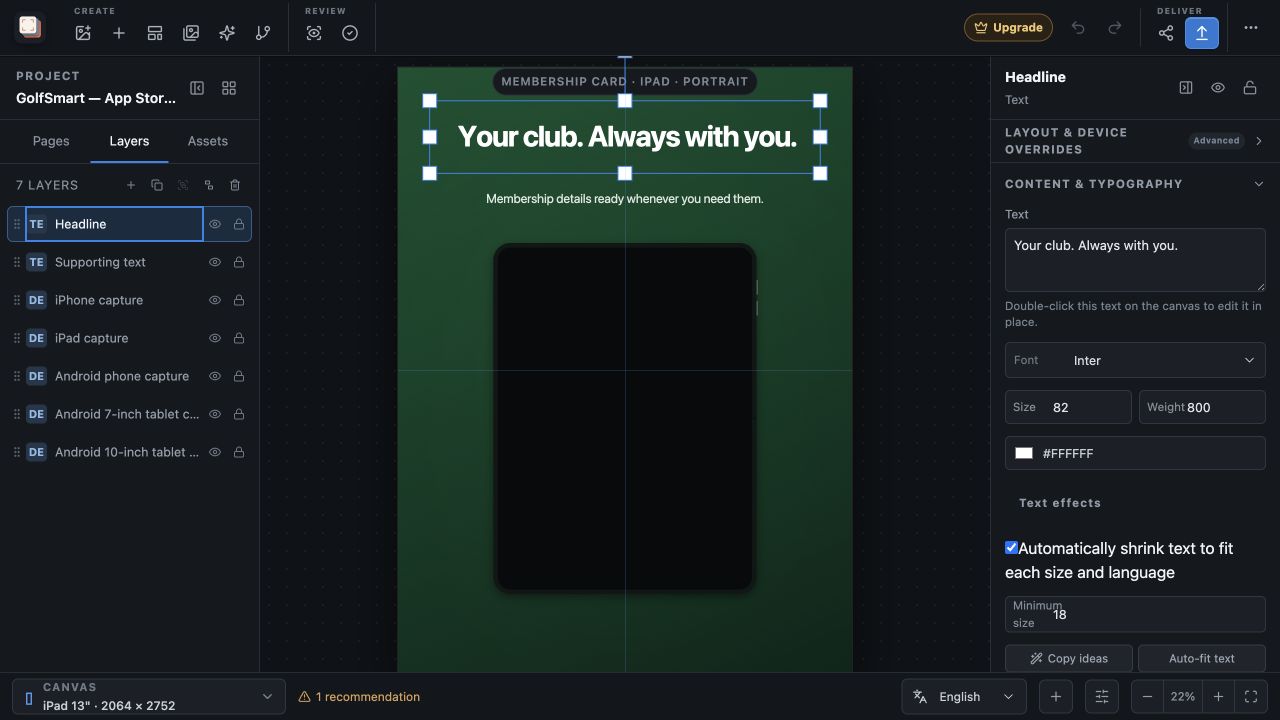
Double-click text on the canvas to edit it in place, import custom fonts, and refine text backgrounds, opacity, padding, corners, outlines, and shadows without leaving the composition.
Auto-fit can shrink text for each output size and language, down to a minimum size you set.
Apply a matching layer style across pages when a treatment needs consistent typography.
Edit on the canvas
Type the headline where it will appear
Double-click a text layer to open an editor directly over it, using the layer's position, size, font and colour. Press Escape or Cmd/Ctrl+Enter when you are done. Writing next to the capture makes line breaks and length easier to judge than a separate text field, and the Text box in the inspector is still there for longer edits.
The canvas editor writes to the language selected in the bottom bar. With a translation selected, you edit that language's wording while the source text stays unchanged, and right-to-left languages open the editor in right-to-left mode.
Press Return inside the editor to start a new line, which is the simplest way to control where a two-line headline breaks.
Type controls
Set the font, size, weight and effects
Content & typography offers Inter, System, Georgia and Monospace, plus any font you import. Import font in the Assets panel accepts TTF, OTF, TTC and OTC files, and imported fonts are kept with the project so the exported image uses the typeface you designed with. Size, Weight and colour sit next to the font choice.
Text effects adds a box behind the words with its own colour, Background % opacity, Padding and Radius, an Outline with its own colour, and a Shadow with its own colour. A semi-transparent box is a practical way to keep a headline readable over a detailed capture or a busy background.
Fit every size
Keep long copy inside its box
Automatically shrink text to fit each size and language reduces the font size when wording would overflow its box, down to the Minimum size you set. Fitting is worked out for every output and language, so a long German headline can shrink on a narrow phone while the English version on iPad keeps its full size.
Preflight warns when text still overflows at a particular size and language, for example when the Minimum size is too large for a translation. The Copy lab's Auto-fit action switches fitting on for every text layer in the project at once.
Consistent style
Carry one text style across the set
Apply style across pages, in the inspector's Layer order section, copies the selected text layer's font, size, colour, effects and fitting settings to every text layer with the same role on every page. Headlines update other headlines and supporting text updates supporting text, while the wording and positions stay as they are.
The Copy lab also suggests headline wording based on your app name and page names, and Build story applies a five-step sequence of headlines across the pages. Use the suggestions as a starting point and replace them with a claim your screenshot actually shows. All of these text tools are included in Free.
In the workflow
How to use it
Write on the canvas
Double-click the headline and type the benefit the screenshot shows.
Choose the type
Pick a built-in font or import your brand font, then set Size, Weight and colour.
Add effects for legibility
Use a background box, outline or shadow if the text sits over detailed artwork.
Fit and apply across pages
Turn on automatic fitting with a sensible Minimum size, then use Apply style across pages for matching headlines.
Useful in practice
When to use it
Related manual
Responsive layouts and localization
Adapt one screenshot system across aspect ratios and languages without turning every output into an unrelated page.
Read the guideDirect answers
Questions about inline copy and rich typography.
Which font files can I import?
TTF, OTF, TTC and OTC files, through Import font in the Assets panel. Imported fonts are stored with the project.
Does editing on the canvas change every language?
No. It changes the language currently selected in the bottom bar. The source text changes only when the default language is selected.
Will automatic fitting make text unreadably small?
Fitting stops at the Minimum size you set. If the text still does not fit, Preflight reports the overflow for that size and language.
Does Apply style across pages change my headline wording?
No. It copies styling to text layers with the same role and leaves their wording and positions unchanged.