Direct answer
How does Diff Anything compare source code?
Diff Anything 1.5 provides two code views. Smart Diff uses language-family-aware token alignment to reduce safe layout-only noise while preserving significant indentation, newlines, strings, comments, and exact changed tokens. Conventional Line Diff remains available for lossless line-by-line review, editing, and apply operations. Both retain normal syntax highlighting, moved-block cues, wrapping, compact context, navigation, and save controls. Smart Diff is not an AST comparison.
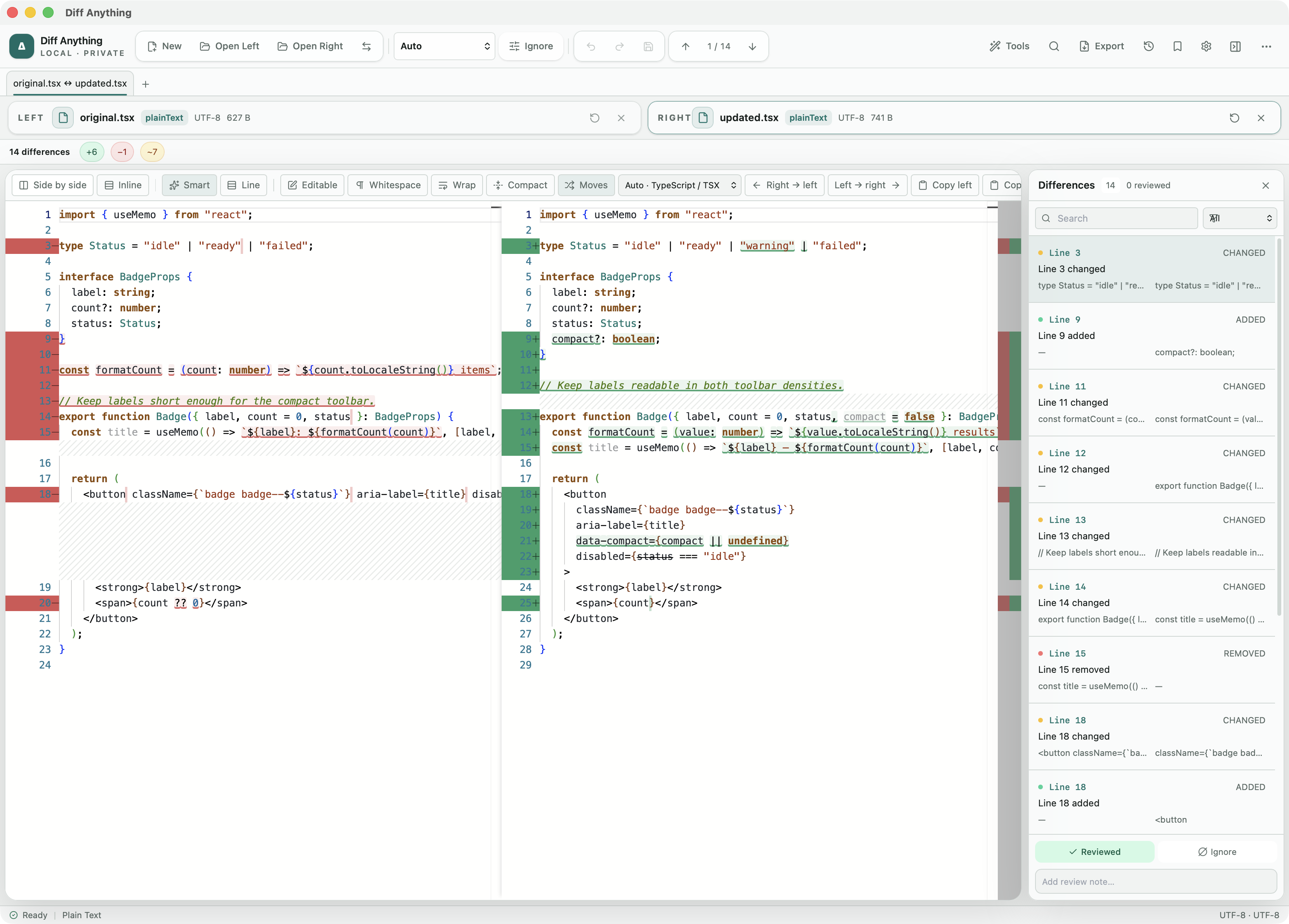
Two views
Smart when layout is noise; exact when lines matter.
Smart Diff is one view option, not a replacement for the conventional diff. It tokenizes both sources using the detected or selected editor language and aligns meaningful tokens across layout changes.
Line Diff remains available beside it. Switching views does not reload the source pair, and exact text editing, directional apply actions, copy controls, moved-block detection, wrapping, and compact context remain part of the same workspace.
- Smart Diff: syntax-aware token alignment
- Line Diff: conventional line-by-line comparison
- Normal syntax highlighting in both views
Languages
The complete editor catalog participates in Smart Diff.
Smart Diff is available for all 117 non-plain-text editor languages. Language-family profiles handle comments, strings, whitespace, indentation, and statement boundaries conservatively instead of applying one whitespace rule to every language.
Version 1.5 adds maintained editor definitions for Ada, Assembly, COBOL, Crystal, CUDA, D, Elm, Erlang, Fortran, GLSL, Haskell, Haxe, HLSL, LaTeX, LLVM IR, OCaml, Raku, and WebAssembly text, alongside Monaco's primary language catalog and existing framework-template support.
- Brace and expression languages can ignore safe layout-only edits
- Python-like languages preserve block indentation
- Shell and configuration formats preserve statement newlines
- Markup and prose-oriented formats preserve visible whitespace conservatively
Detection
Language detection remains visible and overridable.
Diff Anything detects code from native source metadata, exact and compound filenames, extensions, content markers, and shebangs. Shared extensions use content where possible, and embedded templates can retain their implementation-language highlighting.
The language control shows what was selected. Override it when a file is intentionally unusual; use Plain Text when every character and line should be treated without programming-language rules.
Best for
Where this workflow fits.
- Separating meaningful token changes from code reformatting
- Reviewing exact line movement with the conventional diff
- Comparing pasted or extensionless code locally
- Using highlighted text comparison from the desktop, terminal, or Git
No accounts, cloud comparison service, analytics, or telemetry.
Relevant capabilities
What Diff Anything brings to the job.
Practical workflow
From setup to a reviewed result.
Choose sources
Open files or folders, paste content, or use Pro to load a saved profile with known options.
Select a mode
Use automatic detection or explicitly choose text, structured, cross-format spreadsheet, folder, archive, document, image, binary, or API comparison. In code comparisons, switch between Smart Diff and conventional Line Diff without changing sources.
Review and resolve
Navigate stable differences, apply supported changes, or use Pro to resolve three-way conflicts or approve a folder synchronization plan without losing source context.
Save or automate
Use Pro to export a report or retain a profile, invoke the CLI, or wire the comparison into Git and CI.
Useful in practice
Direct answers
Questions about code diff tool.
How does Diff Anything compare source code?
Diff Anything 1.5 provides two code views. Smart Diff uses language-family-aware token alignment to reduce safe layout-only noise while preserving significant indentation, newlines, strings, comments, and exact changed tokens. Conventional Line Diff remains available for lossless line-by-line review, editing, and apply operations. Both retain normal syntax highlighting, moved-block cues, wrapping, compact context, navigation, and save controls. Smart Diff is not an AST comparison.
Does Smart Diff replace the normal line diff?
No. Smart Diff and Line Diff are separate view options, and you can switch between them at any time without reopening the files.
Is Smart Diff an abstract-syntax-tree comparison?
No. It is a syntax-aware token comparison with conservative language-family rules. It does not claim compiler-level semantic equivalence.
How many languages support Smart Diff?
All 117 non-plain-text editor languages in Diff Anything 1.5 support Smart Diff. Plain text keeps the conventional line diff.
Go deeper
Choose sources, understand automatic detection, and select the engine that answers the question you are actually asking.
Read Choose the right comparison modeFree & Pro: what’s included
Available on the Mac App Store and Microsoft Store. Free desktop use lets you try every comparison engine for files up to 5 MiB per side and 10 new comparison sessions per local day; collection previews show the first 100 items and PDF previews show the first 3 pages. The free CLI supports text and JSON. A one-time Pro purchase removes the preview and session limits and unlocks larger sources within technical limits, saved profiles and history, report export, three-way merge, folder synchronization, batch manifests, trusted preprocessors, and every CLI mode.