Capability overview
How can I use three-dimensional device frames in Screen Studio Kit?
Show your app in refined phone, tablet, watch, laptop, desktop and TV frames. Adjust the finish, Turn and Tilt, then export the composition with its lighting and perspective.
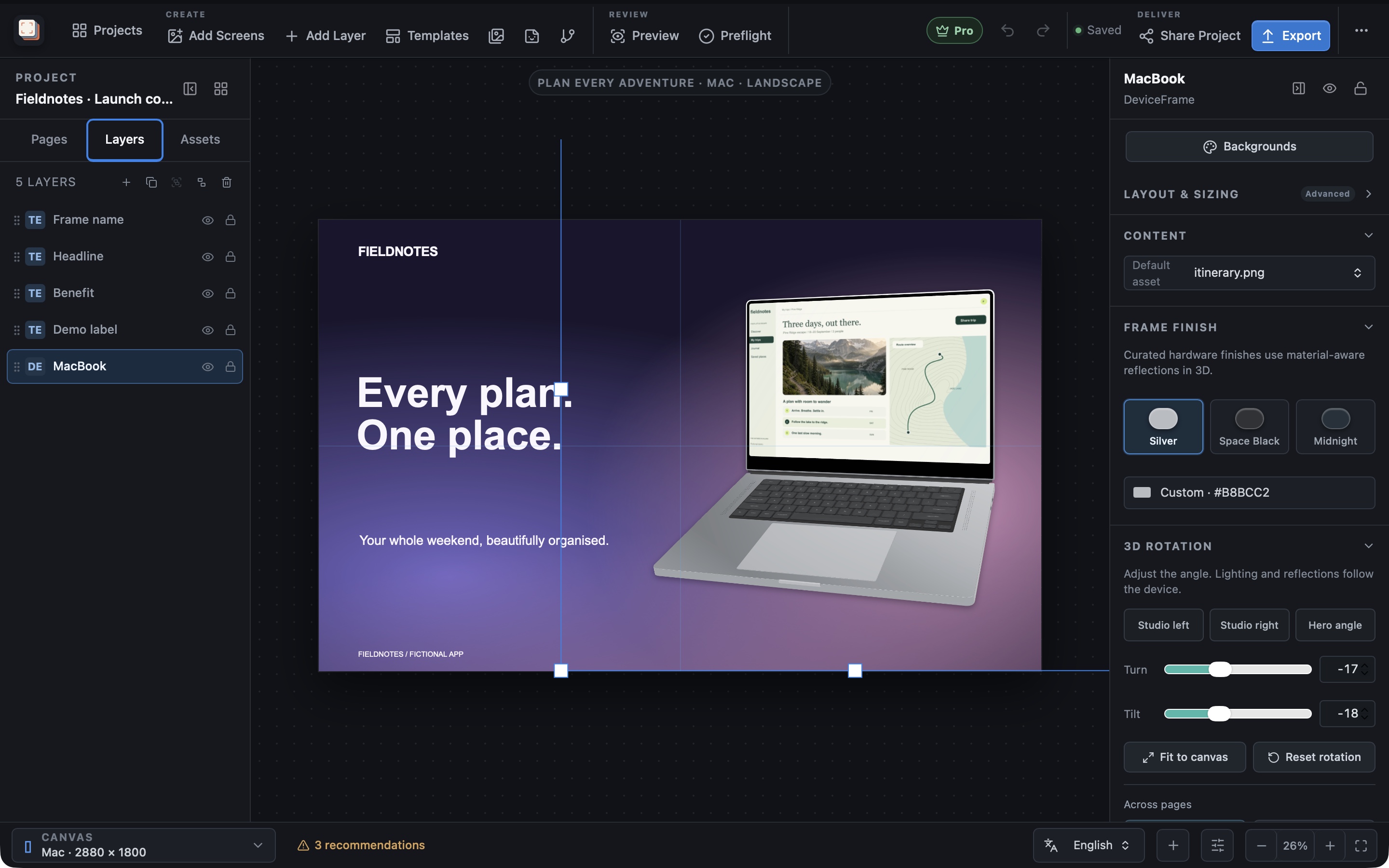
Turn and Tilt remain editable layer properties, with controls to reset the selected frame or every frame in the project.
Studio angle presets, fit-to-canvas and matching-frame appearance controls help keep a whole screenshot set consistent.
Preview, desktop export and the bundled CLI use the same 3D frame renderer. CLI automation requires Pro, the matching installed app and a graphical session with WebGL.
Hardware models
Pick the device that matches your app
The Frame list in the inspector's Device frame section includes Rounded phone, Island phone, Notch phone, Tablet, Android phone, Android tablet, Apple Watch Ultra, Android Watch, MacBook, iMac, PC monitor, Generic laptop and Television. It also has flat Mac window, Windows window, Spatial window and Frameless options, and Automatic for preset, which picks matching hardware for each output size.
Cutout sets None, Island, Notch or Centered camera, while Inset and Radius control how the screen image sits inside the bezel. On Apple Watch outputs, Automatic for preset shows watch hardware and the Frame list is locked, because watch screenshots always include their hardware frame.
Frame finish
Choose a finish that suits the hardware
Frame finish offers colours for the selected model: Cosmic Orange, Deep Blue and Silver for iPhone frames; Silver, Space Black and Midnight for MacBook; seven colours for iMac; Natural Titanium and Black Titanium for Apple Watch Ultra; Silver, Midnight and Rose for Android Watch; and Graphite, Black, White and Clay for the other hardware. A custom colour picker covers anything else.
These curated finishes use material-aware reflections when the frame is shown in 3D. Check the finish again after changing the angle, because the reflections move with the device.
Turn and Tilt
Set the angle with Turn and Tilt
3D rotation has Turn and Tilt sliders from -60° to 60° and three pose presets: Studio left, Studio right and Hero angle. The presets are tuned per device type, so laptops, watches and phones each get angles that suit their shape. Lighting and reflections follow the device as it rotates.
Moderate angles usually work best in a store gallery, because the interface inside the frame has to stay readable at thumbnail size.
A turned device needs more room and casts a wider shadow. Fit to canvas resizes and centres the frame so its hardware and shadow stay inside the canvas, and Reset rotation returns the selected frame to a front view. Turn and Tilt are shared by all output sizes, while Customize layout for this size changes only position and size.
Across pages
Match every frame in the set
Under Across pages, Apply appearance copies the selected frame's finish, shadow and rotation to every frame of the same hardware type on all pages. Reset all rotations returns every device frame in the project to a front view in one step, and both actions can be undone.
Preflight warns when hardware or its shadow is clipped at a specific output size. It also flags any rotated frame while an iPhone output is part of the project, with the advice to reset the rotation or use an unmodified Apple-provided product bezel before App Store submission.
Every device frame, finish and 3D control is included in Free.
In the workflow
How to use it
Choose the hardware
Add a device frame and keep Automatic for preset, or pick a specific model under Device frame.
Pick a finish
Select a finish under Frame finish or set a custom colour that suits your palette.
Set the angle
Start with Studio left, Studio right or Hero angle, then refine Turn and Tilt.
Fit and match the set
Use Fit to canvas, then Apply appearance so matching frames on other pages share the look.
Useful in practice
When to use it
Related manual
Assets, captures, and device frames
Manage source images, replace captures safely, use platform-aware frames, and keep the project portable.
Read the guideDirect answers
Questions about three-dimensional device frames.
How far can a frame be rotated?
Turn and Tilt each range from -60° to 60°. Reset rotation returns a frame to the front view.
Can each output size have a different angle?
No. Turn and Tilt are shared across sizes. Position and size can differ per output with Customize layout for this size.
Why does Preflight warn about a rotated frame when I target iPhone?
When a project includes an iPhone output, Preflight flags rotated frames as a reminder to reset the rotation or use an unmodified Apple-provided product bezel before submitting to the App Store.
Are 3D frames a Pro feature?
No. All device frames, finishes, pose presets and Turn and Tilt controls are available in Free.