Direct answer
Which push providers can TestDock use?
With TestDock Pro, TestDock sends test notifications through Expo Push, Firebase Cloud Messaging, or, on iOS, Apple Push Notification service, using the target and provider setup stored for one app profile. It validates payload size and provider rules before sending, then turns common provider errors into actionable guidance.
Why test directly
A push sent through your backend tests too many things at once.
When a test notification goes through your own server, a failure could be in the server code, the provider credentials, the device token, the payload, or the app's handling of it. Sending the same payload straight to the provider takes the server out of the question, so you can confirm the token, credentials, and app behavior before the backend is ready.
Doing that by hand usually means a curl request from a laptop, a hand-written JSON body, and a freshly generated authorization token. TestDock sends from the phone instead and saves each piece, so the next test takes a few taps.
Building blocks
Targets, providers, templates, and a log.
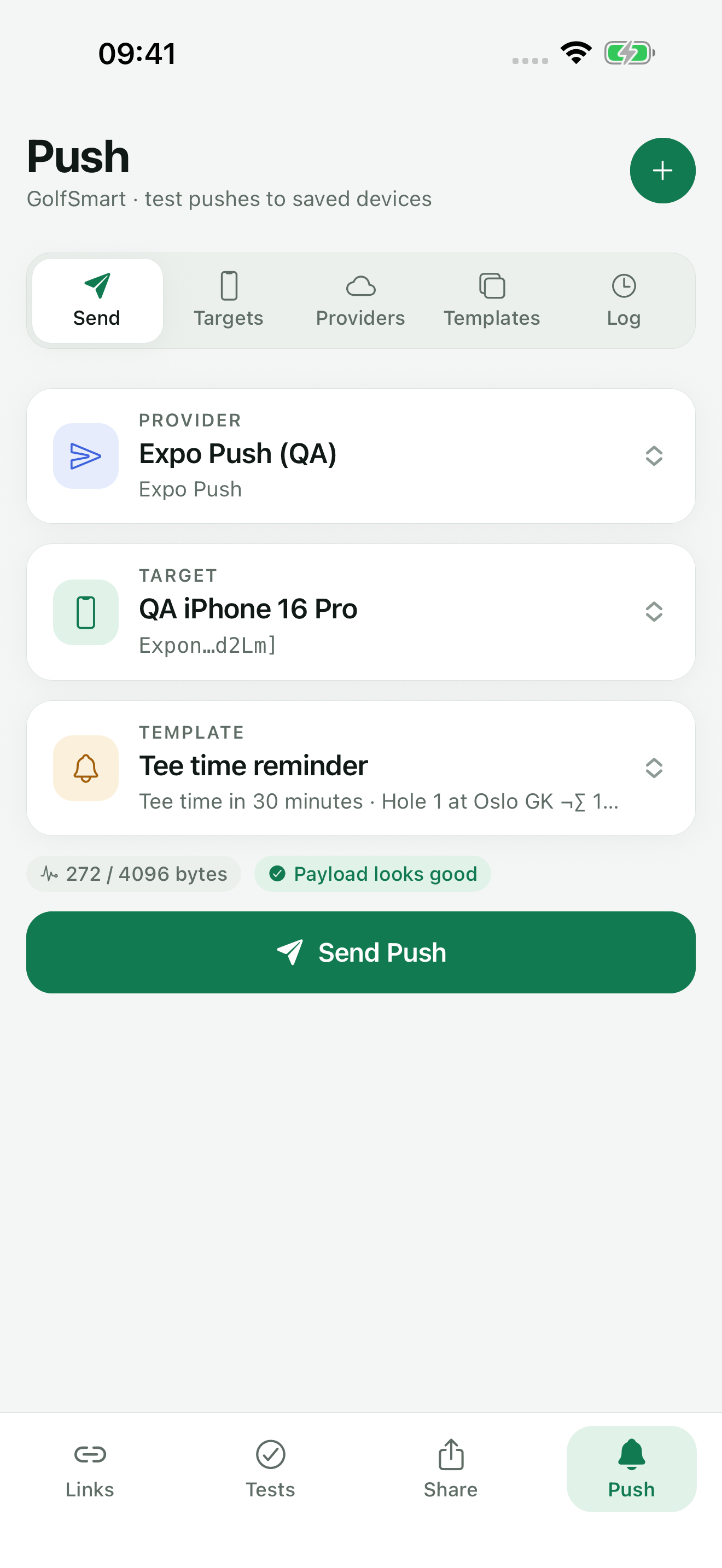
The Push tab in each app profile has five sections: Send push, Targets, Providers, Templates, and Log. You save each part once and combine them when sending.
Device tokens and credentials are stored in the operating system's secure storage and left out of exports. The log shows a shortened form of the token rather than the full value.
- Targets: a named device push token, such as “My test phone”, checked against the provider's token format
- Providers: an Expo Push, APNs, or Firebase / FCM setup with its credentials, marked Active or Disabled
- Templates: a Visible alert or Background data payload with title, body, typed custom data, delivery priority, sound, badge number, TTL, and collapse ID
- Log: each send with provider, shortened token, time, status, error explanation, and the provider's message ID
Providers
Which provider to choose.
Expo Push is for apps that use Expo notifications and takes an ExpoPushToken[…] or ExponentPushToken[…]. An Expo access token is optional and only needed when Expo Push access-token security is enabled for the project.
APNs sends straight to Apple and is offered when TestDock runs on iOS. Firebase / FCM uses the FCM HTTP v1 API with a service-account JSON and is offered on both iOS and Android. For APNs and FCM, TestDock creates the short-lived authorization tokens itself when you send.
Before sending
Payload checks run before anything is sent.
Once a target, provider setup, and template are selected, TestDock shows the payload size against a 4,096-byte limit and warns when it passes 90 percent. It also lists errors such as a disabled setup, a target saved for a different provider, a missing credential, an alert with no title or body, or an invalid badge number. Send Push stays disabled until the errors are fixed.
Sending opens a short dialog where you can change the title, message, and data values for this one push without editing the template. A successful send reads “Accepted by provider” and notes that device delivery and app handling are not confirmed. Push testing is part of TestDock Pro.
Best for
Where this workflow fits.
- Testing notification UI and routing without waiting for the application backend
- Reusing known payload templates across a release cycle
- Separating provider credentials, device tokens, and logs for different apps
Profiles and logs stay on the device, provider credentials use platform secure storage, and exports omit secrets.
Relevant capabilities
What TestDock brings to the job.
Practical workflow
From setup to a reviewed result.
Save a target
Paste the device push token from the app under test and give it a recognizable name.
Add a provider setup
Choose Expo Push, APNs, or Firebase / FCM and save the credentials that provider needs.
Build a template
Pick Visible alert or Background data and add custom data fields for routing IDs or flags.
Check, send, and read the log
Fix any payload errors, send, and use the log entry and error explanation if the provider rejects it.
Useful in practice
Direct answers
Questions about push notification tester.
Which push providers can TestDock use?
With TestDock Pro, TestDock sends test notifications through Expo Push, Firebase Cloud Messaging, or, on iOS, Apple Push Notification service, using the target and provider setup stored for one app profile. It validates payload size and provider rules before sending, then turns common provider errors into actionable guidance.
Where do I get the device push token?
From the app under test. TestDock cannot read another app's token, so have your debug build show or log its token, then paste it into Targets.
Does an accepted push mean it arrived?
No. Accepted means the provider took the request. Check the phone to see whether the notification appeared and whether the app handled its data correctly.
Can I send a silent or background notification?
Yes. A Background data template leaves out the visible alert and uses each provider's background delivery flags, such as content-available for Apple devices.
What happens when a provider rejects a push?
TestDock shows the provider's error with a short explanation, for example that a token is no longer registered or belongs to another project, and saves the attempt in the log as rejected.
Go deeper
Configure provider-specific push targets, reuse payload templates, and combine delivery checks with observable manual scenarios.
Read Test push delivery and repeatable app flowsFree & Pro: what’s included
Available on the App Store and Google Play. Free includes one app profile with unlimited saved links, Quick open, Paste, sharing links in, home-screen shortcuts, and the sample scenario plus one scenario of your own. A one-time Pro purchase unlocks unlimited profiles and scenarios, share fixtures, push testing, association inspection, links created from an apple-app-site-association file on iPhone, and profile or scenario import and export.