How it works
How can I create App Store screenshots with Screen Studio Kit?
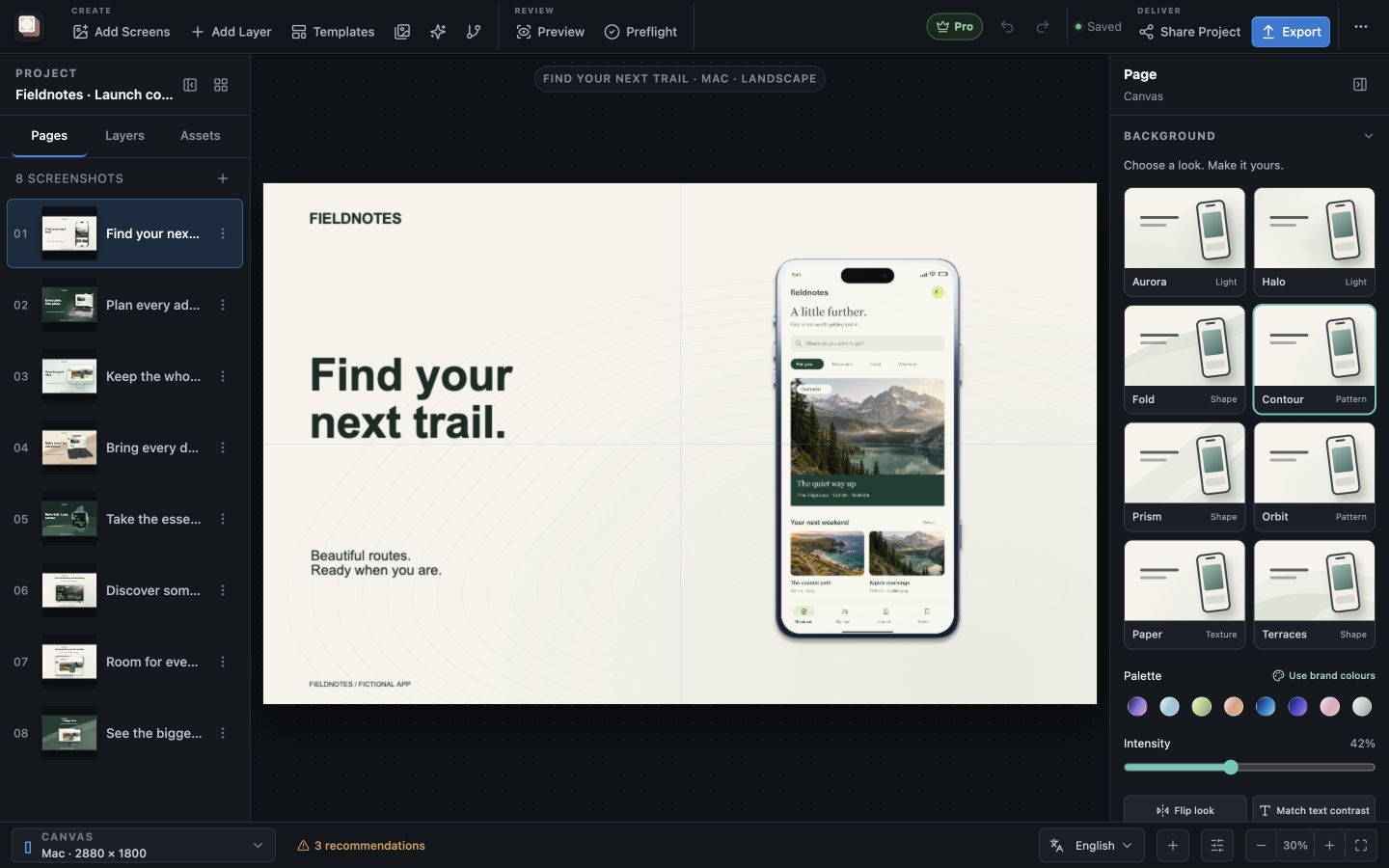
Screen Studio Kit is a desktop App Store screenshot maker for Mac and Windows. Import an app capture, choose a frame and background, and write the message that explains what the screen helps people do. Keep the pages in one editable project so a new capture or headline can become an update to the existing set.
Tell the story
Build a listing people can understand
Give the first image one clear promise, then use the next screenshots to show the important workflows behind it. Use your real interface as the evidence: the result, the organised view or the action someone will take.
Device frames, on-canvas text editing and background controls let you design the message and the image together. Start from a blank page or one of the three free templates; Pro unlocks all 26 built-in layouts.
Fit the destination
Prepare the Apple device sizes your app needs
The output presets cover iPhone, iPad, Mac, Apple Watch, Apple TV and Vision Pro. Choose the targets your app actually supports and preview the composition at each intended size. Adjust position, size or visibility where the format needs a different arrangement.
With Pro, keep translated copy and language-specific captures alongside the shared design, then export the selected sizes and languages together. A reusable project keeps those decisions available for the next release.
Best for
Where this workflow fits.
- First App Store launches that need a polished screenshot set
- Apps that support several Apple device families
- Teams that expect to update UI captures or marketing copy later
Relevant capabilities
What Screen Studio Kit brings to the job.
Practical workflow
Make it with your own app captures.
Choose your target sizes
Select the Apple device families and output presets for your listing.
Import and compose
Place your capture in a frame and add the headline and background.
Review the sequence
Check that each page shows a useful benefit and the text reads at the intended size.
Export the finished set
Export the chosen output, or use Pro for a multi-size, multi-language batch.
Useful in practice
Direct answers
Before you get started.
How can I create App Store screenshots with Screen Studio Kit?
Screen Studio Kit is a desktop App Store screenshot maker for Mac and Windows. Import an app capture, choose a frame and background, and write the message that explains what the screen helps people do. Keep the pages in one editable project so a new capture or headline can become an update to the existing set.
Which stores and device families are supported?
The preset catalog covers Apple device families, Google Play outputs, and Microsoft Store targets, including target-specific dimensions and format rules.
Can one layout serve several screenshot sizes?
Yes. Geometry is normalized to the active canvas, and specific output sizes can override position, dimensions, or visibility when a shared layout needs adjustment.
Go deeper
Set up target stores, organize assets, create pages, and build a reusable composition that survives the next release.
Read Create your first screenshot project